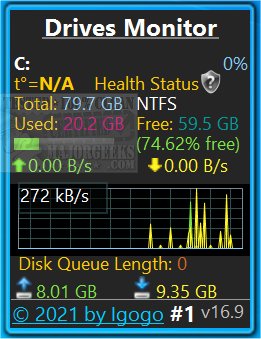
The latest version of Drives Monitor, 19.1, has been released, offering enhanced capabilities for monitoring physical and logical disk activity through performance data visualization. This application is compatible with Windows 8.1 and 10; however, users may need to install Desktop Gadgets Revived or similar software to successfully run Drives Monitor.
Key Features:
- Performance Metrics: For each disk, the application displays critical performance indicators such as percentage active time and the number of bytes read and written per second.
- Real-Time Graphs: Users can interact with a real-time graphical representation of disk activity. Clicking on a specific drive letter opens a fly-out window that provides detailed insights about the physical drive, including model, capacity, type, number of partitions, cylinders, and sectors.
- Safe Eject Functionality: An Eject button is available for the safe removal of USB devices, ensuring data integrity.
- Monitoring Capabilities: The application supports both hidden and mounted drives. It alerts users to critically low free space via a red disk space usage bar and indicates low disk space with a yellow bar. Users can configure the percentage thresholds for critical and warning disk usage in the settings.
- Customizable Settings: The settings menu allows users to toggle between monitoring physical and logical drives, exclude specific drive letters or disk numbers from monitoring, and select which information is displayed.
Additional Resources:
Users can enhance their understanding of disk management with related guides, such as checking hard disk health using WMIC, managing SysMain (Superfetch), addressing bad disk sectors or drive errors, and restoring SSD performance through secure erasing.
Future Extensions:
As Drives Monitor continues to evolve, future updates could introduce features such as advanced predictive analytics for disk failures, integration with cloud storage monitoring, and enhanced user interface options for improved accessibility. Additionally, expanding compatibility to more operating systems could broaden its user base, making it a versatile tool for disk management across various platforms
Key Features:
- Performance Metrics: For each disk, the application displays critical performance indicators such as percentage active time and the number of bytes read and written per second.
- Real-Time Graphs: Users can interact with a real-time graphical representation of disk activity. Clicking on a specific drive letter opens a fly-out window that provides detailed insights about the physical drive, including model, capacity, type, number of partitions, cylinders, and sectors.
- Safe Eject Functionality: An Eject button is available for the safe removal of USB devices, ensuring data integrity.
- Monitoring Capabilities: The application supports both hidden and mounted drives. It alerts users to critically low free space via a red disk space usage bar and indicates low disk space with a yellow bar. Users can configure the percentage thresholds for critical and warning disk usage in the settings.
- Customizable Settings: The settings menu allows users to toggle between monitoring physical and logical drives, exclude specific drive letters or disk numbers from monitoring, and select which information is displayed.
Additional Resources:
Users can enhance their understanding of disk management with related guides, such as checking hard disk health using WMIC, managing SysMain (Superfetch), addressing bad disk sectors or drive errors, and restoring SSD performance through secure erasing.
Future Extensions:
As Drives Monitor continues to evolve, future updates could introduce features such as advanced predictive analytics for disk failures, integration with cloud storage monitoring, and enhanced user interface options for improved accessibility. Additionally, expanding compatibility to more operating systems could broaden its user base, making it a versatile tool for disk management across various platforms
Drives Monitor 19.1 released
Drives Monitor utilizes performance monitor data to visualize physical or logical disk activity.