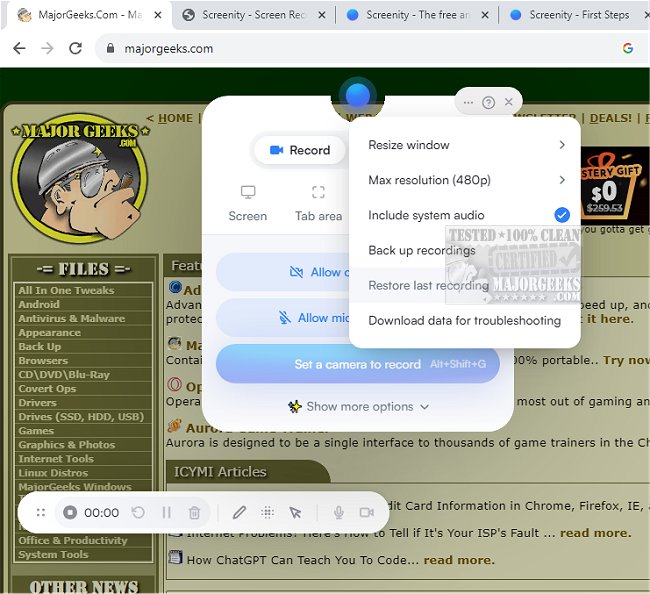
Screenity for Chrome has released version 4.6.5, enhancing its reputation as a user-friendly screen recording extension. This tool offers an unlimited recording experience, enabling users to capture high-quality videos of their screens along with audio, and it also supports adding annotations and highlights for enhanced informative content. Its intuitive interface and customizable settings make Screenity an ideal choice for creating a variety of video content, such as tutorials, presentations, and demos—all without requiring a sign-in.
As a privacy-centric solution, Screenity stands out as a versatile screen recorder and annotation tool. Users can record their entire screen, a specific area, applications, or even their camera, with options to include microphone or internal audio. The extension features a push-to-talk functionality and allows for various annotation methods, including drawing, adding text, arrows, and shapes.
Notably, Screenity incorporates AI-powered features such as customizable camera backgrounds and blurring effects to enhance the visual appeal of recordings. Users can smoothly zoom in on specific areas of their recordings and blur out sensitive content, ensuring privacy. The comprehensive editing capabilities allow for audio manipulation, cutting, trimming, and cropping videos, along with highlighting clicks and cursor movements.
Additional features include the ability to set alarms for automatic recording stops, export in multiple formats (MP4, GIF, WebM), and save directly to Google Drive for easy sharing. Users can configure countdowns, hide UI elements, or reposition them as needed. With no limits on recording duration or frequency, Screenity empowers users to create an infinite number of recordings. Permissions for microphone and camera access are required to utilize the full range of features.
As the demand for high-quality video content continues to grow, tools like Screenity for Chrome are essential for educators, professionals, and content creators looking to produce engaging and informative videos efficiently. The extension's ongoing updates and user-focused enhancements signal a commitment to meeting the evolving needs of its user base.
For those interested in exploring more tools, similar guides on taking screenshots in Windows 10 & 11 are available, along with tips for creating screen snip shortcuts and capturing high-resolution screenshots
As a privacy-centric solution, Screenity stands out as a versatile screen recorder and annotation tool. Users can record their entire screen, a specific area, applications, or even their camera, with options to include microphone or internal audio. The extension features a push-to-talk functionality and allows for various annotation methods, including drawing, adding text, arrows, and shapes.
Notably, Screenity incorporates AI-powered features such as customizable camera backgrounds and blurring effects to enhance the visual appeal of recordings. Users can smoothly zoom in on specific areas of their recordings and blur out sensitive content, ensuring privacy. The comprehensive editing capabilities allow for audio manipulation, cutting, trimming, and cropping videos, along with highlighting clicks and cursor movements.
Additional features include the ability to set alarms for automatic recording stops, export in multiple formats (MP4, GIF, WebM), and save directly to Google Drive for easy sharing. Users can configure countdowns, hide UI elements, or reposition them as needed. With no limits on recording duration or frequency, Screenity empowers users to create an infinite number of recordings. Permissions for microphone and camera access are required to utilize the full range of features.
As the demand for high-quality video content continues to grow, tools like Screenity for Chrome are essential for educators, professionals, and content creators looking to produce engaging and informative videos efficiently. The extension's ongoing updates and user-focused enhancements signal a commitment to meeting the evolving needs of its user base.
For those interested in exploring more tools, similar guides on taking screenshots in Windows 10 & 11 are available, along with tips for creating screen snip shortcuts and capturing high-resolution screenshots
Screenity for Chrome 4.6.5 released
Screenity for Chrome is a user-friendly screen recording extension designed to provide a seamless and unlimited recording experience.