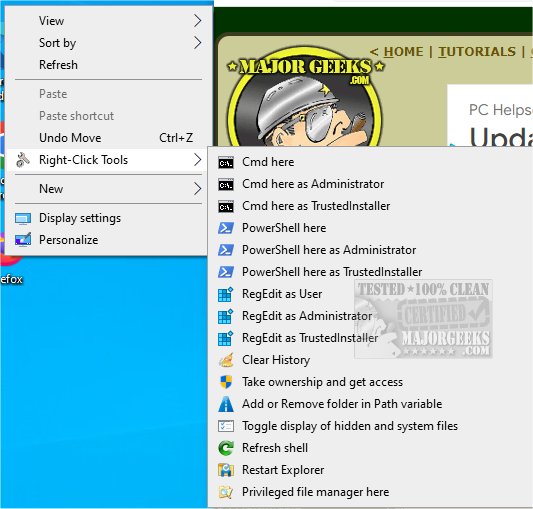
RightClickTools 2.0.0 is a software solution that enhances the Windows Explorer experience by adding a customizable right-click context menu. This tool is designed to improve productivity for users of Windows operating systems from version 7 and later, accommodating both 32-bit and 64-bit systems. It allows multiple users on the same computer to access its features without complications related to long file paths.
Purpose and Benefits
The primary function of RightClickTools is to provide quick access to essential utilities directly from the right-click context menu. Users can initiate commands like launching Command Prompt or PowerShell, managing the system's Path variable, and more, which significantly speeds up common tasks. This seamless integration into the workflow allows users to work more efficiently, as they can quickly execute necessary actions without navigating through multiple menus or interfaces.
How It Operates
RightClickTools operates through registry entries that set up context menu options. When a user selects a command, the tool runs the appropriate executable with the required parameters. Importantly, there is no background code execution simply from right-clicking; actions are only triggered upon user selection, ensuring a clean and efficient context menu with minimal impact on system performance. For administrators, the installation process is streamlined with a single User Account Control (UAC) prompt, after which all tools function without additional prompts.
Key Features
RightClickTools offers a range of functionalities, including:
- Cmd and PowerShell Here as Administrator: Launches the command line with administrative rights in the current directory.
- Cmd and PowerShell Here: Opens the command line with standard user permissions.
- Cmd and PowerShell Here as TrustedInstaller: Provides access to command line tools with elevated privileges for sensitive operations.
- RegEdit as User: Allows standard users to access the Registry Editor while enabling administrators to check user permissions easily.
- Clear History: Deletes historical data related to selected items.
For a detailed list of all features, users are encouraged to visit the developer's repository.
Conclusion and Extended Insights
RightClickTools is an invaluable addition for anyone looking to enhance their workflow on Windows. With its user-friendly interface and powerful tools, it simplifies complex tasks and minimizes the time spent on system management. Beyond just command execution, RightClickTools can significantly streamline project management, workflow automation, and routine maintenance tasks.
As users continue to seek efficiency in their computer usage, tools like RightClickTools become essential. It’s particularly beneficial for IT professionals and power users who frequently interact with command-line interfaces and system settings. By integrating such tools into their daily routines, users can unlock their full potential and achieve higher productivity levels, making RightClickTools a worthy investment for anyone looking to optimize their Windows experience.
In the future, further updates could include additional tools or integrations with other software for even more streamlined workflows, making RightClickTools an evolving asset in any user's toolkit
Purpose and Benefits
The primary function of RightClickTools is to provide quick access to essential utilities directly from the right-click context menu. Users can initiate commands like launching Command Prompt or PowerShell, managing the system's Path variable, and more, which significantly speeds up common tasks. This seamless integration into the workflow allows users to work more efficiently, as they can quickly execute necessary actions without navigating through multiple menus or interfaces.
How It Operates
RightClickTools operates through registry entries that set up context menu options. When a user selects a command, the tool runs the appropriate executable with the required parameters. Importantly, there is no background code execution simply from right-clicking; actions are only triggered upon user selection, ensuring a clean and efficient context menu with minimal impact on system performance. For administrators, the installation process is streamlined with a single User Account Control (UAC) prompt, after which all tools function without additional prompts.
Key Features
RightClickTools offers a range of functionalities, including:
- Cmd and PowerShell Here as Administrator: Launches the command line with administrative rights in the current directory.
- Cmd and PowerShell Here: Opens the command line with standard user permissions.
- Cmd and PowerShell Here as TrustedInstaller: Provides access to command line tools with elevated privileges for sensitive operations.
- RegEdit as User: Allows standard users to access the Registry Editor while enabling administrators to check user permissions easily.
- Clear History: Deletes historical data related to selected items.
For a detailed list of all features, users are encouraged to visit the developer's repository.
Conclusion and Extended Insights
RightClickTools is an invaluable addition for anyone looking to enhance their workflow on Windows. With its user-friendly interface and powerful tools, it simplifies complex tasks and minimizes the time spent on system management. Beyond just command execution, RightClickTools can significantly streamline project management, workflow automation, and routine maintenance tasks.
As users continue to seek efficiency in their computer usage, tools like RightClickTools become essential. It’s particularly beneficial for IT professionals and power users who frequently interact with command-line interfaces and system settings. By integrating such tools into their daily routines, users can unlock their full potential and achieve higher productivity levels, making RightClickTools a worthy investment for anyone looking to optimize their Windows experience.
In the future, further updates could include additional tools or integrations with other software for even more streamlined workflows, making RightClickTools an evolving asset in any user's toolkit
RightClickTools 2.0.0 released
RightClickTools adds a right-click context menu to Windows Explorer, providing several valuable tools.