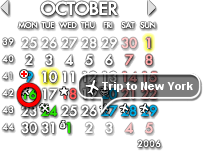
Rainlendar Lite has released two new versions: 2.24.0 and 2.23.0. This versatile calendar tool is user-friendly and designed to occupy minimal space on your desktop, making it an excellent choice for both Windows and Linux users. One of the standout features of Rainlendar Lite is its customizability; users can personalize the appearance through various skins and even combine elements from different skins.
Rainlendar Lite supports the iCalendar format, ensuring that events and tasks can be easily transferred between different calendar applications. It also enables users to subscribe to online calendars and view Outlook appointments directly. The application is Unicode compatible, allowing for localization and the use of multiple character sets simultaneously.
Key features of Rainlendar Lite include:
- Cross-Platform Compatibility: Operates seamlessly on both Windows and Linux.
- Localization Support: Offers a user interface in various languages.
- Standards Compatibility: Uses the iCalendar format for maximum compatibility.
- Customizable Appearance: Users can create unique looks by mixing skins and adjusting sizes.
- Multiple Calendar Support: Users can display various calendars for different purposes.
- Import & Export Functionality: Easy transfer of events and tasks from other applications.
- Integrated To-Do List: Helps manage ongoing tasks alongside calendar events.
- Alarm Notifications: Reminds users of upcoming events and tasks.
- Recurrence Options: Automates event repetition with customizable exceptions.
- Scripting Capability: Lua scripting allows users to enhance functionality.
- Backup and Restore: Protects users' data against loss.
- Printing Options: Events and tasks can be printed in different formats.
- Search Functionality: Helps users quickly locate specific events or tasks.
In conclusion, Rainlendar Lite is a highly adaptable and efficient calendar tool suitable for diverse user needs. Its focus on customization, compatibility, and usability makes it a strong contender in the calendar application market. Future updates could potentially include enhanced collaborative features or integrations with popular productivity tools to further streamline user experience
Rainlendar Lite supports the iCalendar format, ensuring that events and tasks can be easily transferred between different calendar applications. It also enables users to subscribe to online calendars and view Outlook appointments directly. The application is Unicode compatible, allowing for localization and the use of multiple character sets simultaneously.
Key features of Rainlendar Lite include:
- Cross-Platform Compatibility: Operates seamlessly on both Windows and Linux.
- Localization Support: Offers a user interface in various languages.
- Standards Compatibility: Uses the iCalendar format for maximum compatibility.
- Customizable Appearance: Users can create unique looks by mixing skins and adjusting sizes.
- Multiple Calendar Support: Users can display various calendars for different purposes.
- Import & Export Functionality: Easy transfer of events and tasks from other applications.
- Integrated To-Do List: Helps manage ongoing tasks alongside calendar events.
- Alarm Notifications: Reminds users of upcoming events and tasks.
- Recurrence Options: Automates event repetition with customizable exceptions.
- Scripting Capability: Lua scripting allows users to enhance functionality.
- Backup and Restore: Protects users' data against loss.
- Printing Options: Events and tasks can be printed in different formats.
- Search Functionality: Helps users quickly locate specific events or tasks.
In conclusion, Rainlendar Lite is a highly adaptable and efficient calendar tool suitable for diverse user needs. Its focus on customization, compatibility, and usability makes it a strong contender in the calendar application market. Future updates could potentially include enhanced collaborative features or integrations with popular productivity tools to further streamline user experience
Rainlendar Lite 2.24.0 / 2.23.0 released
Rainlendar Lite is a full featured calendar tool that is quite simple to use and doesn't take much space on your desktop.