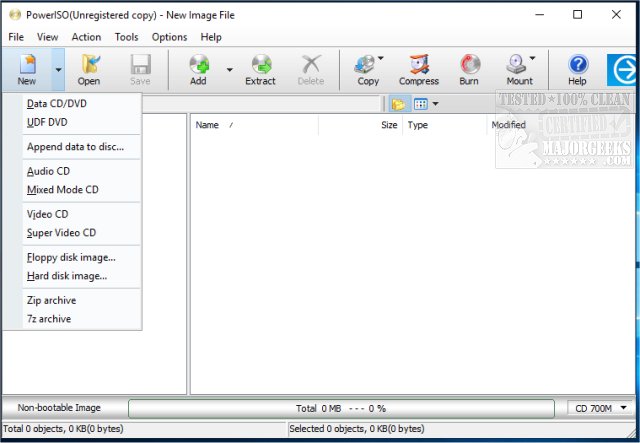
PowerISO 9.4 has been launched, reinforcing its reputation as a powerful all-in-one solution for processing CD, DVD, and Blu-ray (BD) image files. This software allows users to open, extract, burn, create, edit, compress, encrypt, split, and convert ISO files effortlessly.
A Must-Have for Disk Image Professionals and Enthusiasts
PowerISO is an essential tool for anyone who frequently works with disk images. It streamlines the management of ISO files, disc burning, and virtual drive mounting, all within a single, efficient platform. Its speed, flexibility, and compatibility with nearly all disc image formats make it a favorite among tech-savvy users.
Comprehensive Image File Management
PowerISO simplifies the tasks of creating, editing, extracting, and burning ISO files. It supports a variety of image formats, such as ISO, BIN, NRG, and DAA, allowing users to perform multiple image-related tasks without the hassle of switching between different applications. Its intuitive interface is designed for user convenience.
Professional Virtual Drive Mounting
For those looking to minimize physical clutter, PowerISO allows the mounting of ISO files onto virtual drives, providing immediate access to disc images without needing physical media. Users can mount up to 23 virtual drives simultaneously, making it ideal for multitasking and quick access to multiple disk images.
Effortless Burning, Ripping, and Compression
PowerISO is not limited to image handling; it excels at burning data to CD, DVD, and Blu-ray discs. Users can easily back up important files or create bootable media for system installations and repairs. Additionally, the software can rip audio CDs into various formats like MP3, FLAC, or WAV, catering to music enthusiasts looking to archive their collections. Compression and splitting tools help manage large disk images effectively, and sensitive photographs can be encrypted for added security.
User-Friendly and Lightweight
Unlike some disk utilities that come packed with unnecessary features, PowerISO maintains a streamlined approach. Its interface may not be the flashiest, but it is incredibly user-friendly. Integration with Windows Explorer allows users to mount or burn images directly from their file manager with a simple right-click.
Important Considerations
While PowerISO is feature-rich, the free version has a limitation on file size—image files larger than 300MB require a paid license for editing or creation. Additionally, users should be aware that the installer may offer extra software, so it's advisable to uncheck any unwanted options during setup.
Final Thoughts
PowerISO stands out as a reliable and high-performance tool for managing disk images. If you seek a versatile utility for mounting, burning, and handling ISOs and other disc formats, PowerISO 9.4 is definitely worth downloading. Just remember to be mindful of the limitations of the free version, and you’ll be well-equipped to manage your disk images effectively.
Future Prospects
Looking ahead, PowerISO could enhance its offerings by incorporating advanced features such as cloud integration for better file management, collaboration features for team projects, and improved support for emerging disc formats. This would not only solidify its position as a leading disk image utility but also cater to the evolving needs of users in a digital-first world
A Must-Have for Disk Image Professionals and Enthusiasts
PowerISO is an essential tool for anyone who frequently works with disk images. It streamlines the management of ISO files, disc burning, and virtual drive mounting, all within a single, efficient platform. Its speed, flexibility, and compatibility with nearly all disc image formats make it a favorite among tech-savvy users.
Comprehensive Image File Management
PowerISO simplifies the tasks of creating, editing, extracting, and burning ISO files. It supports a variety of image formats, such as ISO, BIN, NRG, and DAA, allowing users to perform multiple image-related tasks without the hassle of switching between different applications. Its intuitive interface is designed for user convenience.
Professional Virtual Drive Mounting
For those looking to minimize physical clutter, PowerISO allows the mounting of ISO files onto virtual drives, providing immediate access to disc images without needing physical media. Users can mount up to 23 virtual drives simultaneously, making it ideal for multitasking and quick access to multiple disk images.
Effortless Burning, Ripping, and Compression
PowerISO is not limited to image handling; it excels at burning data to CD, DVD, and Blu-ray discs. Users can easily back up important files or create bootable media for system installations and repairs. Additionally, the software can rip audio CDs into various formats like MP3, FLAC, or WAV, catering to music enthusiasts looking to archive their collections. Compression and splitting tools help manage large disk images effectively, and sensitive photographs can be encrypted for added security.
User-Friendly and Lightweight
Unlike some disk utilities that come packed with unnecessary features, PowerISO maintains a streamlined approach. Its interface may not be the flashiest, but it is incredibly user-friendly. Integration with Windows Explorer allows users to mount or burn images directly from their file manager with a simple right-click.
Important Considerations
While PowerISO is feature-rich, the free version has a limitation on file size—image files larger than 300MB require a paid license for editing or creation. Additionally, users should be aware that the installer may offer extra software, so it's advisable to uncheck any unwanted options during setup.
Final Thoughts
PowerISO stands out as a reliable and high-performance tool for managing disk images. If you seek a versatile utility for mounting, burning, and handling ISOs and other disc formats, PowerISO 9.4 is definitely worth downloading. Just remember to be mindful of the limitations of the free version, and you’ll be well-equipped to manage your disk images effectively.
Future Prospects
Looking ahead, PowerISO could enhance its offerings by incorporating advanced features such as cloud integration for better file management, collaboration features for team projects, and improved support for emerging disc formats. This would not only solidify its position as a leading disk image utility but also cater to the evolving needs of users in a digital-first world
PowerISO 9.4 released
PowerISO is a powerful all-in-one solution for CD/DVD/BD image file processing that permits opening, extracting, burning, creating, editing, compressing, encrypting, splitting and converting ISO files.