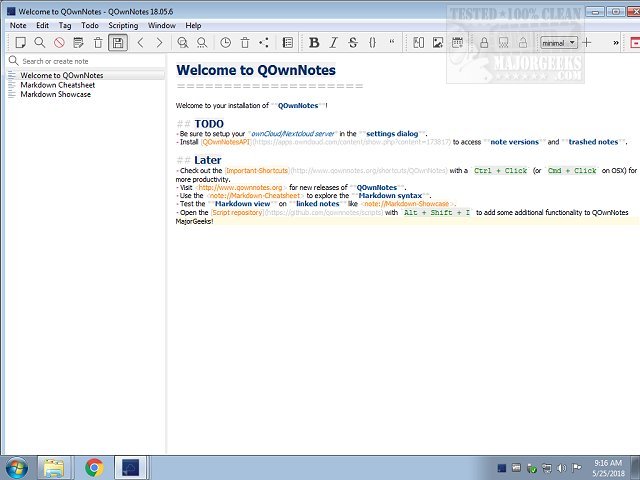
QOwnNotes version 26.7.4 has recently been released, offering users a powerful, portable open-source application for note-taking. This app enables users to create and manage notes that can be easily sorted, organized, printed, and exported. Notably, QOwnNotes stores notes as plain text files, allowing seamless synchronization with cloud services like ownCloud and Nextcloud, as well as alternatives such as Syncthing and Dropbox.
Users can quickly jot down thoughts and later edit or search for them, even on mobile devices. The application supports multimedia, enabling the attachment of images and the inclusion of HTML, and offers encryption for those seeking privacy. Additionally, QOwnNotes features a Markdown cheatsheet and a showcase to assist users in formatting their notes.
Key functionalities include the ability to create multiple note folders, perform substring searches, enjoy markdown highlighting, and utilize a markdown preview mode. The user interface is designed to be smooth and user-friendly, allowing for quick setup through a comprehensive configuration menu tailored to individual preferences and workflows.
For those interested in a full range of features, further information can be found on the author's website.
In extension, QOwnNotes continues to be an ideal choice for individuals or teams looking for a flexible and collaborative note-taking solution. It stands out in the crowded productivity app market due to its focus on open-source principles and extensive customization options. As remote work and digital collaboration become increasingly prevalent, tools like QOwnNotes offer essential functionalities that cater to diverse user needs. The recent updates may include performance enhancements, bug fixes, or new integrations with other productivity tools, ensuring that users can rely on QOwnNotes for their note-taking and organizational requirements in a dynamic digital landscape
Users can quickly jot down thoughts and later edit or search for them, even on mobile devices. The application supports multimedia, enabling the attachment of images and the inclusion of HTML, and offers encryption for those seeking privacy. Additionally, QOwnNotes features a Markdown cheatsheet and a showcase to assist users in formatting their notes.
Key functionalities include the ability to create multiple note folders, perform substring searches, enjoy markdown highlighting, and utilize a markdown preview mode. The user interface is designed to be smooth and user-friendly, allowing for quick setup through a comprehensive configuration menu tailored to individual preferences and workflows.
For those interested in a full range of features, further information can be found on the author's website.
In extension, QOwnNotes continues to be an ideal choice for individuals or teams looking for a flexible and collaborative note-taking solution. It stands out in the crowded productivity app market due to its focus on open-source principles and extensive customization options. As remote work and digital collaboration become increasingly prevalent, tools like QOwnNotes offer essential functionalities that cater to diverse user needs. The recent updates may include performance enhancements, bug fixes, or new integrations with other productivity tools, ensuring that users can rely on QOwnNotes for their note-taking and organizational requirements in a dynamic digital landscape
QOwnNotes 26.7.4 released
QOwnNotes is a portable Open Source app that allows you to create notes that can be efficiently sorted, organized, printed, exported, and more.