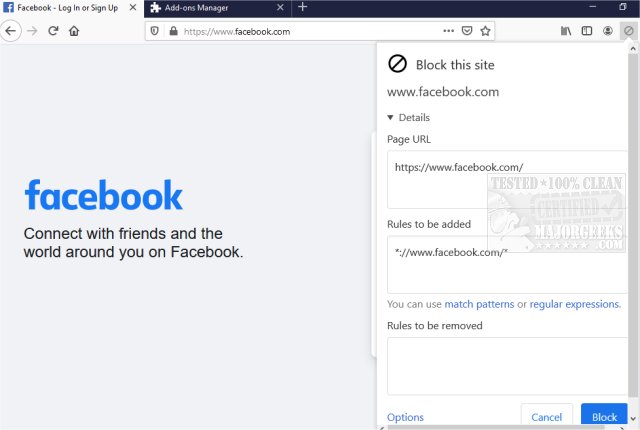
The uBlacklist extension for Chrome and Firefox has recently been updated to version 10.0.0. This tool is designed to enhance the search experience by allowing users to remove specific websites from appearing in Google search results. Users can easily add sites to their blacklist by clicking the toolbar icon, and they have the option to specify rules using match patterns or regular expressions. For instance, users can block all pages from a particular domain or a group of related domains.
One of the key features of uBlacklist is its ability to sync blacklists across different devices using Google Drive, which is convenient for users who access the web from multiple platforms. Additionally, users can subscribe to public blacklists curated by others, offering a broader spectrum of customization.
This extension is particularly useful for researchers or anyone looking to filter out irrelevant search results, helping them focus on more pertinent information. By eliminating time-wasting links, uBlacklist can significantly streamline the research process and improve overall browsing efficiency.
In summary, uBlacklist serves as a powerful tool for managing search results, making it easier for users to navigate the vast amount of information available online. Its features promote a more personalized and efficient browsing experience, making it a valuable addition for anyone seeking to refine their search results.
As the digital landscape continues to evolve, tools like uBlacklist will likely become increasingly important for users who want to take control of their online search experiences. Future updates may include enhancements such as improved user interfaces, additional filtering options, and integration with other productivity tools, further expanding its utility
One of the key features of uBlacklist is its ability to sync blacklists across different devices using Google Drive, which is convenient for users who access the web from multiple platforms. Additionally, users can subscribe to public blacklists curated by others, offering a broader spectrum of customization.
This extension is particularly useful for researchers or anyone looking to filter out irrelevant search results, helping them focus on more pertinent information. By eliminating time-wasting links, uBlacklist can significantly streamline the research process and improve overall browsing efficiency.
In summary, uBlacklist serves as a powerful tool for managing search results, making it easier for users to navigate the vast amount of information available online. Its features promote a more personalized and efficient browsing experience, making it a valuable addition for anyone seeking to refine their search results.
As the digital landscape continues to evolve, tools like uBlacklist will likely become increasingly important for users who want to take control of their online search experiences. Future updates may include enhancements such as improved user interfaces, additional filtering options, and integration with other productivity tools, further expanding its utility
uBlacklist for Chrome and Firefox 10.0.0 released
uBlacklist for Chrome and Firefox removes specific sites from showing up in Google search.
uBlacklist for Chrome and Firefox 10.0.0 released @ MajorGeeks