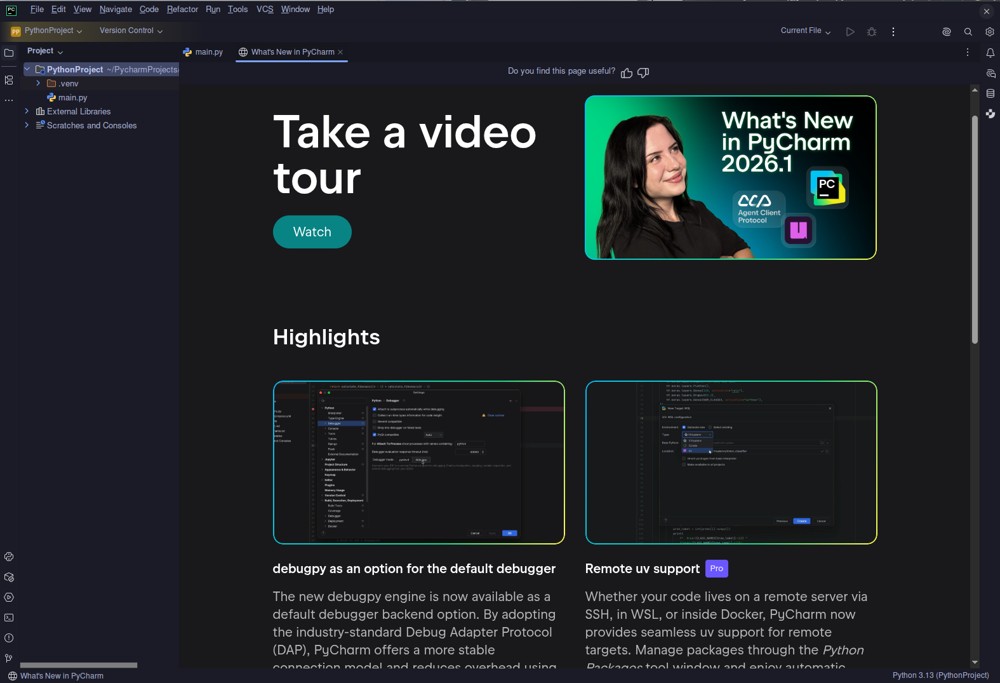
PyCharm 2026.1.3 has been released, marking a significant advancement in Python development tools. This version represents a streamlined approach by JetBrains, merging the Community and Professional editions into a single product, which now offers a unified licensing model. This allows users to access the core IDE for free, while advanced features for web frameworks, Jupyter notebooks, SQL databases, and Cython are available through a paid Professional subscription.
The latest version includes enhancements such as support for recent Python interpreter versions, improved Docker Compose integration, and an upgraded integrated terminal that mimics a true shell experience. Installation is user-friendly, with the IDE bundling its own OpenJDK to avoid common setup hassles. The initial setup may take longer due to plugin downloads and indexing, but subsequent launches are faster once caching is established.
The free tier of PyCharm includes essential features such as code completion, version control, and Docker management, making it suitable for personal projects and serious hobbyists. The Pro subscription, which costs approximately $109 for the first year, unlocks more advanced features, including comprehensive support for various web frameworks, Jupyter notebook editing, and a visual SQL workbench.
Leveraging the robust IntelliJ platform, PyCharm excels in code analysis and refactoring capabilities, providing developers with advanced functionalities that help identify and resolve potential issues in their code. The IDE’s integrated debugging and unit testing tools are also noteworthy, offering seamless management of virtual environments and interpreters.
However, PyCharm is not without its drawbacks. It has a significant memory footprint, particularly when handling large projects, which can result in performance issues on systems with less RAM. Startup times are slower compared to lightweight editors like VS Code, and it lacks a built-in GUI designer, necessitating external tools for certain development tasks.
In summary, PyCharm remains the go-to choice for professional Python developers, thanks to its comprehensive features and user-friendly updates. The unification of editions offers a more accessible path for users to leverage powerful development tools without facing barriers. While it may not be ideal for absolute beginners or lightweight users, those engaged in serious development work will find that PyCharm enhances their productivity and code quality. For anyone serious about Python, this IDE is a valuable asset for refining their coding skills and managing complex projects effectively.
Looking ahead, it is likely that JetBrains will continue to evolve PyCharm, enhancing its features and performance in response to user feedback and the changing landscape of Python development. As the demand for efficient development tools grows, further optimizations and integrations into emerging technologies can be expected, ensuring that PyCharm remains at the forefront of the IDE market
The latest version includes enhancements such as support for recent Python interpreter versions, improved Docker Compose integration, and an upgraded integrated terminal that mimics a true shell experience. Installation is user-friendly, with the IDE bundling its own OpenJDK to avoid common setup hassles. The initial setup may take longer due to plugin downloads and indexing, but subsequent launches are faster once caching is established.
The free tier of PyCharm includes essential features such as code completion, version control, and Docker management, making it suitable for personal projects and serious hobbyists. The Pro subscription, which costs approximately $109 for the first year, unlocks more advanced features, including comprehensive support for various web frameworks, Jupyter notebook editing, and a visual SQL workbench.
Leveraging the robust IntelliJ platform, PyCharm excels in code analysis and refactoring capabilities, providing developers with advanced functionalities that help identify and resolve potential issues in their code. The IDE’s integrated debugging and unit testing tools are also noteworthy, offering seamless management of virtual environments and interpreters.
However, PyCharm is not without its drawbacks. It has a significant memory footprint, particularly when handling large projects, which can result in performance issues on systems with less RAM. Startup times are slower compared to lightweight editors like VS Code, and it lacks a built-in GUI designer, necessitating external tools for certain development tasks.
In summary, PyCharm remains the go-to choice for professional Python developers, thanks to its comprehensive features and user-friendly updates. The unification of editions offers a more accessible path for users to leverage powerful development tools without facing barriers. While it may not be ideal for absolute beginners or lightweight users, those engaged in serious development work will find that PyCharm enhances their productivity and code quality. For anyone serious about Python, this IDE is a valuable asset for refining their coding skills and managing complex projects effectively.
Looking ahead, it is likely that JetBrains will continue to evolve PyCharm, enhancing its features and performance in response to user feedback and the changing landscape of Python development. As the demand for efficient development tools grows, further optimizations and integrations into emerging technologies can be expected, ensuring that PyCharm remains at the forefront of the IDE market
PyCharm 2026.1.3 released
PyCharm is the gold standard for serious Python development, adding native support for recent interpreter versions, tightening Docker Compose integration, and refining the integrated terminal to actually feel like a proper shell instead of a half-hearted wrapper.