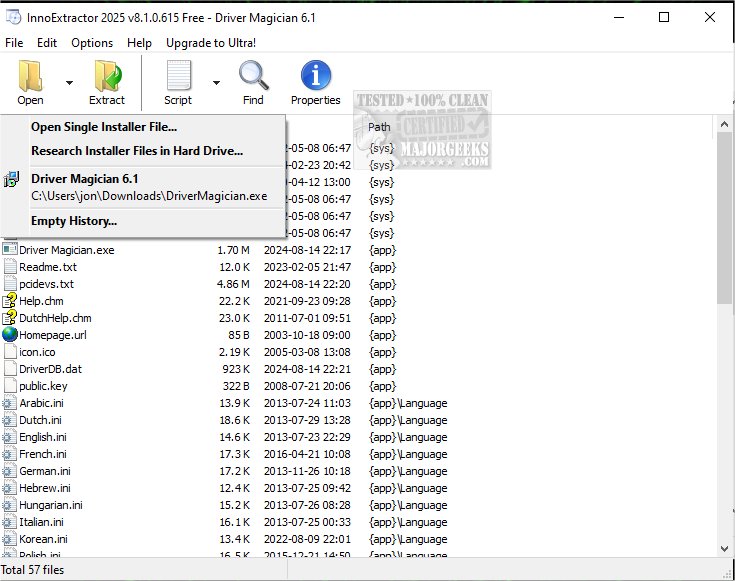
InnoExtractor is a powerful software tool that specializes in extracting content from Inno Setup installers, utilizing InnoUnp technology. This software allows users to delve deep into an installer’s internal components without needing to execute the setup process, providing a convenient solution for users at all experience levels.
- Examine and Extract: Access and extract specific files to a local folder or portable device, making it particularly useful for users without administrative privileges to install programs.
- User-Friendly Interface: The intuitive design allows for easy navigation, including drag-and-drop functionality for EXE files, which displays a comprehensive preview of internal files. Users can also automatically scan designated folders for Inno Setup packages.
- View file details, such as name, size, timestamp, and location.
- Extract selected files either in their original format, as ZIP archives, or self-extracting modules.
- Launch files directly with associated applications without prior extraction.
- Search and Security: The software includes a keyword search function, an input panel for extracting encrypted installers, and an integrated malware scanning engine using VirusTotal.
- Multiple Languages and Unicode Support: InnoExtractor supports various languages and offers full Unicode compatibility, enhancing accessibility for a global user base.
- Extract icons from setup files.
- Decrypt password-protected installers.
- Save lists of decompiled code to files.
- Integrate into the Windows Explorer right-click menu for quick access.
Key Functionality
InnoExtractor enables users to:- Examine and Extract: Access and extract specific files to a local folder or portable device, making it particularly useful for users without administrative privileges to install programs.
- User-Friendly Interface: The intuitive design allows for easy navigation, including drag-and-drop functionality for EXE files, which displays a comprehensive preview of internal files. Users can also automatically scan designated folders for Inno Setup packages.
File Management and Inspection
The tool provides robust file management options, allowing users to:- View file details, such as name, size, timestamp, and location.
- Extract selected files either in their original format, as ZIP archives, or self-extracting modules.
- Launch files directly with associated applications without prior extraction.
Additional Features
- Advanced Tools: For advanced users, InnoExtractor decompiles the “CompiledCode.bin” file to reveal the assembly code linked to the “Code” script section.- Search and Security: The software includes a keyword search function, an input panel for extracting encrypted installers, and an integrated malware scanning engine using VirusTotal.
- Multiple Languages and Unicode Support: InnoExtractor supports various languages and offers full Unicode compatibility, enhancing accessibility for a global user base.
Extended Capabilities
InnoExtractor can also:- Extract icons from setup files.
- Decrypt password-protected installers.
- Save lists of decompiled code to files.
- Integrate into the Windows Explorer right-click menu for quick access.
Performance
The application is designed to execute tasks quickly while maintaining minimal system performance impact, making it an effective solution for users seeking to extract files from Inno Setup packages.Conclusion
InnoExtractor 12.0.0.181 is a versatile and efficient tool that simplifies the extraction process for Inno Setup installers. Its user-friendly interface, combined with advanced features and minimal system impact, makes it a valuable resource for both casual and advanced users alike. Whether you need to extract files for immediate use or inspect installer contents, InnoExtractor provides a seamless experienceInnoExtractor 12.0.0.181 released
InnoExtractor is a software tool designed to extract the contents of Inno Setup installers utilizing InnoUnp technology.