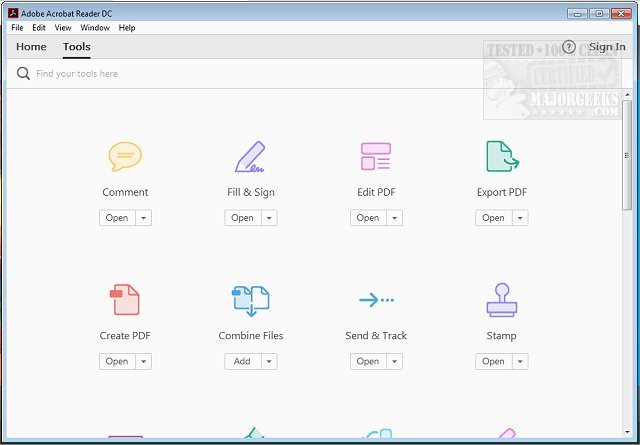
Adobe has recently released version 26.001.21789 of Adobe Acrobat Reader DC, a leading free software solution designed for viewing and printing Portable Document Format (PDF) files. This application has become an essential tool for a wide range of users, from students handling assignments to professionals managing various documents on the go.
Why Choose Adobe Acrobat Reader DC?
Adobe Acrobat Reader DC stands out in the crowded field of PDF tools due to its user-friendly interface and robust features. Here’s a closer look at what makes it a must-have:
1. Easy Viewing and Searching: The software allows users to open multi-page PDFs quickly and navigate seamlessly. Its built-in search functionality helps you find specific terms within the document, making it ideal for lengthy texts or complex reports.
2. Professional Annotation Tools: Users can highlight, underline, and comment on documents directly within the PDF. The application also includes a brush tool for freehand sketches and the ability to add text boxes for detailed notes, making it accessible for all users, regardless of their tech-savviness.
3. Digital Signatures: The "Fill & Sign" feature simplifies the process of signing documents electronically. This eliminates the need for printing, signing, and scanning, streamlining the workflow for contracts, forms, and agreements.
4. Integration with Adobe Document Cloud: Adobe Acrobat Reader DC syncs seamlessly with Adobe Document Cloud, allowing users to access and edit their PDFs across various devices—be it a desktop, smartphone, or tablet. This functionality enhances productivity and ensures continuity in work.
5. Premium Features for Enhanced Functionality: While the free version is comprehensive, users can opt for premium features that include creating PDFs, converting files to different formats, merging multiple PDFs, and advanced editing capabilities. These options cater to users who require more than just basic PDF functionality.
6. Security Features: The application prioritizes user safety with its Protected Mode, which safeguards against potentially harmful files. This is particularly important for those filling out sensitive information or downloading documents from less secure sources.
Final Thoughts: Adobe Acrobat Reader DC is not just another PDF reader; it’s a versatile tool that enhances productivity and simplifies document management. With its combination of free accessibility, cross-platform compatibility, and premium features, it effectively meets the needs of a diverse user base. Whether you’re signing forms, reviewing documents, or reading ebooks, this software can significantly improve your PDF interactions.
Ready to elevate your PDF experience? Download Adobe Acrobat Reader DC today and harness the full potential of your documents! For more tips on working with PDFs, check out resources on creating PDFs in Windows or understanding the Adobe Acrobat Update Service
Why Choose Adobe Acrobat Reader DC?
Adobe Acrobat Reader DC stands out in the crowded field of PDF tools due to its user-friendly interface and robust features. Here’s a closer look at what makes it a must-have:
1. Easy Viewing and Searching: The software allows users to open multi-page PDFs quickly and navigate seamlessly. Its built-in search functionality helps you find specific terms within the document, making it ideal for lengthy texts or complex reports.
2. Professional Annotation Tools: Users can highlight, underline, and comment on documents directly within the PDF. The application also includes a brush tool for freehand sketches and the ability to add text boxes for detailed notes, making it accessible for all users, regardless of their tech-savviness.
3. Digital Signatures: The "Fill & Sign" feature simplifies the process of signing documents electronically. This eliminates the need for printing, signing, and scanning, streamlining the workflow for contracts, forms, and agreements.
4. Integration with Adobe Document Cloud: Adobe Acrobat Reader DC syncs seamlessly with Adobe Document Cloud, allowing users to access and edit their PDFs across various devices—be it a desktop, smartphone, or tablet. This functionality enhances productivity and ensures continuity in work.
5. Premium Features for Enhanced Functionality: While the free version is comprehensive, users can opt for premium features that include creating PDFs, converting files to different formats, merging multiple PDFs, and advanced editing capabilities. These options cater to users who require more than just basic PDF functionality.
6. Security Features: The application prioritizes user safety with its Protected Mode, which safeguards against potentially harmful files. This is particularly important for those filling out sensitive information or downloading documents from less secure sources.
Final Thoughts: Adobe Acrobat Reader DC is not just another PDF reader; it’s a versatile tool that enhances productivity and simplifies document management. With its combination of free accessibility, cross-platform compatibility, and premium features, it effectively meets the needs of a diverse user base. Whether you’re signing forms, reviewing documents, or reading ebooks, this software can significantly improve your PDF interactions.
Ready to elevate your PDF experience? Download Adobe Acrobat Reader DC today and harness the full potential of your documents! For more tips on working with PDFs, check out resources on creating PDFs in Windows or understanding the Adobe Acrobat Update Service
Adobe Acrobat Reader DC 26.001.21789 released
Adobe Acrobat Reader DC is free and freely distributable software that lets you view and print Portable Document Format (PDF) files.