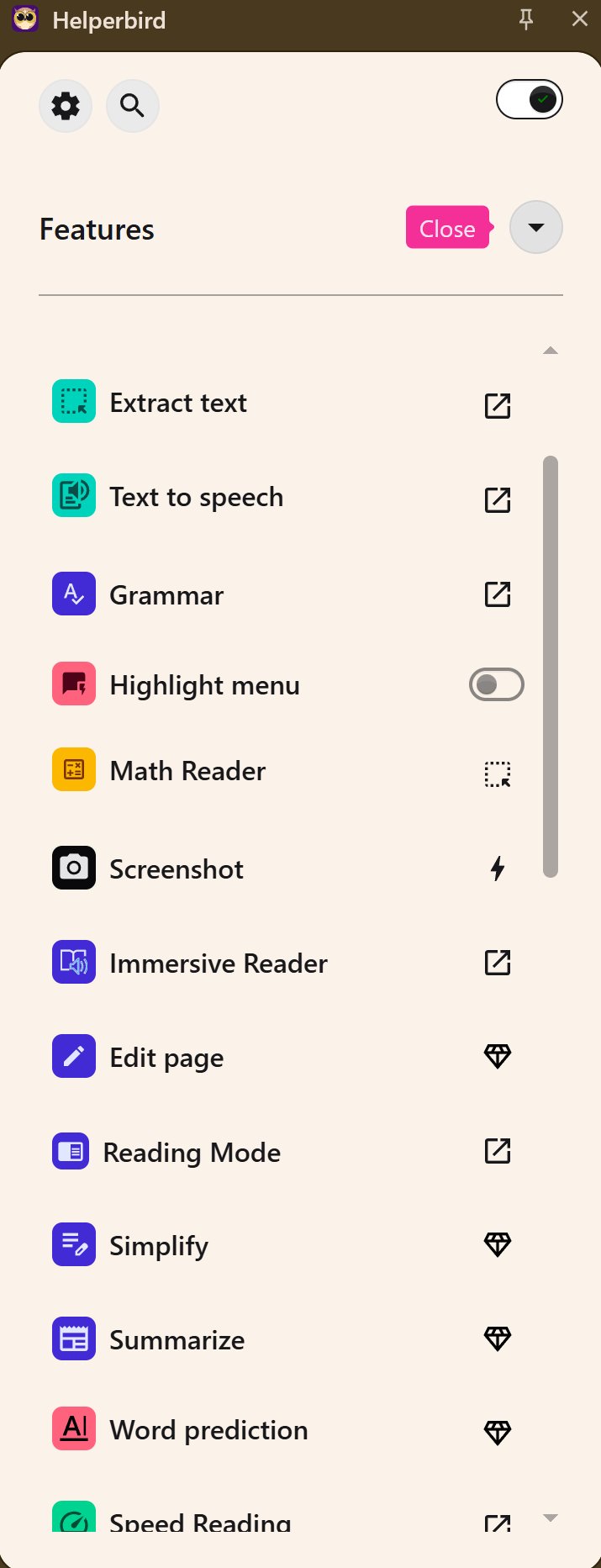
Helperbird 2026.6.25 has been released, enhancing its reputation as a versatile browser-based accessibility and productivity extension. The tool aims to improve the online experience for users, particularly those with dyslexia, ADHD, visual stress, or anyone seeking a more comfortable digital environment.
Helperbird is designed to alleviate the fatigue associated with reading long web pages, allowing for a more focused and less cumbersome experience. Unlike many other tools that simply enlarge text, Helperbird provides a comprehensive suite of customizable features that allow users to manipulate how content is displayed across various platforms, including websites, PDFs, and documents.
Key Features:
- Reading Tools: Helperbird offers a distraction-free reading mode, Immersive Reader with adjustable settings, text-to-speech capabilities, and dyslexia-friendly options such as customized fonts and high-contrast modes.
- Writing and Study Tools: The extension assists not only in consuming content but also in content creation through voice typing, word prediction, sticky notes, text statistics, and OCR functionality.
- Browser and Accessibility Tweaks: Users can enjoy features like custom cursor adjustments, auto-scroll for hands-free reading, and keyboard shortcuts for seamless navigation.
Free vs. Pro: The free version of Helperbird is robust, offering essential features without overwhelming limitations. The Pro version unlocks advanced customization options and deeper reading controls for $30 per year, with discounts available for students and educational institutions.
User Experience: Many users, including those with dyslexia and ADD, find the Dyslexia ruler and Focus ruler particularly beneficial. These features help focus attention by highlighting specific text and fading out distractions, making reading and proofreading far more manageable.
Conclusion: Helperbird is recognized for its practicality and user-friendly approach to accessibility. It effectively consolidates various tools needed for a more inclusive online experience, making it a valuable addition for anyone who frequently engages with digital content. With its deep customization capabilities and cross-browser support, it is recommended for those who find reading online challenging. Users are encouraged to try the free version and witness the improvement in their web experience firsthand.
As digital accessibility becomes increasingly important, tools like Helperbird represent a significant step towards inclusivity, ensuring that everyone can navigate and engage with online content more effectively
Helperbird is designed to alleviate the fatigue associated with reading long web pages, allowing for a more focused and less cumbersome experience. Unlike many other tools that simply enlarge text, Helperbird provides a comprehensive suite of customizable features that allow users to manipulate how content is displayed across various platforms, including websites, PDFs, and documents.
Key Features:
- Reading Tools: Helperbird offers a distraction-free reading mode, Immersive Reader with adjustable settings, text-to-speech capabilities, and dyslexia-friendly options such as customized fonts and high-contrast modes.
- Writing and Study Tools: The extension assists not only in consuming content but also in content creation through voice typing, word prediction, sticky notes, text statistics, and OCR functionality.
- Browser and Accessibility Tweaks: Users can enjoy features like custom cursor adjustments, auto-scroll for hands-free reading, and keyboard shortcuts for seamless navigation.
Free vs. Pro: The free version of Helperbird is robust, offering essential features without overwhelming limitations. The Pro version unlocks advanced customization options and deeper reading controls for $30 per year, with discounts available for students and educational institutions.
User Experience: Many users, including those with dyslexia and ADD, find the Dyslexia ruler and Focus ruler particularly beneficial. These features help focus attention by highlighting specific text and fading out distractions, making reading and proofreading far more manageable.
Conclusion: Helperbird is recognized for its practicality and user-friendly approach to accessibility. It effectively consolidates various tools needed for a more inclusive online experience, making it a valuable addition for anyone who frequently engages with digital content. With its deep customization capabilities and cross-browser support, it is recommended for those who find reading online challenging. Users are encouraged to try the free version and witness the improvement in their web experience firsthand.
As digital accessibility becomes increasingly important, tools like Helperbird represent a significant step towards inclusivity, ensuring that everyone can navigate and engage with online content more effectively
Helperbird 2026.6.25 released
Helperbird is a browser-based accessibility and productivity extension that makes reading, writing, and browsing the web easier for everyone, especially folks with dyslexia, visual stress, ADHD, or anyone who wants a more comfortable online experience.