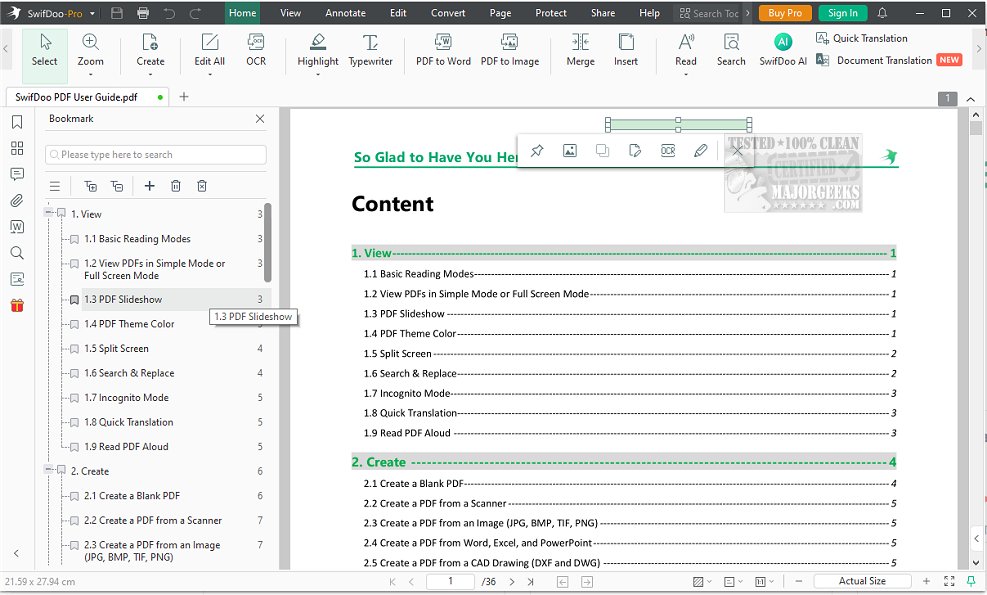
SwifDoo PDF has recently released version 2.0.7.7, presenting a robust set of features designed for the effective handling, editing, and organization of PDF documents. This comprehensive PDF management solution integrates various functionalities that cater to both personal and professional needs. Users can annotate documents, make edits, add images, create notes for collaboration, highlight essential sections, comment, and apply stamps to enhance the PDF experience.
The conversion capabilities of SwifDoo PDF are particularly noteworthy. Users can convert single or multiple PDF files in batches to a diverse range of formats, including Word, Excel, PowerPoint, images, and even scanned copies. The software also supports converting CAD files and MS Office documents into PDFs, along with a 'Conversion History' feature that helps users keep track of their conversion activities.
SwifDoo PDF also incorporates file compression options, allowing users to reduce the size of larger documents while maintaining quality, with various settings available for preview before finalizing. Security is another critical aspect of SwifDoo PDF, as it provides tools for password protection, electronic signatures, and customizable watermarks. Users can define the content and placement of watermarks, preview the effect on each page, and make adjustments to ensure the final output aligns with their expectations.
The software is designed for a seamless user experience, featuring an attractive modern interface and intuitive icons that enhance PDF management. Key functionalities include:
- Open/Create/Read PDF: Easily create PDFs from various sources and read documents with a built-in word count feature.
- Edit/Annotate PDF: Enhance productivity by marking up PDFs, inserting text, and editing content.
- Merge/Split PDF: Combine multiple PDF files or images into one, or separate PDF pages into individual files.
- Compress PDF: Reduce file sizes to specified levels while controlling image quality.
- Convert PDF: Transform PDFs to and from various formats, including Word, Excel, PowerPoint, and more.
- Remove/Add Watermark: Protect documents with customizable watermarks and remove them effortlessly.
- Encrypt/Sign PDF: Secure PDFs with password protection and add signatures, either handwritten or uploaded.
- Print PDF: Print options include double-sided printing, booklet format, and grayscale options.
- Add Links/Pages/Images: Enhance PDFs by adding links, additional pages, or images.
As technology continues to evolve, SwifDoo PDF remains a reliable tool for managing documents efficiently. Its continuous updates ensure that users benefit from the latest features and improvements, making it an essential application for anyone who frequently works with PDF files.
Furthermore, users can look forward to future enhancements that may include improved collaboration features, AI-assisted editing tools, and integration with cloud services for easier access and sharing of documents
The conversion capabilities of SwifDoo PDF are particularly noteworthy. Users can convert single or multiple PDF files in batches to a diverse range of formats, including Word, Excel, PowerPoint, images, and even scanned copies. The software also supports converting CAD files and MS Office documents into PDFs, along with a 'Conversion History' feature that helps users keep track of their conversion activities.
SwifDoo PDF also incorporates file compression options, allowing users to reduce the size of larger documents while maintaining quality, with various settings available for preview before finalizing. Security is another critical aspect of SwifDoo PDF, as it provides tools for password protection, electronic signatures, and customizable watermarks. Users can define the content and placement of watermarks, preview the effect on each page, and make adjustments to ensure the final output aligns with their expectations.
The software is designed for a seamless user experience, featuring an attractive modern interface and intuitive icons that enhance PDF management. Key functionalities include:
- Open/Create/Read PDF: Easily create PDFs from various sources and read documents with a built-in word count feature.
- Edit/Annotate PDF: Enhance productivity by marking up PDFs, inserting text, and editing content.
- Merge/Split PDF: Combine multiple PDF files or images into one, or separate PDF pages into individual files.
- Compress PDF: Reduce file sizes to specified levels while controlling image quality.
- Convert PDF: Transform PDFs to and from various formats, including Word, Excel, PowerPoint, and more.
- Remove/Add Watermark: Protect documents with customizable watermarks and remove them effortlessly.
- Encrypt/Sign PDF: Secure PDFs with password protection and add signatures, either handwritten or uploaded.
- Print PDF: Print options include double-sided printing, booklet format, and grayscale options.
- Add Links/Pages/Images: Enhance PDFs by adding links, additional pages, or images.
As technology continues to evolve, SwifDoo PDF remains a reliable tool for managing documents efficiently. Its continuous updates ensure that users benefit from the latest features and improvements, making it an essential application for anyone who frequently works with PDF files.
Furthermore, users can look forward to future enhancements that may include improved collaboration features, AI-assisted editing tools, and integration with cloud services for easier access and sharing of documents
SwifDoo PDF 2.0.7.7 released
SwifDoo PDF offers comprehensive features for efficiently organizing, editing, and handling PDF documents.