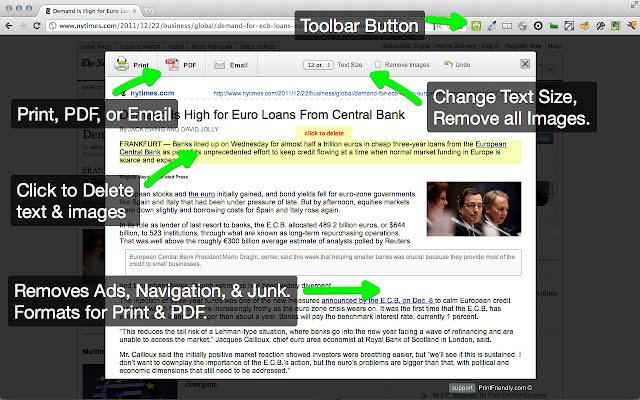
The latest version 6.13.2 of Print Friendly & PDF is now available for popular web browsers including Chrome, Firefox, Edge, and Safari. This extension is designed to enhance the printing experience by cleaning and formatting web pages, effectively removing ads, navigation elements, and unnecessary content that can waste paper and ink.
Key features include a Print Preview option that optimizes the layout for printing, and an Edit Before Printing function that allows users to selectively remove images and text before finalizing their print job. Users can either print the content directly or save it as a PDF for later use.
For new users, the process is simple: just copy and paste the desired URL at PrintFriendly.com. For regular users, adding the extension to the browser allows for one-click access to print-friendly pages. Additionally, developers and bloggers have the option to integrate a print-friendly button directly into their websites or blogs to enhance user experience.
In summary, Print Friendly & PDF offers a streamlined solution for printing web content efficiently while minimizing waste.
To extend this information, it could be beneficial to highlight specific use cases, such as saving resources in educational institutions or businesses that frequently print web content. Furthermore, the extension could also include features for adjusting margins, font sizes, and color settings to cater to different printing preferences. Additionally, user feedback mechanisms could be implemented to continually improve the service based on user experiences and needs
Key features include a Print Preview option that optimizes the layout for printing, and an Edit Before Printing function that allows users to selectively remove images and text before finalizing their print job. Users can either print the content directly or save it as a PDF for later use.
For new users, the process is simple: just copy and paste the desired URL at PrintFriendly.com. For regular users, adding the extension to the browser allows for one-click access to print-friendly pages. Additionally, developers and bloggers have the option to integrate a print-friendly button directly into their websites or blogs to enhance user experience.
In summary, Print Friendly & PDF offers a streamlined solution for printing web content efficiently while minimizing waste.
To extend this information, it could be beneficial to highlight specific use cases, such as saving resources in educational institutions or businesses that frequently print web content. Furthermore, the extension could also include features for adjusting margins, font sizes, and color settings to cater to different printing preferences. Additionally, user feedback mechanisms could be implemented to continually improve the service based on user experiences and needs
Print Friendly and PDF for Chrome, Firefox, Edge, and Safari 6.13.2 released
Print Friendly & PDF for Chrome, Firefox, Edge, and Safari cleans and formats web pages for the perfect print experience.
Print Friendly and PDF for Chrome, Firefox, Edge, and Safari 6.13.2 released @ MajorGeeks