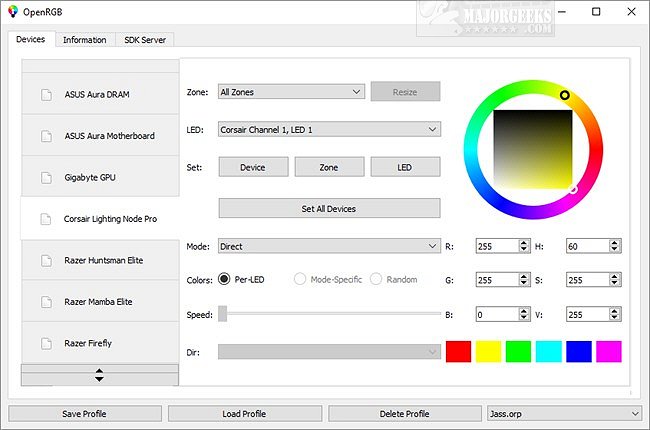
OpenRGB 1.0 has officially been released, marking a significant advancement in RGB lighting control for gaming machines. This cross-platform, open-source application is designed to automatically detect and display supported RGB devices, allowing users to manage them from a single, centralized interface.
Many gaming setups today feature RGB lighting options from various manufacturers, and users often find themselves juggling multiple third-party applications to control these lights, which can consume valuable system resources. OpenRGB addresses this issue by consolidating control into one application, which supports a wide range of RGB devices including popular brands such as ASUS, ASRock, Corsair, Gigabyte, Logitech, MSI, and Razer. A complete list of supported devices can be found on the developer's website, with plans for additional devices as OpenRGB continues to evolve.
The application automatically scans and detects any compatible devices or components, allowing users to manage their settings easily. One notable feature is the ability to create customized profiles, enabling users to load specific configurations for different games or tasks quickly. However, users must run OpenRGB with administrative privileges to ensure proper device detection. Additionally, to unpack OpenRGB, a utility like 7-zip is required.
As OpenRGB continues to develop, it holds great promise for gamers looking for a unified RGB control solution, potentially transforming how users experience and customize their gaming environments. Future updates may enhance compatibility with even more devices and introduce new features to improve user experience further
Many gaming setups today feature RGB lighting options from various manufacturers, and users often find themselves juggling multiple third-party applications to control these lights, which can consume valuable system resources. OpenRGB addresses this issue by consolidating control into one application, which supports a wide range of RGB devices including popular brands such as ASUS, ASRock, Corsair, Gigabyte, Logitech, MSI, and Razer. A complete list of supported devices can be found on the developer's website, with plans for additional devices as OpenRGB continues to evolve.
The application automatically scans and detects any compatible devices or components, allowing users to manage their settings easily. One notable feature is the ability to create customized profiles, enabling users to load specific configurations for different games or tasks quickly. However, users must run OpenRGB with administrative privileges to ensure proper device detection. Additionally, to unpack OpenRGB, a utility like 7-zip is required.
As OpenRGB continues to develop, it holds great promise for gamers looking for a unified RGB control solution, potentially transforming how users experience and customize their gaming environments. Future updates may enhance compatibility with even more devices and introduce new features to improve user experience further
OpenRGB 1.0 released
OpenRGB is a cross-platform, Open Source app designed to auto-detect and display supported devices allowing you to control them from a centralized interface.