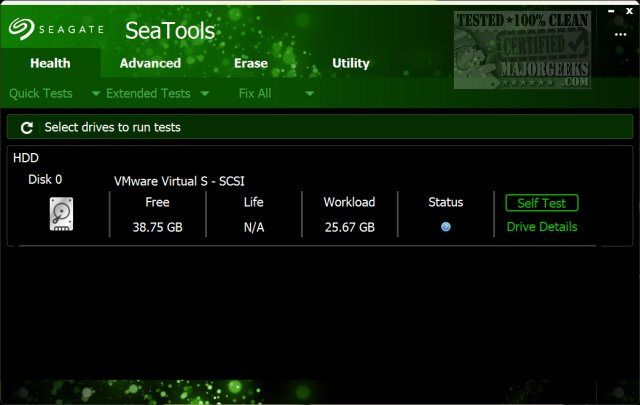
Seagate has released updates for SeaTools, versions 5.2.5 and 5.3.1, a comprehensive diagnostic tool for assessing the health of various storage devices, including SATA, USB, 1394, ATA, and SCSI drives. This utility is designed to aid users experiencing issues with their hard drives, such as slow file loading or disappearing files. SeaTools is compatible not only with Seagate but also with drives from other manufacturers, showcasing its versatility.
The software functions as a diagnostic tool, akin to a physician for hard drives, providing an intuitive and user-friendly interface on both Windows and Linux platforms. It offers a range of tests, from quick scans to in-depth inspections, allowing users to evaluate the performance and health of their drives. Additionally, SeaTools can create bootable USB drives for troubleshooting purposes when systems fail to boot.
Key features of SeaTools include:
1. Early Detection: Utilizing Self-Monitoring Analysis and Reporting Technology (SMART), the tool can identify potential drive failures before they occur, alerting users to issues like bad sectors or temperature anomalies.
2. Repair Capabilities: The "Fix All" option aims to repair problematic sectors, thus preventing possible data loss.
3. Custom Testing: Users can select between quick tests or detailed checks, tailoring the process to their needs.
4. Secure Data Wiping: For users looking to sell or recycle drives, SeaTools offers secure erase functions to ensure sensitive information is permanently deleted.
5. Firmware Management: The software facilitates firmware updates directly, enhancing drive performance without manual intervention.
6. Integration with Windows: SeaTools works alongside Windows utilities, aiding in partition management and drive wiping.
SeaTools is ideal for users facing slow performance, disappearing storage, or when preparing to use second-hand drives. Its bootable version allows for diagnostics outside the operating environment, which is invaluable during critical failures.
Installation is seamless, and the color-coded results offer an easy way to interpret drive conditions—green signals good health, while red indicates urgent issues. The tool remains effective for both Seagate and third-party drives, making it a must-have for tech enthusiasts and network administrators alike.
In conclusion, downloading Seagate SeaTools is highly recommended for anyone looking to maintain their storage devices, troubleshoot issues, or securely wipe data. While it may not resolve every problem, its extensive features and ease of use make it an essential addition to your software toolkit. So, don’t hesitate—download SeaTools today and take proactive steps in safeguarding your data.
Extended Note: As storage technology evolves, tools like SeaTools are crucial for recognizing and addressing potential issues as they arise. Keeping your storage devices in optimal condition can prolong their lifespan and protect valuable data, making regular diagnostics a smart practice for everyone, from casual users to IT professionals
The software functions as a diagnostic tool, akin to a physician for hard drives, providing an intuitive and user-friendly interface on both Windows and Linux platforms. It offers a range of tests, from quick scans to in-depth inspections, allowing users to evaluate the performance and health of their drives. Additionally, SeaTools can create bootable USB drives for troubleshooting purposes when systems fail to boot.
Key features of SeaTools include:
1. Early Detection: Utilizing Self-Monitoring Analysis and Reporting Technology (SMART), the tool can identify potential drive failures before they occur, alerting users to issues like bad sectors or temperature anomalies.
2. Repair Capabilities: The "Fix All" option aims to repair problematic sectors, thus preventing possible data loss.
3. Custom Testing: Users can select between quick tests or detailed checks, tailoring the process to their needs.
4. Secure Data Wiping: For users looking to sell or recycle drives, SeaTools offers secure erase functions to ensure sensitive information is permanently deleted.
5. Firmware Management: The software facilitates firmware updates directly, enhancing drive performance without manual intervention.
6. Integration with Windows: SeaTools works alongside Windows utilities, aiding in partition management and drive wiping.
SeaTools is ideal for users facing slow performance, disappearing storage, or when preparing to use second-hand drives. Its bootable version allows for diagnostics outside the operating environment, which is invaluable during critical failures.
Installation is seamless, and the color-coded results offer an easy way to interpret drive conditions—green signals good health, while red indicates urgent issues. The tool remains effective for both Seagate and third-party drives, making it a must-have for tech enthusiasts and network administrators alike.
In conclusion, downloading Seagate SeaTools is highly recommended for anyone looking to maintain their storage devices, troubleshoot issues, or securely wipe data. While it may not resolve every problem, its extensive features and ease of use make it an essential addition to your software toolkit. So, don’t hesitate—download SeaTools today and take proactive steps in safeguarding your data.
Extended Note: As storage technology evolves, tools like SeaTools are crucial for recognizing and addressing potential issues as they arise. Keeping your storage devices in optimal condition can prolong their lifespan and protect valuable data, making regular diagnostics a smart practice for everyone, from casual users to IT professionals
Seagate SeaTools 5.2.5 / 5.3.1 released
Seagate SeaTools for Windows and Linux tests SATA, USB, 1394, ATA (PATA/IDE), and SCSI drives.