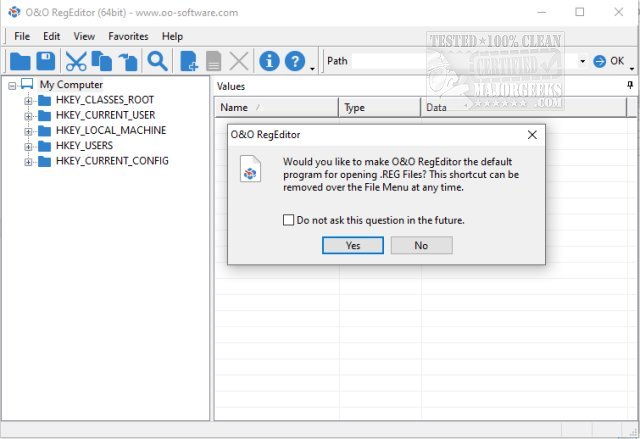
O&O RegEditor 16.0.6656 has been released as a portable alternative to the traditional Windows RegEdit. This new version offers enhanced features, including the management of favorites and a more comprehensive user interface aimed at all skill levels, from novice users to seasoned administrators. Its portability allows users to easily carry it on a USB drive, enabling quick deployment and use across different systems.
One of the key features of O&O RegEditor is its organized display of registry entries, which allows users to efficiently copy and move entire keys. Users can also bookmark frequently accessed keys and navigate to them quickly by pasting their paths from the clipboard. This functionality is particularly beneficial for users who need to frequently interact with the Windows registry, saving time and improving workflow.
It is important to note that before making any changes to the registry, users are advised to perform a backup to prevent potential data loss.
In addition to the main features, O&O RegEditor can be set as the default application for opening .REG files or used on an as-needed basis. A video demonstrating the tool is available for those interested in exploring its capabilities further.
For those looking to enhance their understanding of the Windows registry, related resources include guidance on backing up or restoring the Windows Registry, automatic backup methods for Windows 10, and various ways to access the Registry Editor.
To extend the discussion, the importance of understanding the Windows registry cannot be overstated, as it is a critical component of the operating system that stores configuration settings and options. Users should consider familiarizing themselves with not only O&O RegEditor but also the fundamentals of registry management, including best practices for editing and maintaining system integrity. As registry errors can lead to system instability, tools like O&O RegEditor can play a vital role in efficient and safe registry management
One of the key features of O&O RegEditor is its organized display of registry entries, which allows users to efficiently copy and move entire keys. Users can also bookmark frequently accessed keys and navigate to them quickly by pasting their paths from the clipboard. This functionality is particularly beneficial for users who need to frequently interact with the Windows registry, saving time and improving workflow.
It is important to note that before making any changes to the registry, users are advised to perform a backup to prevent potential data loss.
In addition to the main features, O&O RegEditor can be set as the default application for opening .REG files or used on an as-needed basis. A video demonstrating the tool is available for those interested in exploring its capabilities further.
For those looking to enhance their understanding of the Windows registry, related resources include guidance on backing up or restoring the Windows Registry, automatic backup methods for Windows 10, and various ways to access the Registry Editor.
To extend the discussion, the importance of understanding the Windows registry cannot be overstated, as it is a critical component of the operating system that stores configuration settings and options. Users should consider familiarizing themselves with not only O&O RegEditor but also the fundamentals of registry management, including best practices for editing and maintaining system integrity. As registry errors can lead to system instability, tools like O&O RegEditor can play a vital role in efficient and safe registry management
O and O RegEditor 16.0.6656 released
O&O RegEditor is a portable alternative to Windows RegEdit that includes the ability to manage favorites and more thoroughly. Video available.