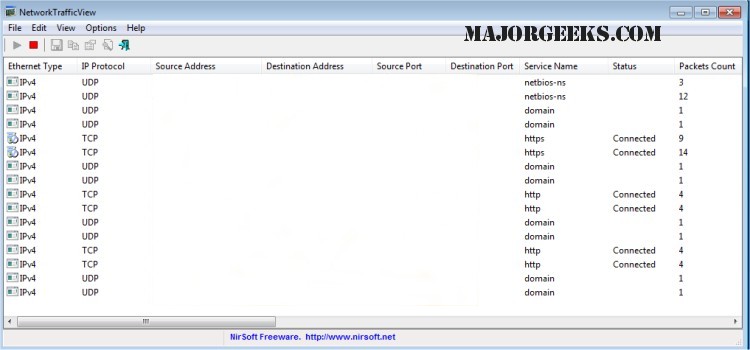
NetworkTrafficView is a lightweight and user-friendly network monitoring tool designed to capture packets flowing through your network adapter. The latest version, 2.52, provides enhanced features to analyze and display comprehensive statistics regarding network traffic.
The software organizes packet statistics by various categories, including Ethernet Type, IP Protocol, Source/Destination Addresses, and Source/Destination Ports. For each statistical entry, NetworkTrafficView presents a wealth of information such as:
- Ethernet Type (e.g., IPv4, IPv6, ARP)
- IP Protocol (e.g., TCP, UDP, ICMP)
- Source and Destination Addresses
- Source and Destination Ports
- Service Names (e.g., HTTP, FTP)
- Packet Count
- Total Packet Size
- Total Data Size
- Data Speed
- Maximum and Average Data Speeds
- Average Packet Size
- Timestamps for First and Last Packets
- Duration of the session
- Process ID/Name for TCP connections
In addition to these functionalities, users can also explore related resources such as guides on improving wireless network performance, resetting TCP/IP settings, flushing the Windows DNS cache, and troubleshooting network settings issues.
Extension: Future Developments and Use Cases
As network monitoring becomes increasingly crucial for both personal and organizational cybersecurity, tools like NetworkTrafficView are set to evolve. Future updates could incorporate advanced features such as real-time alerts for unusual traffic patterns, enhanced visualization tools for data analysis, and improved compatibility with various operating systems.
Moreover, NetworkTrafficView can be utilized in various scenarios, including network troubleshooting, identifying bandwidth hogs, and monitoring unauthorized access attempts. As remote work continues to rise, having a reliable tool to ensure network integrity and performance will be invaluable for both IT professionals and everyday users
The software organizes packet statistics by various categories, including Ethernet Type, IP Protocol, Source/Destination Addresses, and Source/Destination Ports. For each statistical entry, NetworkTrafficView presents a wealth of information such as:
- Ethernet Type (e.g., IPv4, IPv6, ARP)
- IP Protocol (e.g., TCP, UDP, ICMP)
- Source and Destination Addresses
- Source and Destination Ports
- Service Names (e.g., HTTP, FTP)
- Packet Count
- Total Packet Size
- Total Data Size
- Data Speed
- Maximum and Average Data Speeds
- Average Packet Size
- Timestamps for First and Last Packets
- Duration of the session
- Process ID/Name for TCP connections
In addition to these functionalities, users can also explore related resources such as guides on improving wireless network performance, resetting TCP/IP settings, flushing the Windows DNS cache, and troubleshooting network settings issues.
Extension: Future Developments and Use Cases
As network monitoring becomes increasingly crucial for both personal and organizational cybersecurity, tools like NetworkTrafficView are set to evolve. Future updates could incorporate advanced features such as real-time alerts for unusual traffic patterns, enhanced visualization tools for data analysis, and improved compatibility with various operating systems.
Moreover, NetworkTrafficView can be utilized in various scenarios, including network troubleshooting, identifying bandwidth hogs, and monitoring unauthorized access attempts. As remote work continues to rise, having a reliable tool to ensure network integrity and performance will be invaluable for both IT professionals and everyday users
NetworkTrafficView 2.52 released
NetworkTrafficView was built to be a small and easy-to-use network monitoring tool that captures the packets that pass through your network adapter.