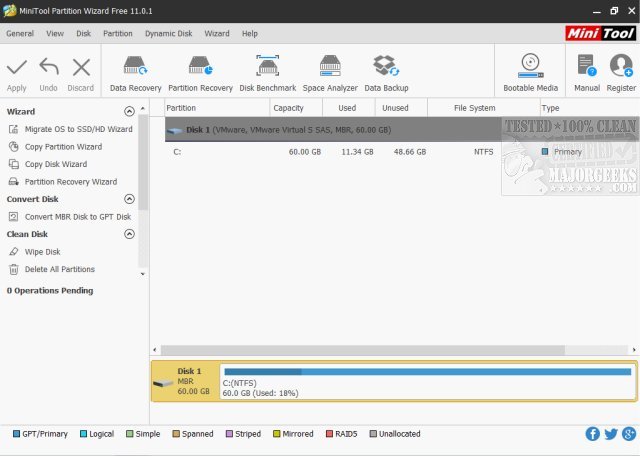
MiniTool Partition Wizard Free Edition 13.9 has been released, providing users with a robust and user-friendly tool for managing hard drive partitions without any cost. This partition manager simplifies complex operations like resizing, creating, deleting, merging, and formatting partitions, making it accessible for both casual users and IT professionals.
Key features include easy partition management, data protection through recovery options and backups, performance optimization tools like MBR rebuilding and SSD alignment, seamless format conversions, and support for large drives exceeding 2TB. Additionally, it offers disk analysis and diagnostics capabilities to help users identify and troubleshoot storage issues.
What sets MiniTool Partition Wizard apart is its intuitive visual interface, which allows users to preview changes before applying them, as well as the ability to extend partitions without rebooting the system. Users can also easily clone drives without needing to reinstall programs.
The free version of MiniTool Partition Wizard is packed with features sufficient for most users, while an optional Pro version provides advanced tools for power users at a cost of $99.
In conclusion, MiniTool Partition Wizard Free Edition is a valuable tool for anyone looking to manage their disk partitions effectively and efficiently. With its comprehensive features and ease of use, it has garnered millions of users and has become a preferred choice for disk management. Whether upgrading drives, optimizing storage, or troubleshooting issues, this tool makes disk management straightforward and hassle-free.
For those considering drive partitioning, understanding the differences between GPT (GUID Partition Table) and MBR (Master Boot Record), as well as knowing whether to format a hard drive during a fresh Windows installation, are crucial aspects to explore further
Key features include easy partition management, data protection through recovery options and backups, performance optimization tools like MBR rebuilding and SSD alignment, seamless format conversions, and support for large drives exceeding 2TB. Additionally, it offers disk analysis and diagnostics capabilities to help users identify and troubleshoot storage issues.
What sets MiniTool Partition Wizard apart is its intuitive visual interface, which allows users to preview changes before applying them, as well as the ability to extend partitions without rebooting the system. Users can also easily clone drives without needing to reinstall programs.
The free version of MiniTool Partition Wizard is packed with features sufficient for most users, while an optional Pro version provides advanced tools for power users at a cost of $99.
In conclusion, MiniTool Partition Wizard Free Edition is a valuable tool for anyone looking to manage their disk partitions effectively and efficiently. With its comprehensive features and ease of use, it has garnered millions of users and has become a preferred choice for disk management. Whether upgrading drives, optimizing storage, or troubleshooting issues, this tool makes disk management straightforward and hassle-free.
For those considering drive partitioning, understanding the differences between GPT (GUID Partition Table) and MBR (Master Boot Record), as well as knowing whether to format a hard drive during a fresh Windows installation, are crucial aspects to explore further
MiniTool Partition Wizard Free Edition 13.9 released
MiniTool Partition Wizard Free Edition is a powerful yet free partition manager that can perform complicated partition operations to manage your hard drive partitions.
MiniTool Partition Wizard Free Edition 13.9 released @ MajorGeeks