NetProxy 2.4.1 has been released as a powerful network tunneling tool, designed to enable seamless data redirection between different ports. This versatile application supports both IPv4 and IPv6 protocols, making it an invaluable resource for network administrators who seek to manage and optimize data traffic across varied network environments effectively. It facilitates data transfer between applications that utilize IPv6 and IPv4, allowing users to connect two instances of the application for data tunneling across distinct networks.
Operating as a Windows Service, NetProxy efficiently reroutes TCP/IP traffic to specified hosts or IP addresses. Its fast and secure operation can be administered remotely through a user-friendly interface, streamlining the setup of load-balancing and fail-over configurations compared to specialized hardware devices. Advanced features include session persistence, buffering, and the ability to manipulate in-flight HTTP headers.
Getting Started with NetProxy
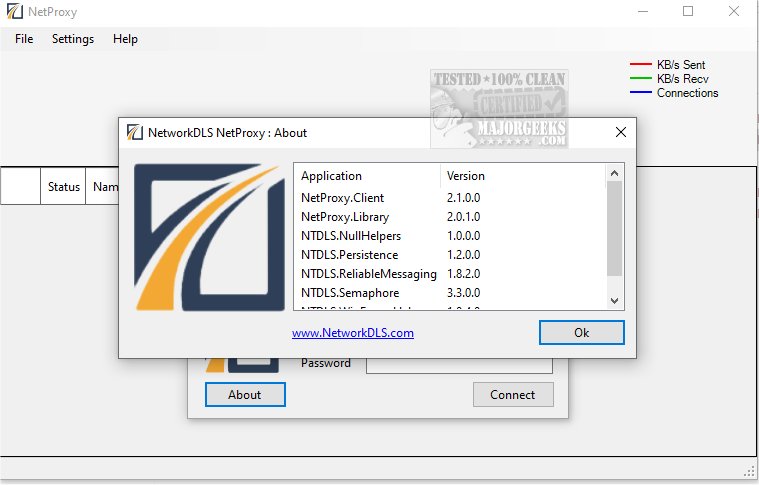
Upon launching NetProxy, users must configure the server connection by entering the server name and credentials; the default username is 'administrator' with a blank password, allowing users to click 'Connect' to initiate the process. The 'Settings' window enables the addition of more users with custom passwords. The main interface displays details about all rerouting tunnels, active connections, and data traffic volumes, accompanied by a graph illustrating these parameters over time.
Configuration and Routing Options
Setting up new routes involves navigating various configuration settings within NetProxy. It supports HTTP, HTTPS, and binary connections while accommodating both IPv4 and IPv6 protocols. Users can define the listening protocol, specify allowed IP addresses or hostnames, establish endpoints, and choose between connection patterns like Round-Robin or Fail-Over. Furthermore, NetProxy's tunneling capabilities include data compression to minimize traffic and RSA encryption for enhanced security. Users can also manipulate HTTP headers for both request and response packets, choose HTTP methods, and define specific actions to execute.
Overall, NetProxy offers a flexible and reliable solution for various networking scenarios, whether it is streamlining communication between distributed systems, enhancing security through encrypted transmissions, or enabling remote access to network resources.
Future Developments and Considerations
Looking ahead, it would be beneficial for the developers of NetProxy to enhance the user experience by providing comprehensive documentation detailing all settings and options. Additionally, incorporating features such as automated configuration wizards could simplify the initial setup process for users. As networks continue to evolve, ongoing updates to support emerging protocols and security standards will be essential to maintain NetProxy's relevance in the networking landscape.
Moreover, as organizations increasingly adopt cloud-based solutions and remote work practices, NetProxy could explore integration with cloud platforms and support for VPN services to broaden its usability and appeal. By continually adapting to the changing technological environment, NetProxy can solidify its position as a leading tool for network management and data tunneling
Operating as a Windows Service, NetProxy efficiently reroutes TCP/IP traffic to specified hosts or IP addresses. Its fast and secure operation can be administered remotely through a user-friendly interface, streamlining the setup of load-balancing and fail-over configurations compared to specialized hardware devices. Advanced features include session persistence, buffering, and the ability to manipulate in-flight HTTP headers.
Getting Started with NetProxy
Upon launching NetProxy, users must configure the server connection by entering the server name and credentials; the default username is 'administrator' with a blank password, allowing users to click 'Connect' to initiate the process. The 'Settings' window enables the addition of more users with custom passwords. The main interface displays details about all rerouting tunnels, active connections, and data traffic volumes, accompanied by a graph illustrating these parameters over time.
Configuration and Routing Options
Setting up new routes involves navigating various configuration settings within NetProxy. It supports HTTP, HTTPS, and binary connections while accommodating both IPv4 and IPv6 protocols. Users can define the listening protocol, specify allowed IP addresses or hostnames, establish endpoints, and choose between connection patterns like Round-Robin or Fail-Over. Furthermore, NetProxy's tunneling capabilities include data compression to minimize traffic and RSA encryption for enhanced security. Users can also manipulate HTTP headers for both request and response packets, choose HTTP methods, and define specific actions to execute.
Overall, NetProxy offers a flexible and reliable solution for various networking scenarios, whether it is streamlining communication between distributed systems, enhancing security through encrypted transmissions, or enabling remote access to network resources.
Future Developments and Considerations
Looking ahead, it would be beneficial for the developers of NetProxy to enhance the user experience by providing comprehensive documentation detailing all settings and options. Additionally, incorporating features such as automated configuration wizards could simplify the initial setup process for users. As networks continue to evolve, ongoing updates to support emerging protocols and security standards will be essential to maintain NetProxy's relevance in the networking landscape.
Moreover, as organizations increasingly adopt cloud-based solutions and remote work practices, NetProxy could explore integration with cloud platforms and support for VPN services to broaden its usability and appeal. By continually adapting to the changing technological environment, NetProxy can solidify its position as a leading tool for network management and data tunneling
NetProxy 2.4.1 released
NetProxy performs as a versatile network tunneling tool designed to facilitate seamless data redirection between different ports.