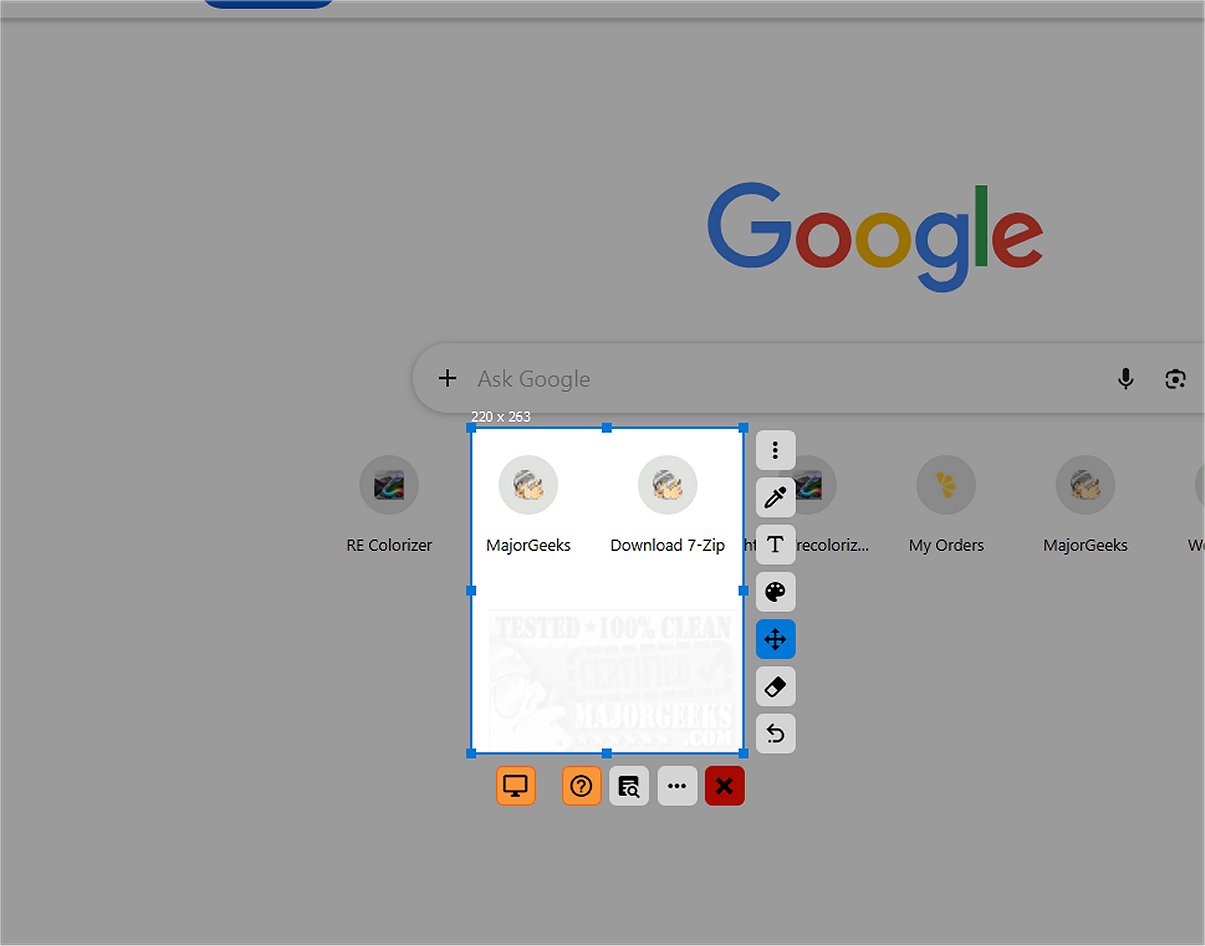
SnipFor is a powerful application designed for capturing and saving specific portions of your screen. Users can easily select any area, take a snapshot, and store it for immediate or later use.
User-Friendly Interface
The interface of SnipFor has been crafted with user experience at the forefront, featuring a modern and intuitive design. Users will find a side panel equipped with simple tools for quick drawing, text insertion, and markup directly on the captured images right after taking a screenshot. The tools are clearly labeled with icons, allowing for an efficient workflow without confusion.
Precision and Accuracy
One of SnipFor's standout features is its exceptional precision when adjusting the capture area, allowing modifications down to the pixel level. This precision is particularly beneficial for users who need to isolate specific content without extraneous elements from their desktop, resulting in clean and relevant screenshots.
Advanced OCR Capability
Beyond standard screenshot functionality, SnipFor integrates an advanced Optical Character Recognition (OCR) engine. This feature distinguishes SnipFor from typical screenshot tools, as it allows users to identify and extract text from their captures. This capability is useful in various scenarios, such as meetings, paused videos, remote desktop sessions, or when dealing with restricted PDF documents. Users can effortlessly extract, copy, and utilize this information.
Privacy-Focused OCR Processing
SnipFor prioritizes user privacy by ensuring that the OCR functionality operates solely on the user's local device. This means that any text extracted from screenshots remains on the device and is not sent to external servers, providing a significant security advantage—especially for users handling confidential or sensitive information.
Final Thoughts
In summary, SnipFor emerges as a robust screen-snipping tool that enables users to capture, annotate, and extract text seamlessly. It offers the added benefit of pinning snippets on top of other windows for easy access. However, there was a minor issue noted during installation where some elements were not fully translated into English, although this was rectified upon launching the app.
Future Enhancements and Suggestions
Looking ahead, SnipFor could benefit from further refining its translation features to ensure complete language compatibility upon installation. Additionally, enhancing the toolset with more advanced annotation options or collaborative features could further elevate the user experience. Expanding support for additional languages and integrating cloud storage options could also enhance accessibility and convenience for a broader audience
User-Friendly Interface
The interface of SnipFor has been crafted with user experience at the forefront, featuring a modern and intuitive design. Users will find a side panel equipped with simple tools for quick drawing, text insertion, and markup directly on the captured images right after taking a screenshot. The tools are clearly labeled with icons, allowing for an efficient workflow without confusion.
Precision and Accuracy
One of SnipFor's standout features is its exceptional precision when adjusting the capture area, allowing modifications down to the pixel level. This precision is particularly beneficial for users who need to isolate specific content without extraneous elements from their desktop, resulting in clean and relevant screenshots.
Advanced OCR Capability
Beyond standard screenshot functionality, SnipFor integrates an advanced Optical Character Recognition (OCR) engine. This feature distinguishes SnipFor from typical screenshot tools, as it allows users to identify and extract text from their captures. This capability is useful in various scenarios, such as meetings, paused videos, remote desktop sessions, or when dealing with restricted PDF documents. Users can effortlessly extract, copy, and utilize this information.
Privacy-Focused OCR Processing
SnipFor prioritizes user privacy by ensuring that the OCR functionality operates solely on the user's local device. This means that any text extracted from screenshots remains on the device and is not sent to external servers, providing a significant security advantage—especially for users handling confidential or sensitive information.
Final Thoughts
In summary, SnipFor emerges as a robust screen-snipping tool that enables users to capture, annotate, and extract text seamlessly. It offers the added benefit of pinning snippets on top of other windows for easy access. However, there was a minor issue noted during installation where some elements were not fully translated into English, although this was rectified upon launching the app.
Future Enhancements and Suggestions
Looking ahead, SnipFor could benefit from further refining its translation features to ensure complete language compatibility upon installation. Additionally, enhancing the toolset with more advanced annotation options or collaborative features could further elevate the user experience. Expanding support for additional languages and integrating cloud storage options could also enhance accessibility and convenience for a broader audience
SnipFor 2.6.2 released
SnipFor is a sophisticated tool for capturing and saving specific screen content. You can select a portion of the display, take a snapshot, and the application will store it for immediate or future use.