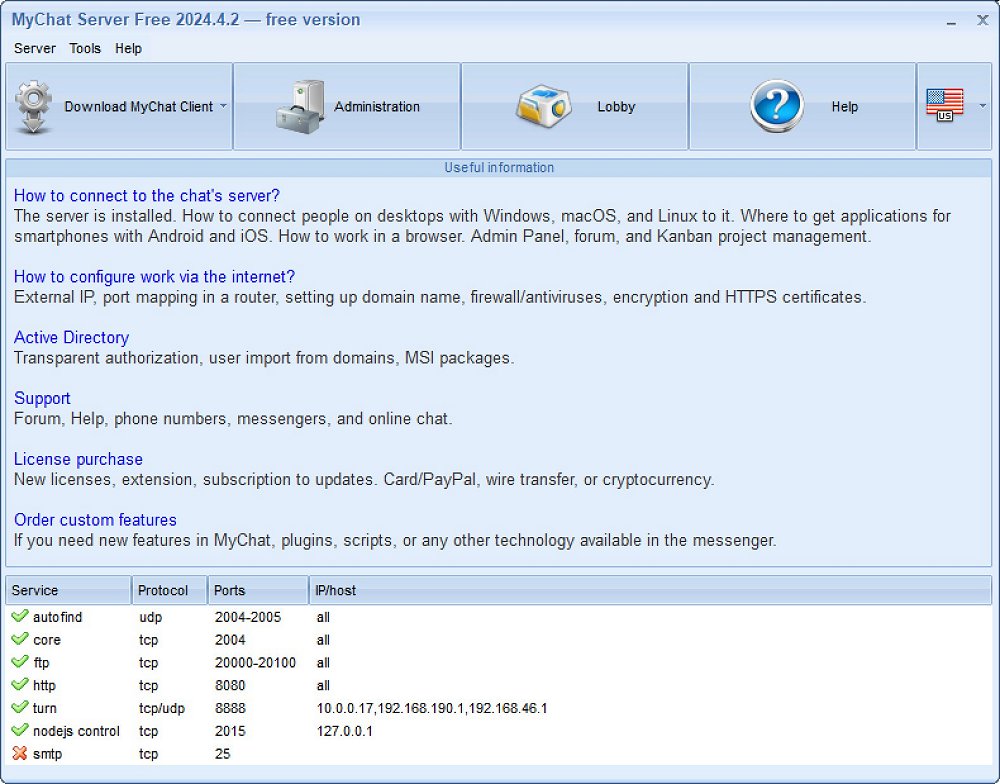
MyChat 2026.3.2 has been released as a secure messaging and collaboration platform specifically designed for internal business networks. Unlike typical messaging apps that often focus on casual communication, MyChat emphasizes private and secure communication for businesses that want to keep their conversations protected from third-party servers. It offers a comprehensive chat system that includes instant messaging, file sharing, task management, and notifications, allowing companies to maintain control over their data.
The platform is designed for businesses ranging from small to medium-sized, particularly those in sectors where data privacy is crucial, such as healthcare, IT, and finance. MyChat employs OpenSSL encryption and operates within a company's internal network, ensuring all communications remain private and secure. The software supports a variety of features including file transfers, project tracking, Kanban boards, and video/voice calls.
Installation of MyChat is straightforward, requiring minimal system specifications such as Windows 7 or later, a 1 GHz processor, and at least 1 GB of RAM. It can be set up easily by users with basic networking knowledge, although those unfamiliar with networking may find it challenging. MyChat also provides comprehensive support for installation and usage.
The platform is free for small teams of up to 20 users, making it accessible for smaller groups needing secure communications. For larger teams or those wanting additional features like unlimited message history and push notifications, a paid license is available starting at $60 for a 10-user license, with options for corporate discounts.
Pros and Cons:
- Pros:
- Secure, in-house communication that keeps data private.
- All-in-one platform for text, voice, and file sharing.
- Customizable features for various industries.
- Mobile applications for accessibility.
- Free version for small teams.
- Cons:
- Free version is limited to 20 users.
- Advanced features require a paid license.
- Setup may require networking skills.
- Limited integrations with external software.
Conclusion:
MyChat is an excellent option for businesses that prioritize privacy and control over their communications. It stands out due to its encryption, ability to function over LAN or the internet, and comprehensive task management capabilities. The free version for small teams provides a significant advantage, allowing organizations to explore the platform's offerings with minimal risk. As businesses continue to prioritize data security, MyChat is positioned as a strong contender in the secure messaging landscape.
Future Prospects:
Looking ahead, MyChat could further enhance its appeal by expanding its integration capabilities with other software solutions, ensuring a more seamless user experience. Additionally, as remote work continues to be the norm, enhancing mobile functionalities and user interface design could attract more users seeking efficient communication tools. Regular updates and feature expansions will be crucial for maintaining competitiveness in the evolving landscape of digital communication
The platform is designed for businesses ranging from small to medium-sized, particularly those in sectors where data privacy is crucial, such as healthcare, IT, and finance. MyChat employs OpenSSL encryption and operates within a company's internal network, ensuring all communications remain private and secure. The software supports a variety of features including file transfers, project tracking, Kanban boards, and video/voice calls.
Installation of MyChat is straightforward, requiring minimal system specifications such as Windows 7 or later, a 1 GHz processor, and at least 1 GB of RAM. It can be set up easily by users with basic networking knowledge, although those unfamiliar with networking may find it challenging. MyChat also provides comprehensive support for installation and usage.
The platform is free for small teams of up to 20 users, making it accessible for smaller groups needing secure communications. For larger teams or those wanting additional features like unlimited message history and push notifications, a paid license is available starting at $60 for a 10-user license, with options for corporate discounts.
Pros and Cons:
- Pros:
- Secure, in-house communication that keeps data private.
- All-in-one platform for text, voice, and file sharing.
- Customizable features for various industries.
- Mobile applications for accessibility.
- Free version for small teams.
- Cons:
- Free version is limited to 20 users.
- Advanced features require a paid license.
- Setup may require networking skills.
- Limited integrations with external software.
Conclusion:
MyChat is an excellent option for businesses that prioritize privacy and control over their communications. It stands out due to its encryption, ability to function over LAN or the internet, and comprehensive task management capabilities. The free version for small teams provides a significant advantage, allowing organizations to explore the platform's offerings with minimal risk. As businesses continue to prioritize data security, MyChat is positioned as a strong contender in the secure messaging landscape.
Future Prospects:
Looking ahead, MyChat could further enhance its appeal by expanding its integration capabilities with other software solutions, ensuring a more seamless user experience. Additionally, as remote work continues to be the norm, enhancing mobile functionalities and user interface design could attract more users seeking efficient communication tools. Regular updates and feature expansions will be crucial for maintaining competitiveness in the evolving landscape of digital communication
MyChat 2026.3.2 released
MyChat is a secure messaging and collaboration platform built for internal business networks.