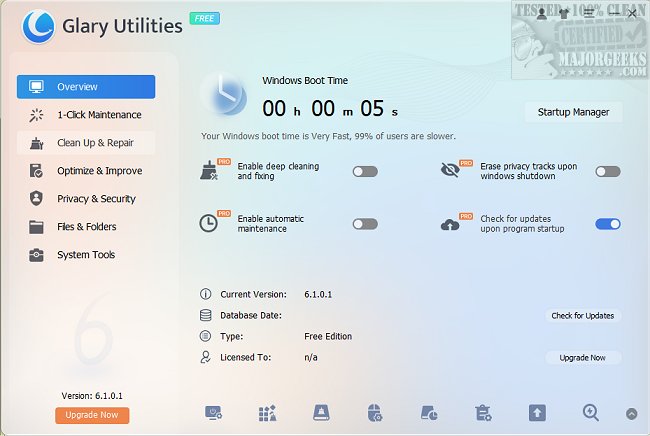
Glary Utilities has unveiled its latest version, 6.43.0.47, which provides a suite of free, powerful, and user-friendly system tools aimed at fixing, speeding up, maintaining, and protecting your PC. For those who prefer learning through visuals, a video tutorial is available, and the software can also be used as a portable app, making it convenient for users who are frequently on the move.
Your All-in-One PC Tune-Up Toolkit
If your PC has been feeling slow or cluttered, Glary Utilities could be the essential tool you need. This comprehensive and easy-to-navigate toolkit is designed to tackle system maintenance effectively. The software is not only intuitive but also equipped with advanced features suitable for both novice and experienced users.
A Digital Toolbox for Every Occasion
Beyond being just a cleaning tool, Glary Utilities serves as a robust system maintenance toolkit. It efficiently eliminates junk files, invalid registry entries, and keeps your internet history private. If your browser is bogged down by unwanted add-ons or duplicate files are consuming valuable disk space, Glary Utilities can swiftly address these issues. Moreover, it provides insights into disk space usage and helps manage shell extensions.
For users needing to secure files, the software offers file encryption capabilities and allows for easy file management, including splitting large files and recombining them.
Performance Boosters & Deep-Clean Features
Glary Utilities also enhances system performance with features such as:
- Memory Optimizer: Frees up RAM to ensure optimal performance.
- Shortcut Fixer: Repairs or removes broken Windows shortcuts.
- Startup Manager: Allows users to manage which applications run at startup.
- Uninstall Manager: Effectively removes unwanted applications.
Advanced tools like the Disk Analyzer and Duplicate Files Finder help reclaim hard drive space, while the File Shredder ensures that sensitive data is permanently erased.
Privacy & Security? Check.
The software prioritizes user privacy by eliminating digital traces through the Tracks Eraser, which clears cookies and browser history. Additionally, the File Encrypter and Decrypter keep private files secure, while the Empty Folders Finder helps tidy up leftover files. The Process Manager monitors active applications, alerting users to any unwanted programs that may try to infiltrate the system.
The Geek Verdict
Glary Utilities is an invaluable tool that efficiently performs its tasks while making a significant impact on your PC’s performance. It combines powerful cleaning capabilities with performance enhancements, all while being simple enough for everyday users. From decluttering to fixing issues and securing files, Glary Utilities is akin to a spring cleaning session for your computer—without the mess. If your device has been underperforming, give Glary Utilities a try; it's free, portable, and may rejuvenate your PC experience.
Further Reading:
- A comparison of drive cleaners: CCleaner vs. Wise Disk Cleaner vs. PrivaZer.
- Instructions on using Storage Sense to automatically delete junk files in Windows 10.
- Tips on how to automatically empty the Recycle Bin in Windows 10.
In conclusion, Glary Utilities serves as an essential toolkit for maintaining and protecting your computer, helping users maximize performance and ensure a smooth and secure digital experience
Your All-in-One PC Tune-Up Toolkit
If your PC has been feeling slow or cluttered, Glary Utilities could be the essential tool you need. This comprehensive and easy-to-navigate toolkit is designed to tackle system maintenance effectively. The software is not only intuitive but also equipped with advanced features suitable for both novice and experienced users.
A Digital Toolbox for Every Occasion
Beyond being just a cleaning tool, Glary Utilities serves as a robust system maintenance toolkit. It efficiently eliminates junk files, invalid registry entries, and keeps your internet history private. If your browser is bogged down by unwanted add-ons or duplicate files are consuming valuable disk space, Glary Utilities can swiftly address these issues. Moreover, it provides insights into disk space usage and helps manage shell extensions.
For users needing to secure files, the software offers file encryption capabilities and allows for easy file management, including splitting large files and recombining them.
Performance Boosters & Deep-Clean Features
Glary Utilities also enhances system performance with features such as:
- Memory Optimizer: Frees up RAM to ensure optimal performance.
- Shortcut Fixer: Repairs or removes broken Windows shortcuts.
- Startup Manager: Allows users to manage which applications run at startup.
- Uninstall Manager: Effectively removes unwanted applications.
Advanced tools like the Disk Analyzer and Duplicate Files Finder help reclaim hard drive space, while the File Shredder ensures that sensitive data is permanently erased.
Privacy & Security? Check.
The software prioritizes user privacy by eliminating digital traces through the Tracks Eraser, which clears cookies and browser history. Additionally, the File Encrypter and Decrypter keep private files secure, while the Empty Folders Finder helps tidy up leftover files. The Process Manager monitors active applications, alerting users to any unwanted programs that may try to infiltrate the system.
The Geek Verdict
Glary Utilities is an invaluable tool that efficiently performs its tasks while making a significant impact on your PC’s performance. It combines powerful cleaning capabilities with performance enhancements, all while being simple enough for everyday users. From decluttering to fixing issues and securing files, Glary Utilities is akin to a spring cleaning session for your computer—without the mess. If your device has been underperforming, give Glary Utilities a try; it's free, portable, and may rejuvenate your PC experience.
Further Reading:
- A comparison of drive cleaners: CCleaner vs. Wise Disk Cleaner vs. PrivaZer.
- Instructions on using Storage Sense to automatically delete junk files in Windows 10.
- Tips on how to automatically empty the Recycle Bin in Windows 10.
In conclusion, Glary Utilities serves as an essential toolkit for maintaining and protecting your computer, helping users maximize performance and ensure a smooth and secure digital experience
Glary Utilities 6.43.0.47 released
Glary Utilities offers free, powerful, and easy-to-use system tools and utilities to help fix, speed up, maintain, and protect your PC. Video tutorial available. Available as a portable app as well.