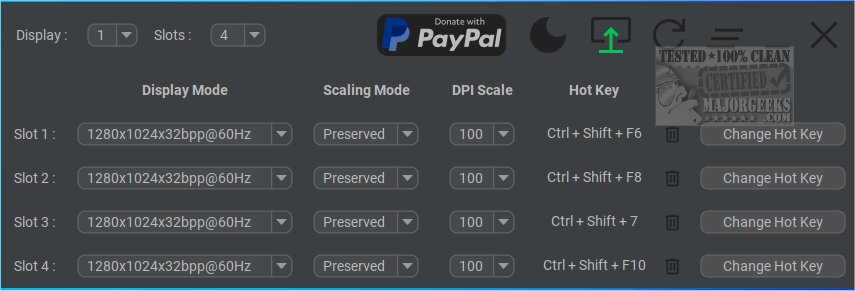
The latest version of Display Hot Keys, 4.2.1, has been launched, offering users an efficient way to switch between various display settings using customizable hotkeys. This tool simplifies the adjustment of display settings, allowing users to optimize their viewing experience for different types of content.
Convenience for Various Users
Display Hot Keys is particularly advantageous for those who regularly alternate between different display modes for activities such as gaming, video watching, or working on diverse projects. Instead of navigating complex menus, users can quickly toggle between settings with designated hotkeys, making the process more efficient and user-friendly.
Quick Access and Customization
With Display Hot Keys, users are granted rapid access to modify display settings across multiple monitors. The software allows for up to 12 customizable hotkey slots per monitor, each linked to specific display modes. Users can adjust various parameters, including resolution, bit depth, refresh rate, scaling mode, and DPI, tailoring each setting to their needs. A comprehensive usage guide is provided in the developer's repository to assist users in maximizing the software's potential.
Multi-Monitor Compatibility
The application also supports multi-monitor configurations, enabling seamless management and switching of display settings according to the user’s activities. This feature is particularly beneficial for those who frequently adjust their display settings, making it accessible even to novice users.
Conclusion
Display Hot Keys 4.2.1 stands out as a practical tool for enhancing productivity and user experience across different display settings. Its simplicity and customizable features cater to a wide range of users, ensuring that everyone can benefit from a more streamlined approach to managing their display preferences.
Additional Resources
For users looking to enhance their multi-monitor experience, consider exploring related topics such as how to show or hide the taskbar on multiple monitors in Windows 10/11, or how to remember window locations with multiple monitors in Windows 10/11. These resources can further assist in optimizing your multi-monitor setup
Convenience for Various Users
Display Hot Keys is particularly advantageous for those who regularly alternate between different display modes for activities such as gaming, video watching, or working on diverse projects. Instead of navigating complex menus, users can quickly toggle between settings with designated hotkeys, making the process more efficient and user-friendly.
Quick Access and Customization
With Display Hot Keys, users are granted rapid access to modify display settings across multiple monitors. The software allows for up to 12 customizable hotkey slots per monitor, each linked to specific display modes. Users can adjust various parameters, including resolution, bit depth, refresh rate, scaling mode, and DPI, tailoring each setting to their needs. A comprehensive usage guide is provided in the developer's repository to assist users in maximizing the software's potential.
Multi-Monitor Compatibility
The application also supports multi-monitor configurations, enabling seamless management and switching of display settings according to the user’s activities. This feature is particularly beneficial for those who frequently adjust their display settings, making it accessible even to novice users.
Conclusion
Display Hot Keys 4.2.1 stands out as a practical tool for enhancing productivity and user experience across different display settings. Its simplicity and customizable features cater to a wide range of users, ensuring that everyone can benefit from a more streamlined approach to managing their display preferences.
Additional Resources
For users looking to enhance their multi-monitor experience, consider exploring related topics such as how to show or hide the taskbar on multiple monitors in Windows 10/11, or how to remember window locations with multiple monitors in Windows 10/11. These resources can further assist in optimizing your multi-monitor setup
Display Hot Keys 4.2.1 released
Display Hot Keys enables quick switching between display settings using custom hotkeys.