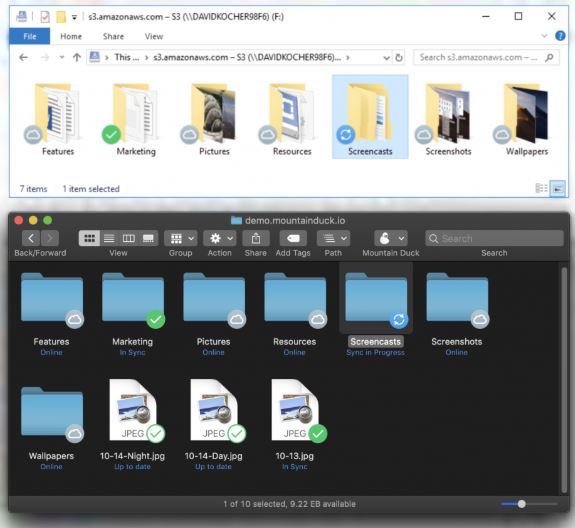
Mountain Duck 5.3.0 has been released, offering users the ability to seamlessly mount remote storage solutions such as FTP, SFTP, WebDAV, Amazon S3, and Google Cloud as local disks on both Windows and macOS. This utility allows users to interact with cloud files as if they reside on their own hard drives, eliminating the need for syncing or navigating between different applications. With a fully functional 14-day trial available, users can explore all features before committing to a purchase.
In essence, Mountain Duck functions as a bridge between your desktop and various cloud storage providers, allowing you to open, edit, and save files directly from familiar apps like Finder or Explorer without any cumbersome upload or download processes. Once a remote server is mounted, it behaves like a local drive, meaning users can manage their files effortlessly.
The tool is particularly beneficial for those who work with remote servers, cloud storage, or off-site file systems, providing significant time savings. For instance, rather than downloading and re-uploading files from Google Drive, users can directly edit them as if they were stored locally.
Key features of Mountain Duck include support for a wide range of protocols, deep integration with the operating system’s file explorers, smart caching for offline access, and secure login management through the OS's keychain. The application also includes a handy launcher for quick connections to frequently used servers.
However, users should note that while Mountain Duck offers extensive functionality, it does require a paid license after the trial period. Additionally, users new to remote mounting may need some time to adjust, and performance may vary based on network conditions.
Overall, Mountain Duck provides a slick solution for those frequently dealing with cloud storage and remote files, making it worthwhile to test the free trial, especially for those frustrated with traditional syncing methods or manual uploads
In essence, Mountain Duck functions as a bridge between your desktop and various cloud storage providers, allowing you to open, edit, and save files directly from familiar apps like Finder or Explorer without any cumbersome upload or download processes. Once a remote server is mounted, it behaves like a local drive, meaning users can manage their files effortlessly.
The tool is particularly beneficial for those who work with remote servers, cloud storage, or off-site file systems, providing significant time savings. For instance, rather than downloading and re-uploading files from Google Drive, users can directly edit them as if they were stored locally.
Key features of Mountain Duck include support for a wide range of protocols, deep integration with the operating system’s file explorers, smart caching for offline access, and secure login management through the OS's keychain. The application also includes a handy launcher for quick connections to frequently used servers.
However, users should note that while Mountain Duck offers extensive functionality, it does require a paid license after the trial period. Additionally, users new to remote mounting may need some time to adjust, and performance may vary based on network conditions.
Overall, Mountain Duck provides a slick solution for those frequently dealing with cloud storage and remote files, making it worthwhile to test the free trial, especially for those frustrated with traditional syncing methods or manual uploads
Mountain Duck 5.3.0 released
Mountain Duck lets you mount remote storage like FTP, SFTP, WebDAV, Amazon S3, and more as local disks on Windows and macOS, so any file‑based app can open, save, or edit files directly in the cloud.