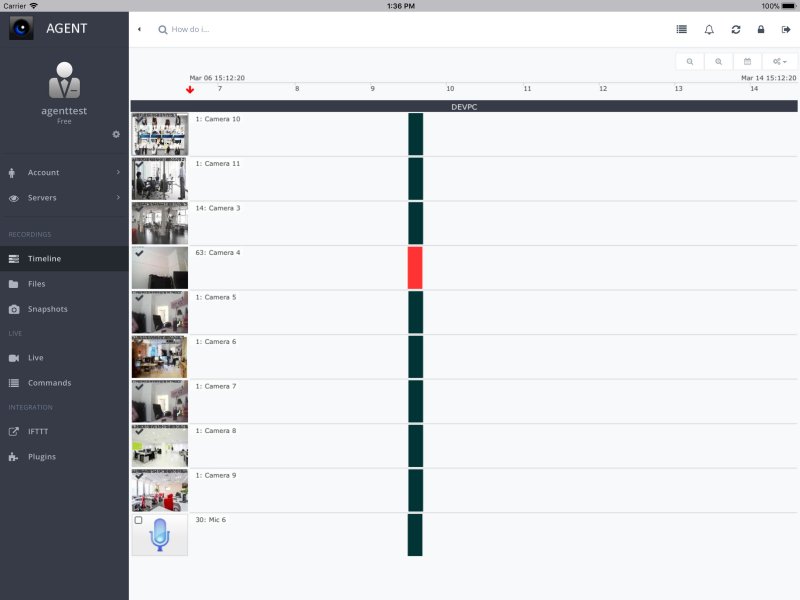
Agent DVR is an advanced, self-hosted Digital Video Recorder (DVR) service that transforms PCs into comprehensive security solutions. This versatile software supports a wide array of video sources, including USB and IP cameras, desktops, and more, making it a fully cross-platform solution for surveillance.
Key Features:
- Privacy and Control: Unlike cloud-based systems, Agent DVR allows users to store and manage footage locally, eliminating subscription fees and privacy concerns.
- Cost-Effective: Free for personal and local use, with optional paid upgrades for AI-enhanced features.
- Wide Compatibility: It is compatible with various camera types—including USB webcams, ONVIF, RTSP, and Raspberry Pi cameras—and supports operating systems like Windows, macOS, Linux, and Docker.
- Remote Access: Users can remotely access their feeds without needing complex configurations such as port forwarding, and can store recordings on local devices or cloud services like Google Drive and OneDrive.
- AI-Powered Motion Detection: This feature minimizes false alerts by discerning between people, vehicles, and animals, and sends notifications via email, SMS, or push alerts.
Use Cases:
Agent DVR is suitable for a range of applications, including:
- Home Security: DIY setups for monitoring homes with motion detection alerts and remote access.
- Business Surveillance: Monitoring multiple locations with secure storage options.
- Pet and Baby Monitoring: Keeping an eye on pets or young children.
- Wildlife Watching: Observing local wildlife.
- Event Surveillance: Temporary setups for events or rentals.
Installation and Setup:
Getting started with Agent DVR involves downloading and installing the software on your chosen platform. Users must connect their cameras, configure the system for motion detection, and set up recording schedules and alerts. While the basic setup process is straightforward, advanced configurations may require networking knowledge.
Performance:
The software's performance is contingent on system specifications. A basic setup typically works well with one or two cameras, while larger networks with multiple HD streams benefit from a more powerful CPU and RAM. Agent DVR is optimized for low power consumption, making it suitable for extensive security installations.
Pros and Cons:
Pros:
- No forced subscriptions and free for personal use.
- Supports a broad range of camera types.
- Advanced AI motion detection reduces false alerts.
- Easy remote access without complicated setups.
- Flexible options for footage storage.
Cons:
- Initial setup may be challenging for beginners.
- AI detection requires robust hardware for optimal performance.
- Lacks a standalone mobile application; configuration is PC-based.
Conclusion:
Agent DVR stands out as a powerful security solution that prioritizes user control and privacy. While it may require some initial setup, its flexibility, cost-effectiveness, and advanced features make it an excellent option for individuals or businesses seeking a customizable surveillance system. For those prioritizing privacy and control over their security footage, Agent DVR is certainly worth considering.
Future Considerations:
Looking ahead, Agent DVR could benefit from developing a mobile application for easier configuration and monitoring on-the-go, improving user experience and accessibility. Additionally, ongoing enhancements to AI features could further refine motion detection capabilities, making the system even more reliable for various surveillance needs
Key Features:
- Privacy and Control: Unlike cloud-based systems, Agent DVR allows users to store and manage footage locally, eliminating subscription fees and privacy concerns.
- Cost-Effective: Free for personal and local use, with optional paid upgrades for AI-enhanced features.
- Wide Compatibility: It is compatible with various camera types—including USB webcams, ONVIF, RTSP, and Raspberry Pi cameras—and supports operating systems like Windows, macOS, Linux, and Docker.
- Remote Access: Users can remotely access their feeds without needing complex configurations such as port forwarding, and can store recordings on local devices or cloud services like Google Drive and OneDrive.
- AI-Powered Motion Detection: This feature minimizes false alerts by discerning between people, vehicles, and animals, and sends notifications via email, SMS, or push alerts.
Use Cases:
Agent DVR is suitable for a range of applications, including:
- Home Security: DIY setups for monitoring homes with motion detection alerts and remote access.
- Business Surveillance: Monitoring multiple locations with secure storage options.
- Pet and Baby Monitoring: Keeping an eye on pets or young children.
- Wildlife Watching: Observing local wildlife.
- Event Surveillance: Temporary setups for events or rentals.
Installation and Setup:
Getting started with Agent DVR involves downloading and installing the software on your chosen platform. Users must connect their cameras, configure the system for motion detection, and set up recording schedules and alerts. While the basic setup process is straightforward, advanced configurations may require networking knowledge.
Performance:
The software's performance is contingent on system specifications. A basic setup typically works well with one or two cameras, while larger networks with multiple HD streams benefit from a more powerful CPU and RAM. Agent DVR is optimized for low power consumption, making it suitable for extensive security installations.
Pros and Cons:
Pros:
- No forced subscriptions and free for personal use.
- Supports a broad range of camera types.
- Advanced AI motion detection reduces false alerts.
- Easy remote access without complicated setups.
- Flexible options for footage storage.
Cons:
- Initial setup may be challenging for beginners.
- AI detection requires robust hardware for optimal performance.
- Lacks a standalone mobile application; configuration is PC-based.
Conclusion:
Agent DVR stands out as a powerful security solution that prioritizes user control and privacy. While it may require some initial setup, its flexibility, cost-effectiveness, and advanced features make it an excellent option for individuals or businesses seeking a customizable surveillance system. For those prioritizing privacy and control over their security footage, Agent DVR is certainly worth considering.
Future Considerations:
Looking ahead, Agent DVR could benefit from developing a mobile application for easier configuration and monitoring on-the-go, improving user experience and accessibility. Additionally, ongoing enhancements to AI features could further refine motion detection capabilities, making the system even more reliable for various surveillance needs
Agent DVR 7.6.1.0 released
Agent DVR is a full DVR service-based solution for PCs (fully cross-platform). It detects movement and sound, records and streams from multiple video sources, including USB, IP cameras, Desktop, etc.