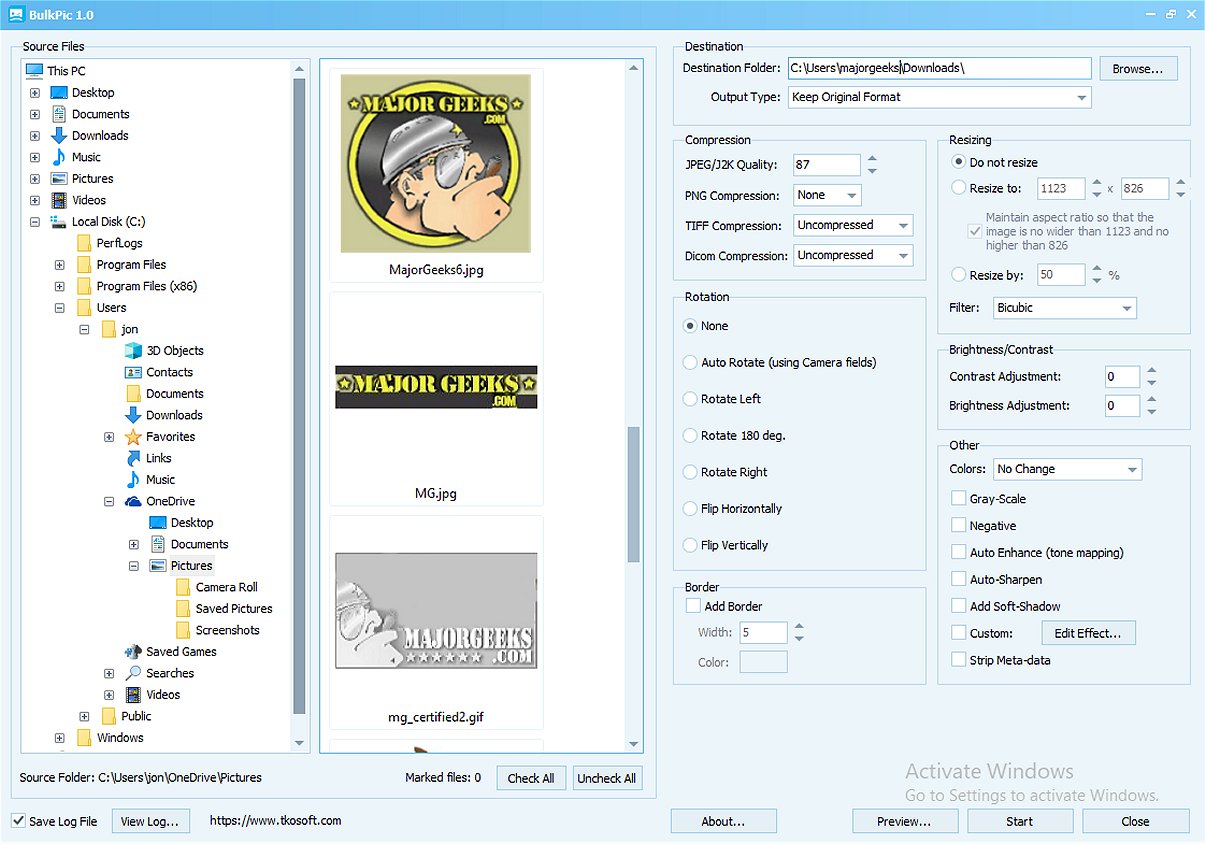
BulkPic has launched its latest version, BulkPic 2.0, which enhances its capabilities as a user-friendly batch image converter and editor. This tool is designed for both individual users and professionals who require efficient management of large quantities of images without compromising on quality.
Key Features of BulkPic
With BulkPic, users can quickly convert images in bulk into a wide range of popular formats such as JPG, PNG, BMP, TIFF, GIF, TGA, PSD, ICO, JPEG 2000, PCX, PPM, PGM, HD Photo, and DICOM. The software also offers the option to maintain the original format of images, providing flexibility for various image management needs.
Resizing and Filter Options
BulkPic includes advanced resizing capabilities, allowing users to define exact dimensions or resize images based on a percentage. The tool employs high-quality resizing filters, such as Lanczos, Bicubic, and Bilinear, to ensure that image quality is preserved during resizing.
Image Manipulation and Enhancement
Users have access to a variety of image manipulation features in BulkPic. This includes rotating images, flipping them, and cropping edges. The software can automatically rotate images based on camera orientation, making the editing process seamless. Additionally, BulkPic offers extensive enhancement tools to adjust brightness, contrast, gamma, and RGB channels, as well as other parameters like hue and saturation. Users can also apply various creative effects, including grayscale and sepia conversions, pixelization, and colorization.
Output Control and Efficiency
BulkPic allows users to control output quality and compression settings for multiple formats, ensuring tailored results. Users can also adjust color depth and remove unnecessary metadata to produce cleaner, smaller files, which is especially useful for web applications.
Conclusion
BulkPic 2.0 emerges as a powerful, all-in-one solution for batch image processing tasks, making it an essential tool for anyone engaged in image editing. Its comprehensive features combined with its free availability make it an attractive addition to any digital toolkit.
Future Developments
As BulkPic continues to evolve, potential future updates could include enhanced AI-driven editing features, support for even more image formats, and integration with cloud storage solutions for better accessibility and collaboration. Users can look forward to ongoing improvements that will make BulkPic an increasingly indispensable resource for image editing professionals and enthusiasts alike
Key Features of BulkPic
With BulkPic, users can quickly convert images in bulk into a wide range of popular formats such as JPG, PNG, BMP, TIFF, GIF, TGA, PSD, ICO, JPEG 2000, PCX, PPM, PGM, HD Photo, and DICOM. The software also offers the option to maintain the original format of images, providing flexibility for various image management needs.
Resizing and Filter Options
BulkPic includes advanced resizing capabilities, allowing users to define exact dimensions or resize images based on a percentage. The tool employs high-quality resizing filters, such as Lanczos, Bicubic, and Bilinear, to ensure that image quality is preserved during resizing.
Image Manipulation and Enhancement
Users have access to a variety of image manipulation features in BulkPic. This includes rotating images, flipping them, and cropping edges. The software can automatically rotate images based on camera orientation, making the editing process seamless. Additionally, BulkPic offers extensive enhancement tools to adjust brightness, contrast, gamma, and RGB channels, as well as other parameters like hue and saturation. Users can also apply various creative effects, including grayscale and sepia conversions, pixelization, and colorization.
Output Control and Efficiency
BulkPic allows users to control output quality and compression settings for multiple formats, ensuring tailored results. Users can also adjust color depth and remove unnecessary metadata to produce cleaner, smaller files, which is especially useful for web applications.
Conclusion
BulkPic 2.0 emerges as a powerful, all-in-one solution for batch image processing tasks, making it an essential tool for anyone engaged in image editing. Its comprehensive features combined with its free availability make it an attractive addition to any digital toolkit.
Future Developments
As BulkPic continues to evolve, potential future updates could include enhanced AI-driven editing features, support for even more image formats, and integration with cloud storage solutions for better accessibility and collaboration. Users can look forward to ongoing improvements that will make BulkPic an increasingly indispensable resource for image editing professionals and enthusiasts alike
BulkPic 2.0 released
BulkPic is a versatile, user-friendly batch image converter and editor. It is ideal for individuals and professionals alike who need to handle large volumes of images efficiently without sacrificing quality.