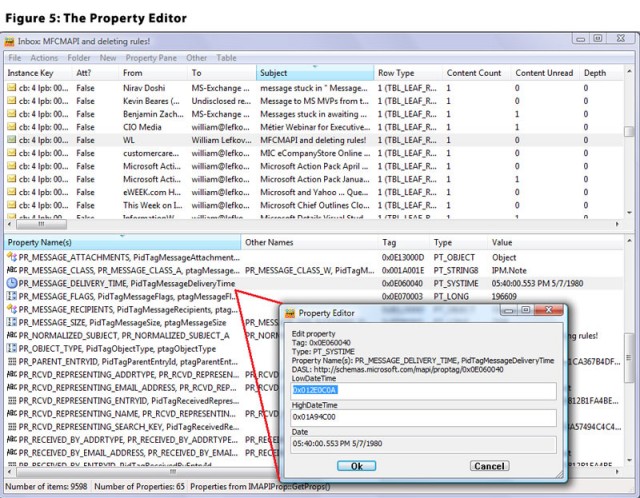
MFCMAPI version 26.0.26170.02 has been released, enhancing the accessibility of MAPI (Messaging Application Programming Interface) stores for users investigating Exchange and Outlook issues, as well as for developers seeking a sample for MAPI development. The tool features a user-friendly graphical interface with a classic design, facilitating easy navigation through MAPI stores and their properties.
One of the standout features of MFCMAPI is the ability to set a default store, which simplifies the management of MAPI data. Users can perform critical functions like calculating and verifying store checksums for data integrity and exporting store contents into text documents, making data review more accessible. Furthermore, MFCMAPI allows efficient sorting of tables and management of active notifications, enhancing user interaction with the data. It supports content restrictions, enabling users to specify criteria for the information they wish to access. The application also provides flexibility in editing MAPI properties across various formats, such as ASCII, Unicode, Rich Text Format (RTF), or binary streams.
For email management, MFCMAPI offers robust capabilities, including the conversion of MSG emails to EML format and vice versa, thanks to the IConverterSession functionality. The tool also allows users to explore the address book hierarchy in-depth, providing a clear view of contacts and their relationships.
A key feature is the ability to export the store or server contents into text files for data analysis or archiving. Users can compare entry IDs to identify duplicates or track changes over time, and the application includes advanced features like encoding entry IDs for MAPI protocol host URLs, which is beneficial for developers and technical users.
It is essential to note that MFCMAPI may show error messages during command execution if an Exchange Server is not installed. However, the application is designed to operate efficiently with minimal CPU and memory usage, ensuring low impact on system performance.
Overall, MFCMAPI presents an intuitive and powerful interface that simplifies access to MAPI stores, allowing users to manage and adjust numerous settings effortlessly. With a comprehensive array of options available, users can confidently conduct complex operations, enhancing their efficiency and effectiveness in data management.
Extension: MFCMAPI's capabilities make it a vital tool for IT professionals and developers who need to troubleshoot issues related to email management systems. As organizations increasingly rely on robust email infrastructures, having tools like MFCMAPI allows for deeper insights and control over MAPI data. Future updates might focus on enhancing compatibility with newer versions of Exchange and Outlook, improving performance further, and introducing additional functionalities to streamline user workflows. Additionally, as cybersecurity becomes a priority, incorporating features that enhance data security and integrity within MFCMAPI could be a valuable enhancement for users managing sensitive information
One of the standout features of MFCMAPI is the ability to set a default store, which simplifies the management of MAPI data. Users can perform critical functions like calculating and verifying store checksums for data integrity and exporting store contents into text documents, making data review more accessible. Furthermore, MFCMAPI allows efficient sorting of tables and management of active notifications, enhancing user interaction with the data. It supports content restrictions, enabling users to specify criteria for the information they wish to access. The application also provides flexibility in editing MAPI properties across various formats, such as ASCII, Unicode, Rich Text Format (RTF), or binary streams.
For email management, MFCMAPI offers robust capabilities, including the conversion of MSG emails to EML format and vice versa, thanks to the IConverterSession functionality. The tool also allows users to explore the address book hierarchy in-depth, providing a clear view of contacts and their relationships.
A key feature is the ability to export the store or server contents into text files for data analysis or archiving. Users can compare entry IDs to identify duplicates or track changes over time, and the application includes advanced features like encoding entry IDs for MAPI protocol host URLs, which is beneficial for developers and technical users.
It is essential to note that MFCMAPI may show error messages during command execution if an Exchange Server is not installed. However, the application is designed to operate efficiently with minimal CPU and memory usage, ensuring low impact on system performance.
Overall, MFCMAPI presents an intuitive and powerful interface that simplifies access to MAPI stores, allowing users to manage and adjust numerous settings effortlessly. With a comprehensive array of options available, users can confidently conduct complex operations, enhancing their efficiency and effectiveness in data management.
Extension: MFCMAPI's capabilities make it a vital tool for IT professionals and developers who need to troubleshoot issues related to email management systems. As organizations increasingly rely on robust email infrastructures, having tools like MFCMAPI allows for deeper insights and control over MAPI data. Future updates might focus on enhancing compatibility with newer versions of Exchange and Outlook, improving performance further, and introducing additional functionalities to streamline user workflows. Additionally, as cybersecurity becomes a priority, incorporating features that enhance data security and integrity within MFCMAPI could be a valuable enhancement for users managing sensitive information
MFCMAPI 26.0.26170.02 released
MFCMAPI provides access to MAPI stores to facilitate the investigation of Exchange and Outlook issues and to provide developers with a sample for MAPI development.