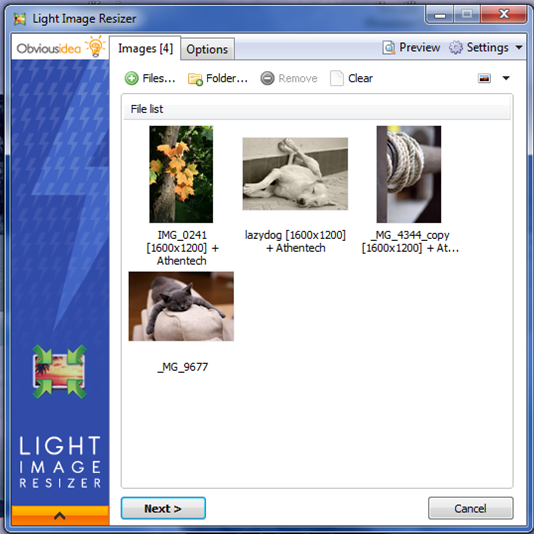
Light Image Resizer has released version 7.6.4.173, offering users an efficient and precise tool for resizing images and converting them into various formats. This software employs advanced multi-core resizing technology, allowing users to quickly resize, compress, and convert images while maintaining high quality. Its user-friendly interface streamlines the processes of creating, renaming, and organizing images, making it easier for users to manage their photo collections.
Key features of Light Image Resizer include the ability to add watermarks to protect intellectual property, select output resolutions for images, and create duplicates of original files to preserve them. Users can customize images by compressing them to reduce file size or by applying filters such as sepia or borders. The software allows for the organization of images into folders and supports batch processing, enabling users to resize multiple images simultaneously.
Additionally, the software provides the option to attach photos directly to emails or create PDFs from images. It also includes pre-defined profiles for quick access to popular settings, such as FULL HD wallpapers and device-specific resolutions. The Digital Picture Frame Wizard feature allows users to optimize images for digital frames by resizing them to the supported resolution.
Light Image Resizer caters to both casual users and professionals, ensuring that images are efficiently processed while retaining their quality. With continuous updates and improvements, it remains a valuable tool for anyone looking to enhance their image management capabilities.
In summary, Light Image Resizer is a comprehensive solution for image resizing and conversion, equipped with a variety of features that enhance usability and efficiency. Whether for personal use or professional projects, this software simplifies the often tedious task of image management, making it a must-have tool in any digital toolkit
Key features of Light Image Resizer include the ability to add watermarks to protect intellectual property, select output resolutions for images, and create duplicates of original files to preserve them. Users can customize images by compressing them to reduce file size or by applying filters such as sepia or borders. The software allows for the organization of images into folders and supports batch processing, enabling users to resize multiple images simultaneously.
Additionally, the software provides the option to attach photos directly to emails or create PDFs from images. It also includes pre-defined profiles for quick access to popular settings, such as FULL HD wallpapers and device-specific resolutions. The Digital Picture Frame Wizard feature allows users to optimize images for digital frames by resizing them to the supported resolution.
Light Image Resizer caters to both casual users and professionals, ensuring that images are efficiently processed while retaining their quality. With continuous updates and improvements, it remains a valuable tool for anyone looking to enhance their image management capabilities.
In summary, Light Image Resizer is a comprehensive solution for image resizing and conversion, equipped with a variety of features that enhance usability and efficiency. Whether for personal use or professional projects, this software simplifies the often tedious task of image management, making it a must-have tool in any digital toolkit
Light Image Resizer 7.6.4.173 released
Light Image Resizer gives you the power to resize pictures or convert them into different formats easily and accurately.