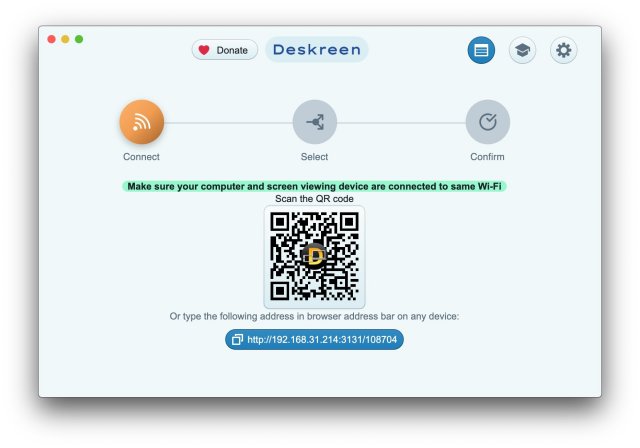
Deskreen 3.2.16 has been released, further enhancing its capabilities as an innovative desktop application that allows users to convert any device with a web browser into a secondary screen for their computer via Wi-Fi. This functionality provides significant flexibility and convenience, making it a valuable tool for various scenarios.
What is Deskreen?
Deskreen is designed to mirror a computer's display onto any connected device, which is ideal for presentations and sharing content. Users can opt to share their entire screen or limit sharing to a specific application window, reducing distractions during presentations. The application employs a Virtual Display Adapter to create a genuine extended desktop experience but also offers a Flip Screen Mode that allows for mirroring without the adapter—making it especially beneficial for video bloggers who need to maintain eye contact with the camera.
Offline Capabilities
A standout feature of Deskreen is its ability to operate without an internet connection, allowing users to present their screens using only a local Wi-Fi network. This capability makes Deskreen an excellent choice for settings where internet access is unreliable or unavailable.
Quality and Connectivity Management
Deskreen offers adjustable video quality settings, enabling users to optimize performance based on their needs. It supports multiple device connections simultaneously, making it suitable for larger presentations or collaborative efforts.
Key Features of Deskreen:
- Second Screen: Use any web-enabled device as an extended display for your computer.
- Screen Sharing: Share the entire computer screen or a single application view.
- Teleprompter Functionality: Utilize Flip Screen Mode for teleprompting during video sessions.
- Wi-Fi Compatibility: Wirelessly share screens without the need for additional cables.
- Multiple Device Connectivity: Simultaneously connect multiple devices for collaborative use.
Conclusion
Deskreen stands out as an essential tool for users who value flexibility and control in their digital interactions. Its ability to function offline, coupled with its versatile screen-sharing options, makes it suitable for a wide range of applications, from professional presentations to personal video conferencing. In today's fast-paced digital environment, Deskreen is a must-have solution that meets the diverse needs of both professionals and casual users alike.
Future Potential
Looking ahead, Deskreen could further enhance its offerings by integrating additional features such as cloud support for seamless accessibility across devices, advanced security options for users concerned about privacy, and improved customization settings to tailor user experiences. These enhancements could solidify Deskreen's position as a leader in desktop extension applications, catering to an even broader audience
What is Deskreen?
Deskreen is designed to mirror a computer's display onto any connected device, which is ideal for presentations and sharing content. Users can opt to share their entire screen or limit sharing to a specific application window, reducing distractions during presentations. The application employs a Virtual Display Adapter to create a genuine extended desktop experience but also offers a Flip Screen Mode that allows for mirroring without the adapter—making it especially beneficial for video bloggers who need to maintain eye contact with the camera.
Offline Capabilities
A standout feature of Deskreen is its ability to operate without an internet connection, allowing users to present their screens using only a local Wi-Fi network. This capability makes Deskreen an excellent choice for settings where internet access is unreliable or unavailable.
Quality and Connectivity Management
Deskreen offers adjustable video quality settings, enabling users to optimize performance based on their needs. It supports multiple device connections simultaneously, making it suitable for larger presentations or collaborative efforts.
Key Features of Deskreen:
- Second Screen: Use any web-enabled device as an extended display for your computer.
- Screen Sharing: Share the entire computer screen or a single application view.
- Teleprompter Functionality: Utilize Flip Screen Mode for teleprompting during video sessions.
- Wi-Fi Compatibility: Wirelessly share screens without the need for additional cables.
- Multiple Device Connectivity: Simultaneously connect multiple devices for collaborative use.
Conclusion
Deskreen stands out as an essential tool for users who value flexibility and control in their digital interactions. Its ability to function offline, coupled with its versatile screen-sharing options, makes it suitable for a wide range of applications, from professional presentations to personal video conferencing. In today's fast-paced digital environment, Deskreen is a must-have solution that meets the diverse needs of both professionals and casual users alike.
Future Potential
Looking ahead, Deskreen could further enhance its offerings by integrating additional features such as cloud support for seamless accessibility across devices, advanced security options for users concerned about privacy, and improved customization settings to tailor user experiences. These enhancements could solidify Deskreen's position as a leader in desktop extension applications, catering to an even broader audience
Deskreen 3.2.16 released
Deskreen is a powerful desktop application that enables you to transform any device with a web browser into a secondary screen for your computer over Wi-Fi, offering unparalleled flexibility and convenience.