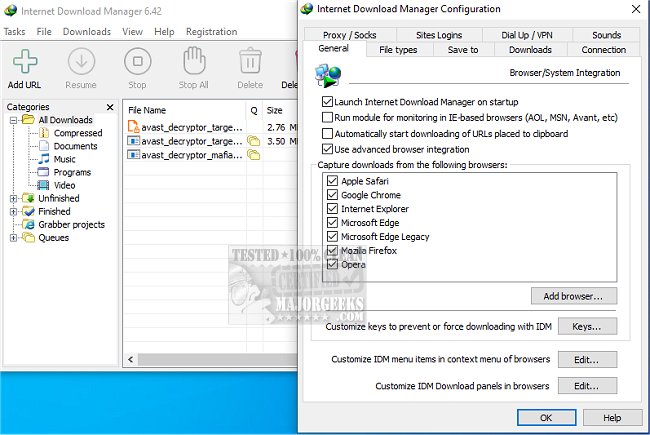
Internet Download Manager (IDM) has recently unveiled version 6.43 Build 15, further enhancing its capabilities as a premier tool for accelerating download speeds, managing downloads efficiently, and enabling users to download streaming videos.
What is Internet Download Manager?
IDM is designed to address common frustrations associated with slow, interrupted, or disorganized downloads. It surpasses the capabilities of standard browser downloaders by providing robust features that significantly enhance the downloading experience.
Key Features of Internet Download Manager:
1. Accelerated Download Speeds:
IDM utilizes innovative file-segmentation technology that can increase download speeds by up to five times. By splitting files into smaller segments and downloading them simultaneously through multiple connections, IDM maximizes bandwidth and circumvents server-imposed speed limitations. This approach not only reduces latency but also improves overall efficiency, making it particularly effective for larger files.
2. Resume and Recover Capabilities:
Users often encounter interruptions during downloads due to various reasons like internet disruptions or computer crashes. IDM mitigates this issue by remembering the last point of download, allowing users to resume from where they left off without starting over.
3. Seamless Browser Integration:
IDM integrates smoothly with popular web browsers such as Chrome, Firefox, Edge, and Opera. It automatically detects downloadable content on web pages and provides a convenient "Download" button for instant access to files and videos.
4. Streaming Video and Audio Downloads:
The software enables users to download streaming media from various platforms, including YouTube and Dailymotion. Whether it's a tutorial or a music playlist, IDM simplifies the process of saving content for offline viewing.
5. Advanced File Organization:
IDM automatically categorizes downloads into distinct folders—such as documents, music, and videos—enhancing file management and ensuring users can easily find their downloaded items.
6. Customization Options:
Power users will appreciate IDM's extensive customization capabilities. Users can set download limits, schedule downloads during off-peak hours, and control the number of simultaneous downloads. The ability to initiate downloads from the command line adds another layer of flexibility.
7. Security Features:
IDM prioritizes security by cooperating with antivirus software to scan downloads, protecting users from potential malware threats that may come bundled with files.
Conclusion:
Internet Download Manager has established itself as an essential tool for anyone who frequently downloads files, whether for work or leisure. While the user interface may not be the most modern, its powerful functionality and efficiency make it a worthwhile investment. Users can expect a faster, more streamlined download experience that ensures reliability and convenience.
In the rapidly evolving digital landscape, tools like IDM are crucial for enhancing productivity and optimizing online activities. With the latest updates and features, IDM continues to solidify its position as a leader in download management solutions, making it a must-try for anyone looking to improve their download efficiency
What is Internet Download Manager?
IDM is designed to address common frustrations associated with slow, interrupted, or disorganized downloads. It surpasses the capabilities of standard browser downloaders by providing robust features that significantly enhance the downloading experience.
Key Features of Internet Download Manager:
1. Accelerated Download Speeds:
IDM utilizes innovative file-segmentation technology that can increase download speeds by up to five times. By splitting files into smaller segments and downloading them simultaneously through multiple connections, IDM maximizes bandwidth and circumvents server-imposed speed limitations. This approach not only reduces latency but also improves overall efficiency, making it particularly effective for larger files.
2. Resume and Recover Capabilities:
Users often encounter interruptions during downloads due to various reasons like internet disruptions or computer crashes. IDM mitigates this issue by remembering the last point of download, allowing users to resume from where they left off without starting over.
3. Seamless Browser Integration:
IDM integrates smoothly with popular web browsers such as Chrome, Firefox, Edge, and Opera. It automatically detects downloadable content on web pages and provides a convenient "Download" button for instant access to files and videos.
4. Streaming Video and Audio Downloads:
The software enables users to download streaming media from various platforms, including YouTube and Dailymotion. Whether it's a tutorial or a music playlist, IDM simplifies the process of saving content for offline viewing.
5. Advanced File Organization:
IDM automatically categorizes downloads into distinct folders—such as documents, music, and videos—enhancing file management and ensuring users can easily find their downloaded items.
6. Customization Options:
Power users will appreciate IDM's extensive customization capabilities. Users can set download limits, schedule downloads during off-peak hours, and control the number of simultaneous downloads. The ability to initiate downloads from the command line adds another layer of flexibility.
7. Security Features:
IDM prioritizes security by cooperating with antivirus software to scan downloads, protecting users from potential malware threats that may come bundled with files.
Conclusion:
Internet Download Manager has established itself as an essential tool for anyone who frequently downloads files, whether for work or leisure. While the user interface may not be the most modern, its powerful functionality and efficiency make it a worthwhile investment. Users can expect a faster, more streamlined download experience that ensures reliability and convenience.
In the rapidly evolving digital landscape, tools like IDM are crucial for enhancing productivity and optimizing online activities. With the latest updates and features, IDM continues to solidify its position as a leader in download management solutions, making it a must-try for anyone looking to improve their download efficiency
Internet Download Manager 6.43 Build 15 released
Internet Download Manager is a tool for drastically increasing your download speeds and resuming/scheduling downloads, including the capability to download any streaming video.
Internet Download Manager 6.43 Build 15 released @ MajorGeeks