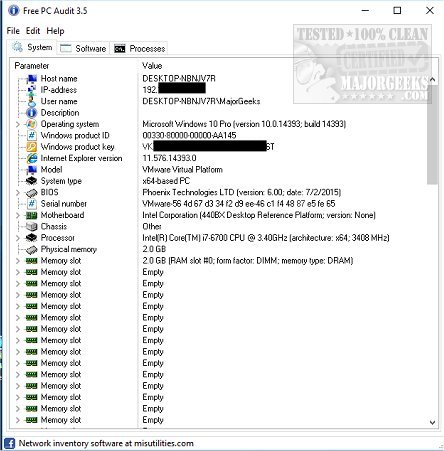
Free PC Audit 5.4.1 has been released as a free and portable system information tool designed to collect comprehensive data about your computer's hardware and software. The tool quickly compiles information within a minute, categorizing it into three main tabs: System, Software, and Processes.
The System tab provides insights into various components of your computer, including the Windows product key, IP address, BIOS details, motherboard specifications, processor type, memory capacity, drives, user accounts, installed hotfixes, and startup configurations. This extensive range of data is presented in a user-friendly format, often divided into sub-categories for easier navigation.
In the Software tab, users can view a list of all installed applications, complete with details such as version numbers, publishers, installation dates, sizes, and product keys. However, the accuracy of the product key retrieval may vary, as it is typically sourced from the Windows registry, leading to potential inconsistencies.
The Processes tab lists all currently running processes, allowing users to copy information directly from the interface. While this feature is straightforward, it serves its purpose as a basic system information tool.
Free PC Audit has been available on MajorGeeks since 2012, and its previous reviews have highlighted its reliability and the depth of information it provides. The ability to extract product keys further enhances its appeal, making it a valuable resource for users looking to manage their system information effectively.
In addition to the features mentioned, users may find other useful resources related to hardware identification, serial number retrieval, and version specifications for Windows operating systems, which can complement the information gathered by Free PC Audit. Overall, this tool stands out in a crowded field of system information utilities, providing a robust solution for users seeking detailed insights into their PCs
The System tab provides insights into various components of your computer, including the Windows product key, IP address, BIOS details, motherboard specifications, processor type, memory capacity, drives, user accounts, installed hotfixes, and startup configurations. This extensive range of data is presented in a user-friendly format, often divided into sub-categories for easier navigation.
In the Software tab, users can view a list of all installed applications, complete with details such as version numbers, publishers, installation dates, sizes, and product keys. However, the accuracy of the product key retrieval may vary, as it is typically sourced from the Windows registry, leading to potential inconsistencies.
The Processes tab lists all currently running processes, allowing users to copy information directly from the interface. While this feature is straightforward, it serves its purpose as a basic system information tool.
Free PC Audit has been available on MajorGeeks since 2012, and its previous reviews have highlighted its reliability and the depth of information it provides. The ability to extract product keys further enhances its appeal, making it a valuable resource for users looking to manage their system information effectively.
In addition to the features mentioned, users may find other useful resources related to hardware identification, serial number retrieval, and version specifications for Windows operating systems, which can complement the information gathered by Free PC Audit. Overall, this tool stands out in a crowded field of system information utilities, providing a robust solution for users seeking detailed insights into their PCs
Free PC Audit 5.4.1 released
Free PC Audit is a free, portable system information tool that gathers information about your system, including hardware, software, product keys, and processes.