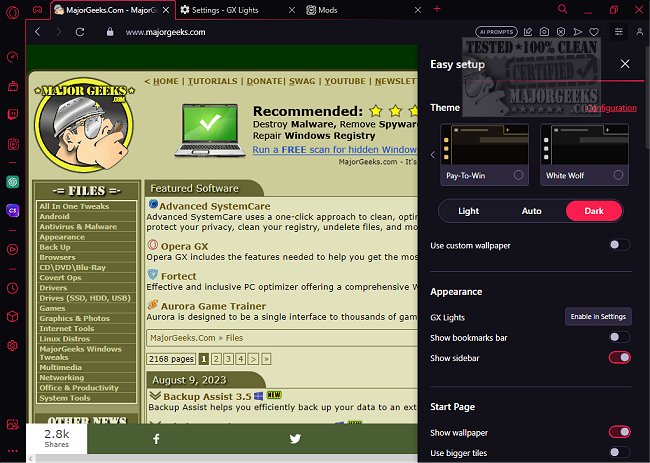
Opera GX has recently released version 136.0.6008.111, enhancing its distinct capabilities tailored for gamers and multitaskers alike. More than a visually appealing browser adorned with RGB themes, Opera GX is engineered to optimize both gaming and browsing experiences. It is available for free on Windows, macOS, and Chromebooks, with Linux support on the horizon.
The browser shines with features designed to manage system resources effectively, making it a favored choice among streamers and gamers who seek to alleviate lag without shutting down applications. Built on Chromium—like Google Chrome—Opera GX stands out due to its performance management capabilities and seamless integration with popular gaming platforms such as Twitch and Discord.
Key functionalities of Opera GX include:
- CPU and RAM usage limiters to prevent system overload
- A network limiter to regulate browser bandwidth
- A built-in ad blocker and VPN for enhanced privacy
- GX Cleaner for decluttering the browser
- GX Corner, offering game deals, release calendars, and news
The browser’s high-contrast, customizable interface complements any gaming setup. Regarding safety and privacy, Opera GX is developed by Opera Software, a reputable entity in browser development, providing features like a free VPN, tracker blocking, and no Google telemetry.
One of the standout features is the GX Control Panel, enabling users to manage browser resource allocation for smoother gaming experiences. Additionally, integrations for Twitch, Discord, and Messenger in the sidebar minimize the need for constant tab switching, while the Hot Tabs Killer feature allows users to quickly identify and close resource-heavy tabs.
Opera GX supports extensions from the Chrome Web Store, maintaining flexibility for users who wish to use their favorite tools.
Pros:
- Built-in resource limiters
- Free VPN and ad blocker
- Ideal for multitasking and streaming
- Cross-platform support (Windows, macOS, Chromebook, Android)
- Compatibility with Chrome extensions
Cons:
- Slightly heavier than minimalistic browsers
- No native Linux version (workaround available for Chromebook)
- Aesthetic-focused GX Mods may not appeal to all users
- May seem excessive for those seeking a basic browsing experience
Geek Verdict:
Opera GX is not merely a flashy browser; it's a functional tool for gamers and multitaskers. Its performance-enhancing features are practical, helping to prevent system slowdowns. For users frustrated with Chrome's resource demands or seeking enhanced control without sacrificing speed or usability, Opera GX is a compelling option worth exploring.
For those interested in alternative browsing experiences, consider trying out Opera Air, which promises a fresh approach to web navigation.
Further Exploration:
- Discover the benefits of Opera GX's "Redeem My Soul" feature.
- Explore indie games with our comprehensive guide.
- Learn how to leverage the Gaming Task Manager in Windows 10 & 11.
- Find out how to uninstall the Xbox Game Bar and Console Companion.
- Adjust Game Mode settings in Windows 10 & 11 for optimal performance
The browser shines with features designed to manage system resources effectively, making it a favored choice among streamers and gamers who seek to alleviate lag without shutting down applications. Built on Chromium—like Google Chrome—Opera GX stands out due to its performance management capabilities and seamless integration with popular gaming platforms such as Twitch and Discord.
Key functionalities of Opera GX include:
- CPU and RAM usage limiters to prevent system overload
- A network limiter to regulate browser bandwidth
- A built-in ad blocker and VPN for enhanced privacy
- GX Cleaner for decluttering the browser
- GX Corner, offering game deals, release calendars, and news
The browser’s high-contrast, customizable interface complements any gaming setup. Regarding safety and privacy, Opera GX is developed by Opera Software, a reputable entity in browser development, providing features like a free VPN, tracker blocking, and no Google telemetry.
One of the standout features is the GX Control Panel, enabling users to manage browser resource allocation for smoother gaming experiences. Additionally, integrations for Twitch, Discord, and Messenger in the sidebar minimize the need for constant tab switching, while the Hot Tabs Killer feature allows users to quickly identify and close resource-heavy tabs.
Opera GX supports extensions from the Chrome Web Store, maintaining flexibility for users who wish to use their favorite tools.
Pros:
- Built-in resource limiters
- Free VPN and ad blocker
- Ideal for multitasking and streaming
- Cross-platform support (Windows, macOS, Chromebook, Android)
- Compatibility with Chrome extensions
Cons:
- Slightly heavier than minimalistic browsers
- No native Linux version (workaround available for Chromebook)
- Aesthetic-focused GX Mods may not appeal to all users
- May seem excessive for those seeking a basic browsing experience
Geek Verdict:
Opera GX is not merely a flashy browser; it's a functional tool for gamers and multitaskers. Its performance-enhancing features are practical, helping to prevent system slowdowns. For users frustrated with Chrome's resource demands or seeking enhanced control without sacrificing speed or usability, Opera GX is a compelling option worth exploring.
For those interested in alternative browsing experiences, consider trying out Opera Air, which promises a fresh approach to web navigation.
Further Exploration:
- Discover the benefits of Opera GX's "Redeem My Soul" feature.
- Explore indie games with our comprehensive guide.
- Learn how to leverage the Gaming Task Manager in Windows 10 & 11.
- Find out how to uninstall the Xbox Game Bar and Console Companion.
- Adjust Game Mode settings in Windows 10 & 11 for optimal performance
Opera GX 136.0.6008.111 released
Opera GX includes the features needed to help you get the most out of gaming and browsing.