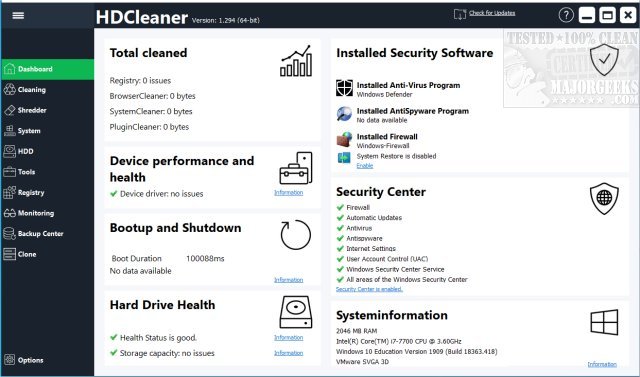
HDCleaner version 2.096 has been released, providing users with a powerful freeware application designed to thoroughly clean and optimize Windows PCs. This comprehensive tool addresses common issues that can slow down a computer, such as accumulated temporary files, bloated registries, and unnecessary startup programs.
Key Features of HDCleaner:
- Junk & Registry Cleaner: Efficiently removes temporary files, cache, and obsolete registry entries to free up disk space.
- Startup & Service Manager: Enhances boot times by allowing users to disable unnecessary background programs.
- Privacy Protection: Permanently deletes browsing history, cookies, and sensitive files to safeguard user privacy.
- System Tweaks & Optimization: Offers over 300 customizable settings to enhance the Windows experience.
- Disk Defragmentation & SSD Optimization: Maintains storage drives for optimal performance.
- One-Click Maintenance: Facilitates quick cleanup and optimization in just a few clicks.
- Backup & Restore Options: Enables users to create safety backups before making major changes.
- Auto Maintenance Scheduler: Automates routine cleanups, allowing for maintenance without manual intervention.
- Custom Cleaning Rules: Provides advanced users with the option to specify what gets deleted.
- Ad-Free Experience: No intrusive ads or bloatware, ensuring a smooth user experience.
Who Can Benefit from HDCleaner?
HDCleaner is ideal for a wide range of users, from casual PC users needing a simple cleanup to power users seeking detailed optimizations. Gamers can enjoy enhanced performance, IT professionals can automate system maintenance, and privacy-conscious individuals can securely erase personal data. The availability of a portable version allows users to run HDCleaner directly from a USB drive, making it convenient for on-the-go cleanup.
Important Considerations:
- Users are advised to use the registry cleaning feature cautiously, always backing up the registry before making changes.
- Beginners may find some advanced features overwhelming; the One-Click Maintenance option is recommended for safe and easy cleanup.
- The software features a dark mode and an intuitive interface, making it accessible even for those new to PC optimization tools.
Conclusion:
HDCleaner is a robust solution for anyone looking to improve their PC's performance. Its combination of deep cleaning, privacy protection, and system optimization makes it a valuable addition to any user's toolkit. For those experiencing a slow or cluttered system, HDCleaner offers an effective way to restore speed and efficiency. Download HDCleaner today to experience the benefits firsthand!
Related Topics:
- Comparison of popular drive cleaning tools such as CCleaner, Wise Disk Cleaner, and PrivaZer.
- Guide to using Storage Sense for automatic junk file deletion in Windows 10 and 11.
- Instructions on securely deleting files using PowerShell and Cipher in Windows 10 and 11.
- Steps to back up or restore the Windows Registry
Key Features of HDCleaner:
- Junk & Registry Cleaner: Efficiently removes temporary files, cache, and obsolete registry entries to free up disk space.
- Startup & Service Manager: Enhances boot times by allowing users to disable unnecessary background programs.
- Privacy Protection: Permanently deletes browsing history, cookies, and sensitive files to safeguard user privacy.
- System Tweaks & Optimization: Offers over 300 customizable settings to enhance the Windows experience.
- Disk Defragmentation & SSD Optimization: Maintains storage drives for optimal performance.
- One-Click Maintenance: Facilitates quick cleanup and optimization in just a few clicks.
- Backup & Restore Options: Enables users to create safety backups before making major changes.
- Auto Maintenance Scheduler: Automates routine cleanups, allowing for maintenance without manual intervention.
- Custom Cleaning Rules: Provides advanced users with the option to specify what gets deleted.
- Ad-Free Experience: No intrusive ads or bloatware, ensuring a smooth user experience.
Who Can Benefit from HDCleaner?
HDCleaner is ideal for a wide range of users, from casual PC users needing a simple cleanup to power users seeking detailed optimizations. Gamers can enjoy enhanced performance, IT professionals can automate system maintenance, and privacy-conscious individuals can securely erase personal data. The availability of a portable version allows users to run HDCleaner directly from a USB drive, making it convenient for on-the-go cleanup.
Important Considerations:
- Users are advised to use the registry cleaning feature cautiously, always backing up the registry before making changes.
- Beginners may find some advanced features overwhelming; the One-Click Maintenance option is recommended for safe and easy cleanup.
- The software features a dark mode and an intuitive interface, making it accessible even for those new to PC optimization tools.
Conclusion:
HDCleaner is a robust solution for anyone looking to improve their PC's performance. Its combination of deep cleaning, privacy protection, and system optimization makes it a valuable addition to any user's toolkit. For those experiencing a slow or cluttered system, HDCleaner offers an effective way to restore speed and efficiency. Download HDCleaner today to experience the benefits firsthand!
Related Topics:
- Comparison of popular drive cleaning tools such as CCleaner, Wise Disk Cleaner, and PrivaZer.
- Guide to using Storage Sense for automatic junk file deletion in Windows 10 and 11.
- Instructions on securely deleting files using PowerShell and Cipher in Windows 10 and 11.
- Steps to back up or restore the Windows Registry
HDCleaner 2.096 released
HDCleaner is a freeware app to completely clean your Windows PC, including registry and backup, encrypting data, splitting files, removing traces, etc.