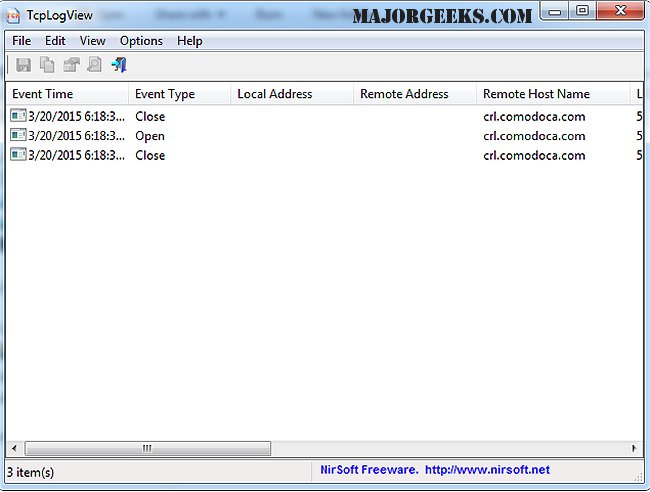
TcpLogView version 1.42 has been released, offering enhanced monitoring capabilities for TCP connections on your system. This tool logs every instance a TCP connection is opened or closed, providing detailed information for each event. The log entries include various metrics such as the event time, type (Open, Close, Listen), local and remote addresses, remote host name, local and remote ports, process ID, process name, and country information for the remote IP address, though the latter requires a separate download of an IP-to-country file.
In addition to the main features of TcpLogView, users can also find useful resources on networking within Windows. These include guidance on utilizing the Ping command, creating WLAN reports, renaming network profile names in Windows 10 and 11, employing the built-in network packet sniffer, and viewing and resetting network data usage.
To extend the functionality of TcpLogView, users may consider integrating it with other network monitoring tools to gain deeper insights into network performance and security. Additionally, users can leverage the data logged by TcpLogView to troubleshoot connectivity issues, optimize network usage, and enhance cybersecurity measures by monitoring unusual connection patterns. As the digital landscape evolves, tools like TcpLogView become crucial for maintaining network integrity and performance
In addition to the main features of TcpLogView, users can also find useful resources on networking within Windows. These include guidance on utilizing the Ping command, creating WLAN reports, renaming network profile names in Windows 10 and 11, employing the built-in network packet sniffer, and viewing and resetting network data usage.
To extend the functionality of TcpLogView, users may consider integrating it with other network monitoring tools to gain deeper insights into network performance and security. Additionally, users can leverage the data logged by TcpLogView to troubleshoot connectivity issues, optimize network usage, and enhance cybersecurity measures by monitoring unusual connection patterns. As the digital landscape evolves, tools like TcpLogView become crucial for maintaining network integrity and performance
TcpLogView 1.42 released
TcpLogView monitors opened TCP connections on your system, adding a new log line every time a TCP connection is opened or closed.