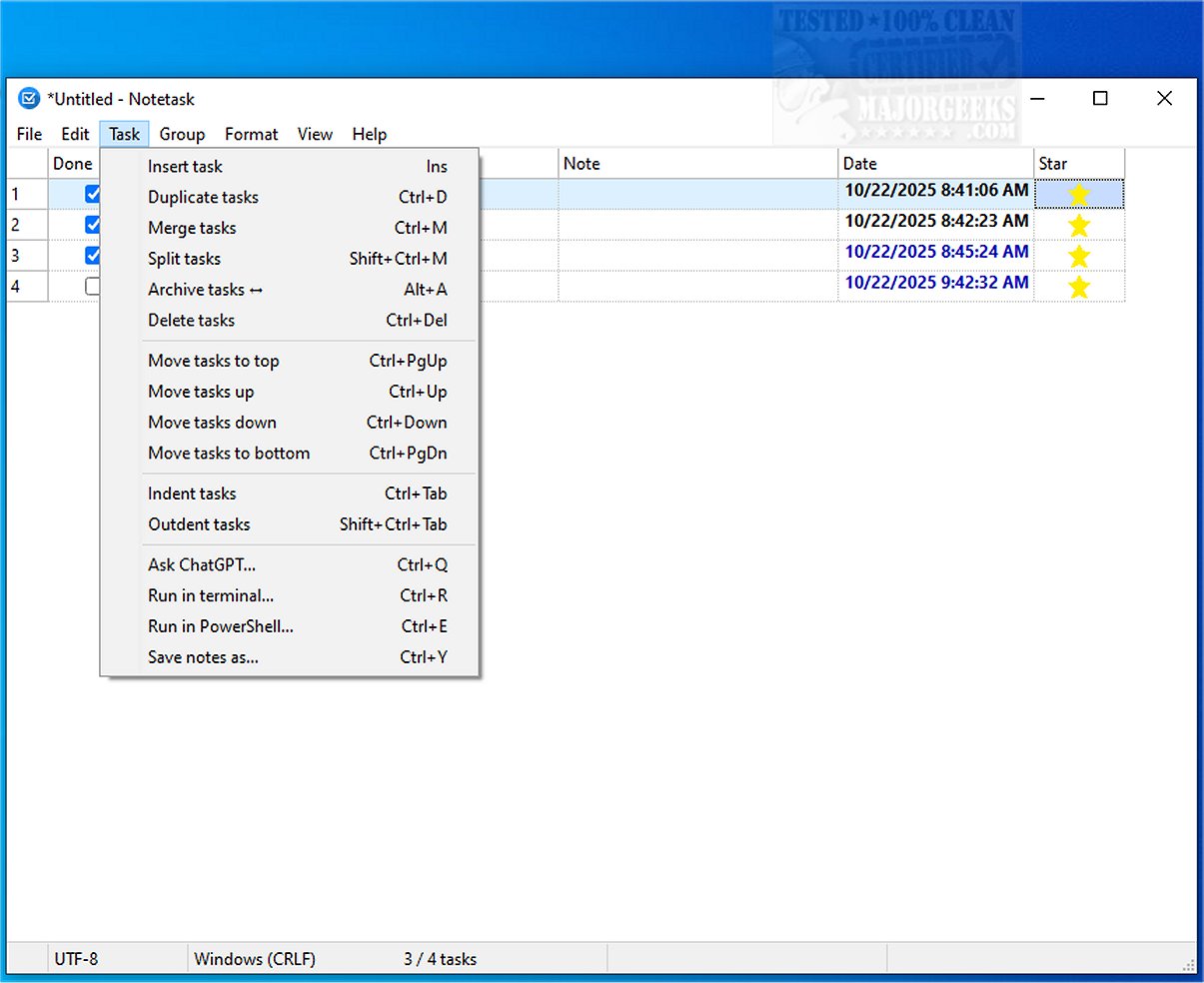
The latest version of Notetask, a user-friendly cross-platform application, has been released, offering an efficient solution for creating and organizing task lists. With a focus on functionality and ease of use, Notetask serves as a robust alternative to traditional note-taking tools like Notepad, specifically tailored for task management.
Key Features of Notetask
Notetask stands out as a versatile tool for both Windows and Linux users, built on the Lazarus (Free Pascal) framework. The application operates on a simple principle: it utilizes plain text files to store tasks and notes, with each line representing a distinct entry. Users benefit from the option of encrypted file storage, which protects personal data while ensuring it remains on their devices.
Enhanced Security with Encryption
Security is a cornerstone of Notetask, which employs AES-256 encryption in CBC mode for file protection. The encryption process uses a key derived from the PBKDF2-HMAC-SHA256 method, providing a 64-byte key that is split into an encryption key and an HMAC key. To optimize storage, files are compressed using zlib before encryption. Users can choose to save their files in an encrypted binary format, with the option for password protection to enhance data security.
Customization and Usability
Notetask's interface is highly customizable, featuring various tools that streamline task management. Key functionalities include:
- Automatic Task Numbering: Tasks are automatically numbered based on their order in the file.
- Task Movement: Users can move single or multiple tasks within or across groups, with priority determined by their position.
- Archiving: Archived tasks can be crossed out and hidden or shown as needed.
- Duration and Quantity Tracking: Users can track time spent on tasks and manage quantities or prices.
- Task Merging and Splitting: Users can combine multiple tasks or split a single task based on selected criteria.
- Indentation and Highlighting: The application supports the creation of subtasks and enhances visibility for overdue or upcoming tasks.
- Markdown Support: Notetask allows users to copy and paste tasks in Markdown format.
- Unicode Support: The application is fully Unicode-enabled and available in 14 languages, catering to a diverse user base.
Conclusion: The Ideal Task Management Tool
Notetask aims to streamline the organization of numerous small, routine tasks, making it an ideal tool for project management, bug tracking, feature requests, and more. Whether entering tasks manually or pasting from the clipboard, users can efficiently sort and categorize their tasks, set specific durations or quantities, and maintain focus on their work. With its array of features and emphasis on security and usability, Notetask empowers users to enhance productivity and effectively manage their daily responsibilities.
Future Enhancements
Looking ahead, Notetask could benefit from additional integrations with third-party applications, support for mobile devices, and advanced analytics for task performance. These enhancements could further solidify its position as a leading task management solution in a competitive landscape
Key Features of Notetask
Notetask stands out as a versatile tool for both Windows and Linux users, built on the Lazarus (Free Pascal) framework. The application operates on a simple principle: it utilizes plain text files to store tasks and notes, with each line representing a distinct entry. Users benefit from the option of encrypted file storage, which protects personal data while ensuring it remains on their devices.
Enhanced Security with Encryption
Security is a cornerstone of Notetask, which employs AES-256 encryption in CBC mode for file protection. The encryption process uses a key derived from the PBKDF2-HMAC-SHA256 method, providing a 64-byte key that is split into an encryption key and an HMAC key. To optimize storage, files are compressed using zlib before encryption. Users can choose to save their files in an encrypted binary format, with the option for password protection to enhance data security.
Customization and Usability
Notetask's interface is highly customizable, featuring various tools that streamline task management. Key functionalities include:
- Automatic Task Numbering: Tasks are automatically numbered based on their order in the file.
- Task Movement: Users can move single or multiple tasks within or across groups, with priority determined by their position.
- Archiving: Archived tasks can be crossed out and hidden or shown as needed.
- Duration and Quantity Tracking: Users can track time spent on tasks and manage quantities or prices.
- Task Merging and Splitting: Users can combine multiple tasks or split a single task based on selected criteria.
- Indentation and Highlighting: The application supports the creation of subtasks and enhances visibility for overdue or upcoming tasks.
- Markdown Support: Notetask allows users to copy and paste tasks in Markdown format.
- Unicode Support: The application is fully Unicode-enabled and available in 14 languages, catering to a diverse user base.
Conclusion: The Ideal Task Management Tool
Notetask aims to streamline the organization of numerous small, routine tasks, making it an ideal tool for project management, bug tracking, feature requests, and more. Whether entering tasks manually or pasting from the clipboard, users can efficiently sort and categorize their tasks, set specific durations or quantities, and maintain focus on their work. With its array of features and emphasis on security and usability, Notetask empowers users to enhance productivity and effectively manage their daily responsibilities.
Future Enhancements
Looking ahead, Notetask could benefit from additional integrations with third-party applications, support for mobile devices, and advanced analytics for task performance. These enhancements could further solidify its position as a leading task management solution in a competitive landscape
Notetask 1.2.0 released
Notetask provides a straightforward and efficient cross-platform solution for creating and organizing task lists. It includes essential features that facilitate efficient task management, much like Notepad, but with an emphasis on functionality and ease of use.