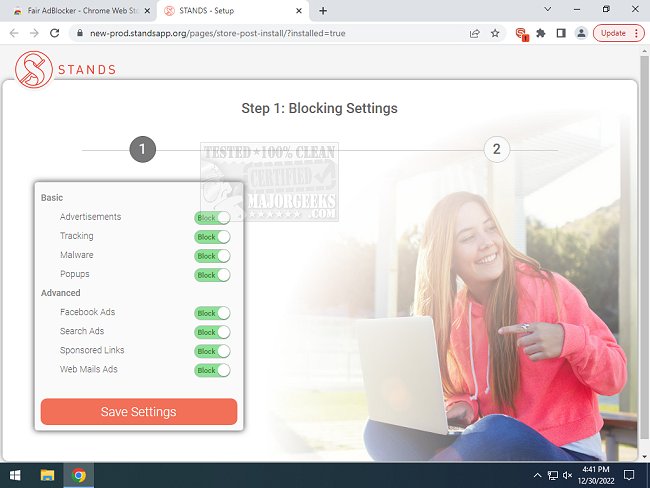
The latest version, 2.1.73, of Stands AdBlocker is now available for Chrome, Edge, and Firefox. This extension is designed to enhance your web browsing experience by effectively blocking pop-ups, ads, malware, and tracking mechanisms, particularly on platforms like Facebook and YouTube. By utilizing Stands AdBlocker, users can enjoy a cleaner, more secure browsing environment, free from the distractions of intrusive advertisements.
Stands AdBlocker stands out due to its comprehensive protection against various types of ads, providing users with the ability to control their browsing experience. Users can easily choose to whitelist certain sites or allow specific ads to support the websites they visit, ensuring that their engagement with the free web remains intact. In addition to eliminating unwanted ads and pop-ups, Stands AdBlocker can enhance browser speed and responsiveness as a result of reduced clutter.
Key features of Stands AdBlocker include:
- Blocking a wide range of annoying ads, such as autoplay video ads, YouTube ads, expanding ads, interstitial page ads, and overlay ads.
- Preventing pop-up ads and pop-unders regardless of where you click on the page.
- Offering more options to block specific types of ads, including those on Facebook, webmail, and search engines.
- Providing users with full control over their ad experience, allowing them to permit certain ads or whitelist supportive websites.
In summary, Stands AdBlocker is a powerful tool for anyone seeking to improve their online privacy and streamline their browsing experience. Its user-friendly dashboard allows for easy adjustments to align with personal preferences, making it a versatile choice for managing ads effectively.
Furthermore, users interested in maximizing their online experience can explore related topics such as managing their YouTube history, disabling advertising in Windows operating systems, and enabling heavy ad intervention in Google Chrome. This extended functionality ensures that users can tailor their internet usage to fit their unique needs while maintaining a secure and enjoyable browsing environment
Stands AdBlocker stands out due to its comprehensive protection against various types of ads, providing users with the ability to control their browsing experience. Users can easily choose to whitelist certain sites or allow specific ads to support the websites they visit, ensuring that their engagement with the free web remains intact. In addition to eliminating unwanted ads and pop-ups, Stands AdBlocker can enhance browser speed and responsiveness as a result of reduced clutter.
Key features of Stands AdBlocker include:
- Blocking a wide range of annoying ads, such as autoplay video ads, YouTube ads, expanding ads, interstitial page ads, and overlay ads.
- Preventing pop-up ads and pop-unders regardless of where you click on the page.
- Offering more options to block specific types of ads, including those on Facebook, webmail, and search engines.
- Providing users with full control over their ad experience, allowing them to permit certain ads or whitelist supportive websites.
In summary, Stands AdBlocker is a powerful tool for anyone seeking to improve their online privacy and streamline their browsing experience. Its user-friendly dashboard allows for easy adjustments to align with personal preferences, making it a versatile choice for managing ads effectively.
Furthermore, users interested in maximizing their online experience can explore related topics such as managing their YouTube history, disabling advertising in Windows operating systems, and enabling heavy ad intervention in Google Chrome. This extended functionality ensures that users can tailor their internet usage to fit their unique needs while maintaining a secure and enjoyable browsing environment
Stands AdBlocker for Chrome, Edge, and Firefox 2.1.73 released
Stands AdBlocker for Chrome, Edge, and Firefox helps block popups, ads, malware, and tracking even on Facebook and Youtube, ultimately protecting your privacy.
Stands AdBlocker for Chrome, Edge, and Firefox 2.1.73 released @ MajorGeeks