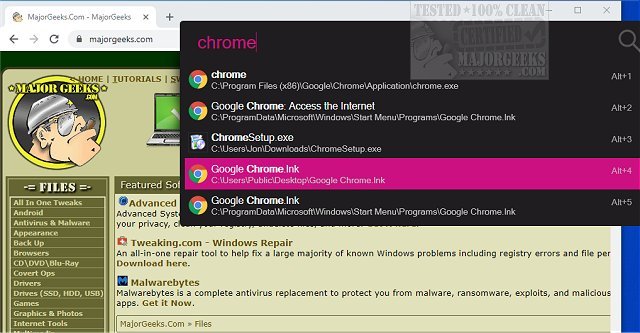
Flow Launcher has recently been updated to version 2.1.3, enhancing its reputation as a powerful, open-source system navigation tool designed for Windows users. This application provides a quick and efficient search interface that allows users to launch applications, open files, execute commands, and conduct web searches without the delays often associated with the built-in Windows Search.
Key Features and Benefits:
Flow Launcher replaces the traditional hunt-and-click method with a streamlined, keyboard-centric approach. By simply pressing Alt+Space and typing the desired item, users can swiftly access apps, files, folders, Windows settings, bookmarks, and system commands—all from a single search bar. The application also supports plugins, making it more than just a basic launcher; it becomes a comprehensive command center with customizable capabilities. Plugins can enhance functionality with features like YouTube searches, clipboard tools, GitHub integration, and more.
Why Opt for Flow Launcher?
While Windows Search has improved, it can still be unreliable and slow. Flow Launcher provides a more dependable solution, allowing users to quickly access the tools they need without navigating through a cluttered Start Menu. This is particularly beneficial for users who frequently work with PowerShell, batch scripts, and files, reducing the time spent on repetitive tasks.
Useful Features:
- Default hotkey is Alt+Space, customizable based on user preferences.
- Supports direct calculations and searches through Windows settings without needing to remember current locations.
- Can utilize Windows Index or Everything for fast file searches.
- Offers a Game Mode to avoid interruptions during gameplay.
- Extensive plugin capabilities for tailored functionality.
Installation and Usage:
To get started, users can install Flow Launcher, launch it, and use the hotkey to access the search bar. Basic usage involves typing the name of an app, folder, or command, while advanced users can customize settings and explore plugins to enhance their experience further.
Real-World Application:
For example, if a user is troubleshooting a startup issue, they can quickly navigate between Task Manager, Services, and Settings using simple commands in Flow Launcher, thereby minimizing frustration and increasing efficiency.
Considerations:
While Flow Launcher is a robust tool, it may not be necessary for users who only access a few applications regularly. Additionally, the plugin system, while powerful, might overwhelm some users due to varying levels of polish and complexity. Users are also advised to download the software from reputable sources to avoid any security concerns.
Conclusion:
Flow Launcher is a highly effective tool for users frustrated with the limitations of Windows Search. It offers a fast, customizable solution that caters to both casual and power users alike. As it continues to gain recognition, those seeking a more efficient workflow will find Flow Launcher to be a valuable addition to their productivity toolkit
Key Features and Benefits:
Flow Launcher replaces the traditional hunt-and-click method with a streamlined, keyboard-centric approach. By simply pressing Alt+Space and typing the desired item, users can swiftly access apps, files, folders, Windows settings, bookmarks, and system commands—all from a single search bar. The application also supports plugins, making it more than just a basic launcher; it becomes a comprehensive command center with customizable capabilities. Plugins can enhance functionality with features like YouTube searches, clipboard tools, GitHub integration, and more.
Why Opt for Flow Launcher?
While Windows Search has improved, it can still be unreliable and slow. Flow Launcher provides a more dependable solution, allowing users to quickly access the tools they need without navigating through a cluttered Start Menu. This is particularly beneficial for users who frequently work with PowerShell, batch scripts, and files, reducing the time spent on repetitive tasks.
Useful Features:
- Default hotkey is Alt+Space, customizable based on user preferences.
- Supports direct calculations and searches through Windows settings without needing to remember current locations.
- Can utilize Windows Index or Everything for fast file searches.
- Offers a Game Mode to avoid interruptions during gameplay.
- Extensive plugin capabilities for tailored functionality.
Installation and Usage:
To get started, users can install Flow Launcher, launch it, and use the hotkey to access the search bar. Basic usage involves typing the name of an app, folder, or command, while advanced users can customize settings and explore plugins to enhance their experience further.
Real-World Application:
For example, if a user is troubleshooting a startup issue, they can quickly navigate between Task Manager, Services, and Settings using simple commands in Flow Launcher, thereby minimizing frustration and increasing efficiency.
Considerations:
While Flow Launcher is a robust tool, it may not be necessary for users who only access a few applications regularly. Additionally, the plugin system, while powerful, might overwhelm some users due to varying levels of polish and complexity. Users are also advised to download the software from reputable sources to avoid any security concerns.
Conclusion:
Flow Launcher is a highly effective tool for users frustrated with the limitations of Windows Search. It offers a fast, customizable solution that caters to both casual and power users alike. As it continues to gain recognition, those seeking a more efficient workflow will find Flow Launcher to be a valuable addition to their productivity toolkit
Flow Launcher 2.1.3 released
Flow Launcher is an Open Source system navigation tool that enables fast search results.