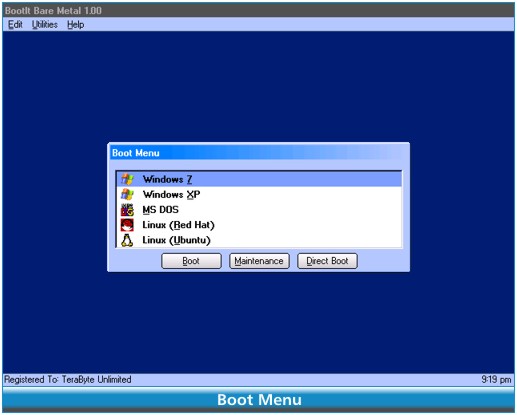
BootIt Bare Metal 2.11 has been released, enhancing its capabilities to manage partitions and facilitate the installation and booting of multiple operating systems seamlessly. This software provides a comprehensive suite of user-friendly partitioning tools, all in one location, making it an essential tool for users looking to customize their computer setups.
One of the standout features of BootIt Bare Metal is its Boot Manager, which allows users to boot from any partition on up to 16 different hard drives, including logical volumes, and to run multiple operating systems from a single partition. The software can automatically detect existing operating systems and incorporate them into the boot menu during installation. Additionally, users have the option to bypass the standard boot menu and directly boot to any partition using the Direct Boot Menu.
The program also offers robust security features, allowing users to customize their systems with user IDs and passwords, as well as supports a variety of operating systems including Linux, MS-DOS, and OS/2.
Key features include:
- Support for MBR, EMBR, and GPT partitioning schemes.
- Compatibility with PATA/SATA (AHCI) drives.
- Functions for creating, moving, copying, deleting, and undeleting partitions, with an option to wipe partitions upon deletion.
- Non-destructive resizing for FAT/FAT32, NTFS, and Linux Ext2/3/4 partitions.
- Capability to create over 200 primary partitions on EMBR disks.
- Conversion between MBR, EMBR, and GPT disks.
- Compliance with Windows 7 partition alignment standards.
- Direct editing of the Windows BCD store to resolve booting issues without needing a Windows installation DVD.
- Support for editing small text files on any supported partition, even those hidden from Windows.
- Ability to handle hard drives exceeding 16 exabytes in size.
In terms of disk imaging, BootIt Bare Metal is compatible with Linux file systems and enables users to create backup images of individual partitions, multiple partitions, or entire drives. This feature is particularly useful for quickly recovering from drive failures, corruption, or data loss by restoring an image or extracting data from backups. Users can also migrate to new drives by restoring images or cloning existing drives, with the option to expand partitions to take advantage of larger drives.
Overall, BootIt Bare Metal 2.11 is a versatile tool that caters to various partitioning and backup needs, making it an invaluable resource for both casual users and IT professionals
One of the standout features of BootIt Bare Metal is its Boot Manager, which allows users to boot from any partition on up to 16 different hard drives, including logical volumes, and to run multiple operating systems from a single partition. The software can automatically detect existing operating systems and incorporate them into the boot menu during installation. Additionally, users have the option to bypass the standard boot menu and directly boot to any partition using the Direct Boot Menu.
The program also offers robust security features, allowing users to customize their systems with user IDs and passwords, as well as supports a variety of operating systems including Linux, MS-DOS, and OS/2.
Key features include:
- Support for MBR, EMBR, and GPT partitioning schemes.
- Compatibility with PATA/SATA (AHCI) drives.
- Functions for creating, moving, copying, deleting, and undeleting partitions, with an option to wipe partitions upon deletion.
- Non-destructive resizing for FAT/FAT32, NTFS, and Linux Ext2/3/4 partitions.
- Capability to create over 200 primary partitions on EMBR disks.
- Conversion between MBR, EMBR, and GPT disks.
- Compliance with Windows 7 partition alignment standards.
- Direct editing of the Windows BCD store to resolve booting issues without needing a Windows installation DVD.
- Support for editing small text files on any supported partition, even those hidden from Windows.
- Ability to handle hard drives exceeding 16 exabytes in size.
In terms of disk imaging, BootIt Bare Metal is compatible with Linux file systems and enables users to create backup images of individual partitions, multiple partitions, or entire drives. This feature is particularly useful for quickly recovering from drive failures, corruption, or data loss by restoring an image or extracting data from backups. Users can also migrate to new drives by restoring images or cloning existing drives, with the option to expand partitions to take advantage of larger drives.
Overall, BootIt Bare Metal 2.11 is a versatile tool that caters to various partitioning and backup needs, making it an invaluable resource for both casual users and IT professionals
BootIt Bare Metal 2.11 released
BootIt Bare Metal helps manage your partitions, install and boot multiple operating systems with ease, back up and restore partitions or entire drives.