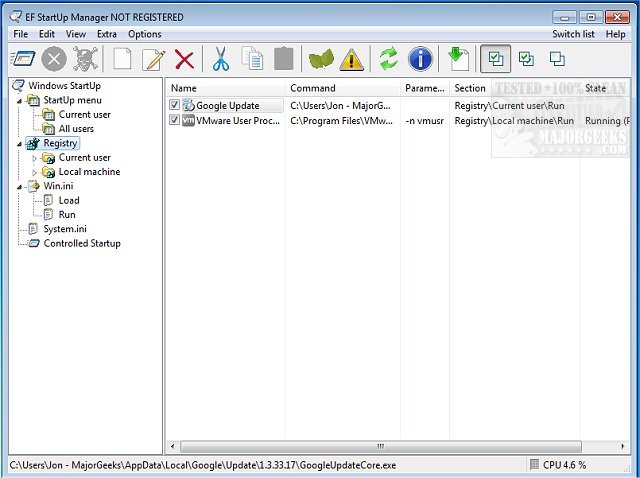
EF StartUp Manager 26.04 has been released, providing users with an efficient tool to manage applications that automatically start with Windows. This software enables users to easily add, temporarily disable, or remove programs from the startup list, ensuring better control over what runs when the operating system boots up. While some startup applications are essential, others may be unnecessary or even harmful, such as spyware. By utilizing EF StartUp Manager, users can optimize their system's performance by preventing unused programs from consuming resources.
The application features a user-friendly interface similar to Windows Explorer, allowing for a clear overview of all startup entries. Additionally, it offers a controlled startup mode that lets users define the order in which programs are launched and set optional delays between them, enhancing system efficiency during boot-up.
EF StartUp Manager supports multiple languages, including English, German, Arabic, and many others, making it accessible to a diverse user base.
In summary, EF StartUp Manager 26.04 is a valuable tool for anyone looking to streamline their Windows startup process. By giving users the ability to manage their startup applications effectively, it helps improve system performance and security.
To further enhance your understanding of process management, consider exploring related topics such as identifying running processes, saving process information using TaskList, customizing Task Manager views, and managing startup apps in Windows 10 and 11. Additionally, you can learn how to disable unnecessary tasks in the Windows Task Scheduler that may compromise privacy or lead to automatic maintenance
The application features a user-friendly interface similar to Windows Explorer, allowing for a clear overview of all startup entries. Additionally, it offers a controlled startup mode that lets users define the order in which programs are launched and set optional delays between them, enhancing system efficiency during boot-up.
EF StartUp Manager supports multiple languages, including English, German, Arabic, and many others, making it accessible to a diverse user base.
In summary, EF StartUp Manager 26.04 is a valuable tool for anyone looking to streamline their Windows startup process. By giving users the ability to manage their startup applications effectively, it helps improve system performance and security.
To further enhance your understanding of process management, consider exploring related topics such as identifying running processes, saving process information using TaskList, customizing Task Manager views, and managing startup apps in Windows 10 and 11. Additionally, you can learn how to disable unnecessary tasks in the Windows Task Scheduler that may compromise privacy or lead to automatic maintenance
EF StartUp Manager 26.04 released
EF StartUp Manager allows you a simple handling and complete control of applications that start with Windows. They can insert, temporarily disable or delete any new programs with ease.