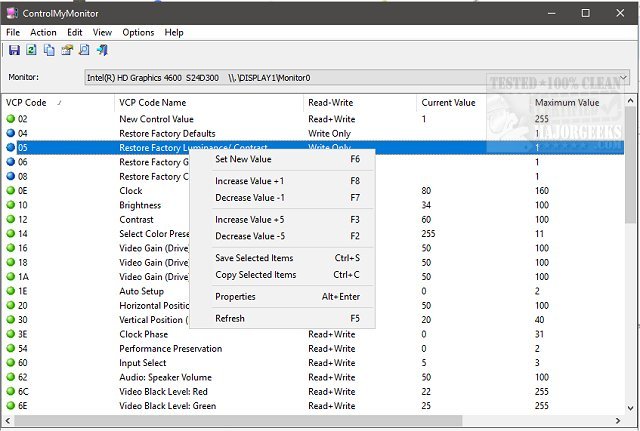
ControlMyMonitor version 1.43 has been released, enhancing its status as a free utility that simplifies the management of monitor display settings. This software provides users with access to various Virtual Control Panel (VCP) settings, including essential adjustments like brightness, contrast, sharpness, and RGB color balance. Users can modify their monitor settings through a graphical user interface (GUI) or command line, catering to different preferences.
One of the standout features of ControlMyMonitor is its compatibility with multiple monitors, which can be effortlessly selected from a drop-down menu in the main window. The GUI is user-friendly; simply select the desired attribute and press F6 or double-click to access modification options. Additionally, the program integrates into the right-click context menu for quick access.
ControlMyMonitor also offers a configuration file export feature, allowing users to save and load specific monitor settings easily. This is particularly beneficial for those who prefer tailored settings for different activities, such as gaming versus regular desktop tasks.
In conclusion, ControlMyMonitor 1.43 is a powerful, user-friendly tool for anyone looking to take control of their monitor settings with the flexibility of using either a GUI or command line. Whether for enhancing gaming experiences or optimizing work environments, this utility serves as a valuable asset for managing display preferences efficiently
One of the standout features of ControlMyMonitor is its compatibility with multiple monitors, which can be effortlessly selected from a drop-down menu in the main window. The GUI is user-friendly; simply select the desired attribute and press F6 or double-click to access modification options. Additionally, the program integrates into the right-click context menu for quick access.
ControlMyMonitor also offers a configuration file export feature, allowing users to save and load specific monitor settings easily. This is particularly beneficial for those who prefer tailored settings for different activities, such as gaming versus regular desktop tasks.
In conclusion, ControlMyMonitor 1.43 is a powerful, user-friendly tool for anyone looking to take control of their monitor settings with the flexibility of using either a GUI or command line. Whether for enhancing gaming experiences or optimizing work environments, this utility serves as a valuable asset for managing display preferences efficiently
ControlMyMonitor 1.43 released
ControlMyMonitor is a freeware monitor utility that provides a simple way to view and modify your monitor's display settings.