The latest version of Bookmarks Backuper for Chrome, 0.2.1.3, has been released, providing users with a reliable way to protect their bookmarks by backing them up directly to Google Drive. This feature ensures that users can always access their bookmarks, even in the event of data loss from local devices or system crashes.
The extension is user-friendly and can be set up to automatically back up bookmarks at regular intervals, offering peace of mind for users concerned about losing their important links. Bookmarks Backuper for Chrome offers two convenient methods for accessing bookmarks: through Google Drive or temporary local storage. Users can easily activate the extension by clicking the yellow star icon (which must be pinned after installation) to choose between the two options.
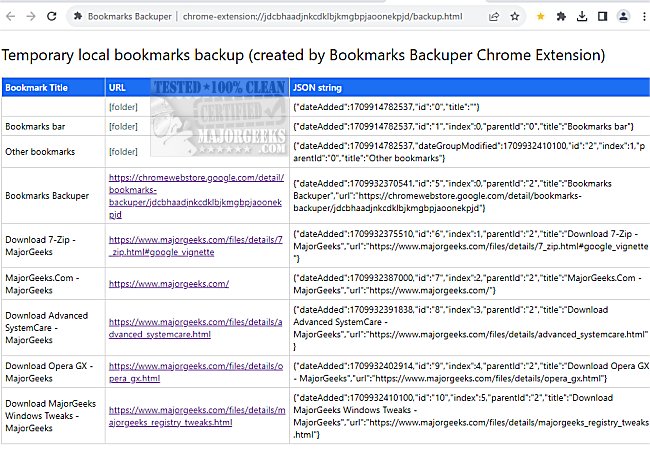
When accessing bookmarks stored locally, a new tab will open displaying the bookmarks along with their titles, URLs, and the dates they were added, although the date format is presented as a JSON string. For those who prefer using Google Drive, bookmarks can be synchronized and viewed in an Excel spreadsheet format, retaining the same essential information.
While Bookmarks Backuper for Chrome may not introduce groundbreaking features, it effectively simplifies the process of saving and organizing bookmarks, allowing users to access them from various devices, including mobile.
To enhance the user experience further, it may be beneficial for future updates to include additional features such as improved formatting options for exported bookmarks, integration with other cloud services, or enhanced search capabilities within the bookmarks. This could provide users with even more flexibility and control over their bookmark organization and access. Additionally, users might appreciate a feature that allows for easy sharing of bookmark collections with others, boosting collaboration and resource sharing among teams or friends
The extension is user-friendly and can be set up to automatically back up bookmarks at regular intervals, offering peace of mind for users concerned about losing their important links. Bookmarks Backuper for Chrome offers two convenient methods for accessing bookmarks: through Google Drive or temporary local storage. Users can easily activate the extension by clicking the yellow star icon (which must be pinned after installation) to choose between the two options.
When accessing bookmarks stored locally, a new tab will open displaying the bookmarks along with their titles, URLs, and the dates they were added, although the date format is presented as a JSON string. For those who prefer using Google Drive, bookmarks can be synchronized and viewed in an Excel spreadsheet format, retaining the same essential information.
While Bookmarks Backuper for Chrome may not introduce groundbreaking features, it effectively simplifies the process of saving and organizing bookmarks, allowing users to access them from various devices, including mobile.
To enhance the user experience further, it may be beneficial for future updates to include additional features such as improved formatting options for exported bookmarks, integration with other cloud services, or enhanced search capabilities within the bookmarks. This could provide users with even more flexibility and control over their bookmark organization and access. Additionally, users might appreciate a feature that allows for easy sharing of bookmark collections with others, boosting collaboration and resource sharing among teams or friends
Bookmarks Backuper for Chrome 0.2.1.3 released
Bookmarks Backuper for Chrome lets you safeguard your bookmarks and prevent data loss by backing them up to Google Drive.