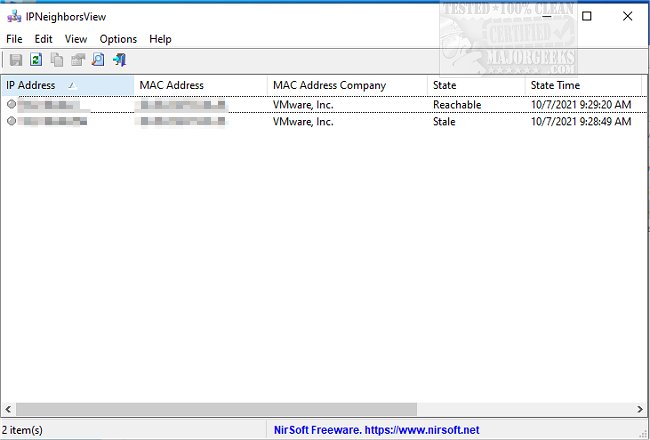
IPNeighborsView version 1.04 has been released, offering a portable solution for users to visualize the IP neighbor table of their local machine. This utility presents a comprehensive overview of the devices connected to your network by displaying key details for each IP neighbor entry, including the IP Address, MAC Address, the corresponding MAC Address Company, State, State Time, Local Adapter Name, and Local Connection Name.
The tool primarily focuses on devices that have recently connected to your network; those not detected by the Windows operating system will not appear in the list. By default, IPNeighborsView hides permanent items in the IP neighbor table, but users have the option to view these entries by unchecking the 'Hide Permanent Items' option found in the Options menu.
Moreover, IPNeighborsView allows users to export the displayed network information into various formats such as comma-delimited, tab-delimited, HTML, XML, or JSON files, making it versatile for different use cases.
In addition to its core functionality, IPNeighborsView can be particularly useful for network administrators and users looking to troubleshoot or optimize their networks. It complements other network management tools and commands, such as the Ping command in Windows, methods to improve wireless network performance, and instructions on finding the MAC address in Windows. Overall, IPNeighborsView provides a user-friendly interface for monitoring and managing network connectivity efficiently.
Future updates could expand its capabilities with additional features like real-time network monitoring, alerts for unauthorized devices, or integration with network management software for more comprehensive oversight
The tool primarily focuses on devices that have recently connected to your network; those not detected by the Windows operating system will not appear in the list. By default, IPNeighborsView hides permanent items in the IP neighbor table, but users have the option to view these entries by unchecking the 'Hide Permanent Items' option found in the Options menu.
Moreover, IPNeighborsView allows users to export the displayed network information into various formats such as comma-delimited, tab-delimited, HTML, XML, or JSON files, making it versatile for different use cases.
In addition to its core functionality, IPNeighborsView can be particularly useful for network administrators and users looking to troubleshoot or optimize their networks. It complements other network management tools and commands, such as the Ping command in Windows, methods to improve wireless network performance, and instructions on finding the MAC address in Windows. Overall, IPNeighborsView provides a user-friendly interface for monitoring and managing network connectivity efficiently.
Future updates could expand its capabilities with additional features like real-time network monitoring, alerts for unauthorized devices, or integration with network management software for more comprehensive oversight
IPNeighborsView 1.04 released
IPNeighborsView is a portable utility designed to display the IP neighbor table of your local machine.