ImageConverter has launched its latest version, 1.6.1, designed to simplify the process of changing image formats with just a single click. The app is specifically tailored to be user-friendly, making it accessible to users of all skill levels, from beginners to seasoned professionals.
Ease of Use:
The application allows users to drag and drop images directly into the interface for quick uploading. Once the images are uploaded, users can customize their conversion settings, including selecting the output format, adjusting resolution, and applying filters or enhancements as needed. The design prioritizes efficiency, enabling users to convert images swiftly according to their specifications.
Customizable Output Paths:
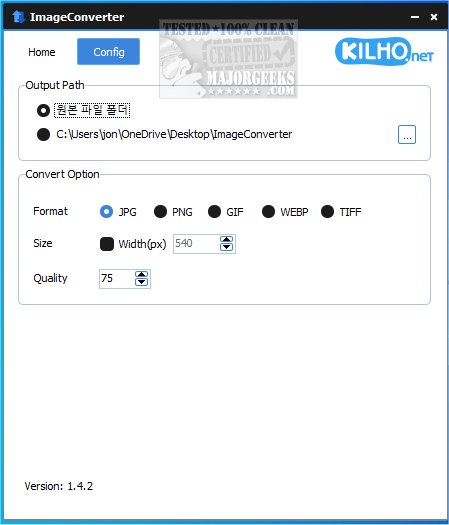
Users have the flexibility to define their output paths for saved files. While customization is possible, many may prefer the default setting, which automatically creates a new folder on the desktop for easy access.
Resizing Functionality:
Beyond format conversion, ImageConverter offers a resizing feature that allows users to specify desired image dimensions. This is particularly useful for preparing images for web use or optimizing them for various devices, ensuring quality while adhering to size constraints.
Multi-Format Support:
The app supports a wide range of standard graphic formats, including PDF, SVG, AI, PSD, PNG, JPG, GIF, WEBP, and TGA. Its compatibility with WEBP files is especially noteworthy, as this format is commonly used on the web but can pose compatibility issues with certain applications. ImageConverter effectively addresses these challenges, making it an essential tool for managing and converting graphic files.
In summary, ImageConverter is an invaluable resource for anyone engaged in image editing or manipulation. Its streamlined approach to format conversion allows users to achieve quick and efficient results without the burden of complex software. The intuitive interface invites users to focus on their creative pursuits while saving time and enhancing productivity.
Key Features of ImageConverter
Ease of Use:
The application allows users to drag and drop images directly into the interface for quick uploading. Once the images are uploaded, users can customize their conversion settings, including selecting the output format, adjusting resolution, and applying filters or enhancements as needed. The design prioritizes efficiency, enabling users to convert images swiftly according to their specifications.
Customizable Output Paths:
Users have the flexibility to define their output paths for saved files. While customization is possible, many may prefer the default setting, which automatically creates a new folder on the desktop for easy access.
Resizing Functionality:
Beyond format conversion, ImageConverter offers a resizing feature that allows users to specify desired image dimensions. This is particularly useful for preparing images for web use or optimizing them for various devices, ensuring quality while adhering to size constraints.
Multi-Format Support:
The app supports a wide range of standard graphic formats, including PDF, SVG, AI, PSD, PNG, JPG, GIF, WEBP, and TGA. Its compatibility with WEBP files is especially noteworthy, as this format is commonly used on the web but can pose compatibility issues with certain applications. ImageConverter effectively addresses these challenges, making it an essential tool for managing and converting graphic files.
Conclusion
In summary, ImageConverter is an invaluable resource for anyone engaged in image editing or manipulation. Its streamlined approach to format conversion allows users to achieve quick and efficient results without the burden of complex software. The intuitive interface invites users to focus on their creative pursuits while saving time and enhancing productivity.
Future Enhancements
Looking ahead, future updates to ImageConverter could include additional features such as batch processing for converting multiple images simultaneously, enhanced filter options, and improved integration with cloud storage services for easy access and sharing. As the app continues to evolve, it aims to remain a top choice for both casual users and professionals in the ever-changing landscape of digital image managementImageConverter 1.6.1 released
ImageConverter lets you change image formats in one click; it is designed to be a user-friendly image conversion app.