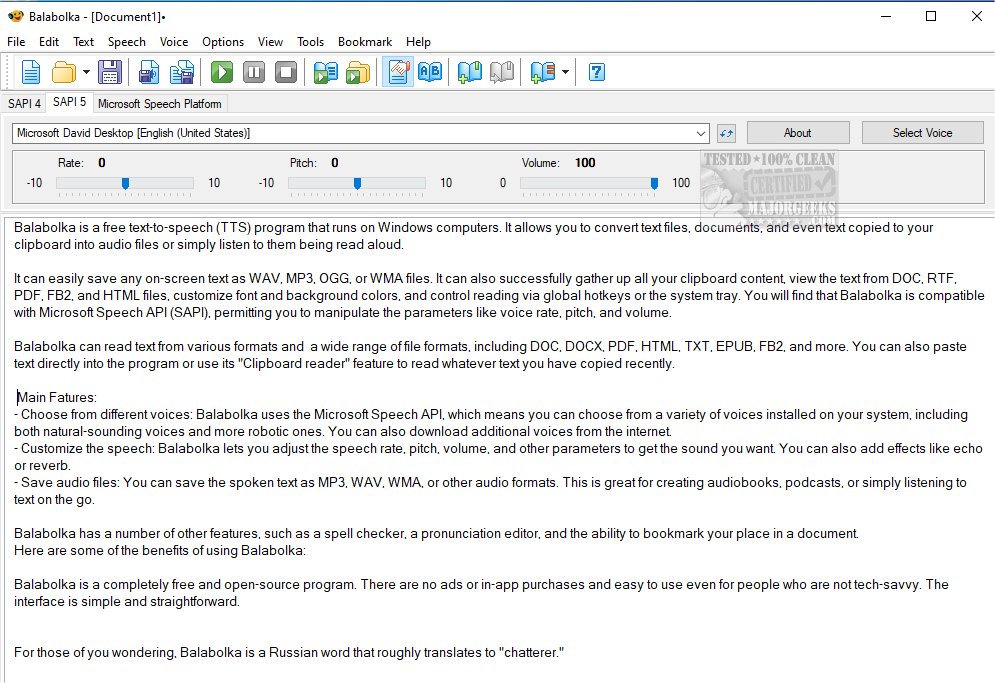
Balabolka 2.15.0.919 has been released, enhancing the capabilities of this customizable freeware text-to-speech (TTS) application for Windows. This program allows users to convert text from various sources, including documents and clipboard contents, into audio files or listen to them being read aloud. Users can save text as WAV, MP3, OGG, or WMA files and can easily access text from formats like DOC, RTF, PDF, FB2, and HTML.
Key features of Balabolka include compatibility with the Microsoft Speech API (SAPI), which enables users to select from a variety of installed computer voices, adjust parameters such as speech rate, pitch, and volume, and apply effects like echo or reverb. The program also offers tools like a spell checker, pronunciation editor, and bookmarking for easy navigation through documents. The user-friendly interface is designed for accessibility, making it suitable for individuals who may not be technically inclined.
Balabolka stands out as a completely free and open-source solution, devoid of ads or in-app purchases, appealing to a broad audience. The name "Balabolka" translates to "chatterer" in Russian, reflecting the program's primary function.
In addition to its core functionalities, users can benefit from the flexibility of creating audiobooks or podcasts, making it a versatile tool for both personal and professional use. With ongoing updates and community support, Balabolka continues to evolve, providing users with an effective means to listen to text in various formats.
In conclusion, Balabolka remains a robust and adaptable text-to-speech application, ideal for users looking for a free and powerful tool to convert text to audio. Its extensive features and ease of use make it a valuable asset for anyone needing assistance with reading or audio content creation
Key features of Balabolka include compatibility with the Microsoft Speech API (SAPI), which enables users to select from a variety of installed computer voices, adjust parameters such as speech rate, pitch, and volume, and apply effects like echo or reverb. The program also offers tools like a spell checker, pronunciation editor, and bookmarking for easy navigation through documents. The user-friendly interface is designed for accessibility, making it suitable for individuals who may not be technically inclined.
Balabolka stands out as a completely free and open-source solution, devoid of ads or in-app purchases, appealing to a broad audience. The name "Balabolka" translates to "chatterer" in Russian, reflecting the program's primary function.
In addition to its core functionalities, users can benefit from the flexibility of creating audiobooks or podcasts, making it a versatile tool for both personal and professional use. With ongoing updates and community support, Balabolka continues to evolve, providing users with an effective means to listen to text in various formats.
In conclusion, Balabolka remains a robust and adaptable text-to-speech application, ideal for users looking for a free and powerful tool to convert text to audio. Its extensive features and ease of use make it a valuable asset for anyone needing assistance with reading or audio content creation
Balabolka 2.15.0.919 released
Balabolka is a mildly customizable freeware text-to-speech application capable of utilizing all the installed computer voices on your PC.