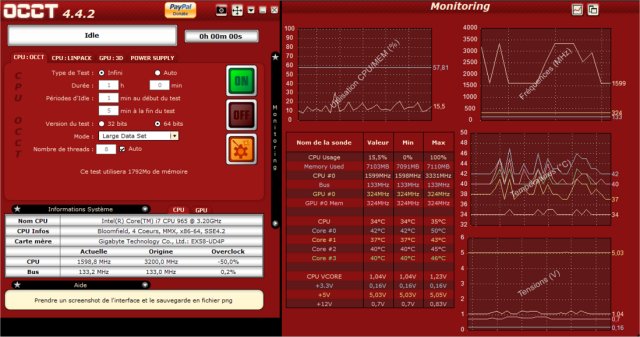
The latest release of OCCT (OverClock Checking Tool) version 17.0.18 offers a robust platform for benchmarking, overclocking, and monitoring various system components. Designed specifically for overclockers, system builders, and hardware enthusiasts, OCCT provides essential tools to ensure system stability under pressure, making it indispensable for those pushing their PCs to their limits.
- Hardware Monitoring: Monitor crucial metrics in real-time to identify overheating or power issues.
- Power Supply Testing: Simulate high power demands to assess PSU reliability.
- Benchmarking: Compare performance metrics pre- and post-hardware upgrades.
- Error Detection: Identify faulty components through targeted stress tests.
- Troubleshooting: Identify the cause of random crashes or freezes by testing individual components.
- New Builds: Stress-test newly constructed PCs to ensure stability before regular use.
- Overheating Diagnosis: Determine which component is causing excessive heat.
- PSU Stability Verification: Check if the PSU can handle peak loads.
- BIOS Update Stability: Confirm system stability after BIOS changes.
- Laptop Cooling Tests: Assess whether the laptop cooling system is effective.
- Benchmarking Upgrades: Evaluate performance improvements after upgrading components.
- Workstation Stress Testing: Ideal for professionals in video editing, 3D rendering, and game development requiring reliable performance.
- Preventative Maintenance: Regular tests can detect aging hardware before failures occur.
- Undervolting Stability Tests: Ensure stability after reducing power consumption and heat generation.
- Comprehensive testing for various components.
- Real-time monitoring with graphical representations.
- Ideal for both overclocking and troubleshooting.
- Free version available with essential features.
Cons:
- Some advanced features require a paid subscription.
- Can stress hardware to extreme limits, necessitating caution.
- May not be beginner-friendly compared to other tools.
- How to Benchmark Your Computer
- How to Update and Find Your Windows Experience Index Score
- How to Identify the Hardware in Your Computer
In conclusion, OCCT 17.0.18 is an essential tool for anyone looking to optimize their PC performance, ensuring stability and reliability in both everyday tasks and demanding workloads
What is OCCT?
OCCT is a comprehensive utility that stress-tests critical components such as the CPU, GPU, RAM, and power supply (PSU). It also offers real-time monitoring capabilities, allowing users to track temperatures, voltages, clock speeds, and power consumption. This data is crucial for diagnosing potential hardware failures before they lead to system crashes.Key Features:
- Stress Testing: OCCT rigorously tests your components to ensure they can withstand maximum loads.- Hardware Monitoring: Monitor crucial metrics in real-time to identify overheating or power issues.
- Power Supply Testing: Simulate high power demands to assess PSU reliability.
- Benchmarking: Compare performance metrics pre- and post-hardware upgrades.
- Error Detection: Identify faulty components through targeted stress tests.
Real-World Applications:
OCCT is not solely for overclockers; it can benefit anyone looking to optimize their system’s performance. Here are a few practical uses:- Troubleshooting: Identify the cause of random crashes or freezes by testing individual components.
- New Builds: Stress-test newly constructed PCs to ensure stability before regular use.
- Overheating Diagnosis: Determine which component is causing excessive heat.
- PSU Stability Verification: Check if the PSU can handle peak loads.
- BIOS Update Stability: Confirm system stability after BIOS changes.
- Laptop Cooling Tests: Assess whether the laptop cooling system is effective.
- Benchmarking Upgrades: Evaluate performance improvements after upgrading components.
- Workstation Stress Testing: Ideal for professionals in video editing, 3D rendering, and game development requiring reliable performance.
- Preventative Maintenance: Regular tests can detect aging hardware before failures occur.
- Undervolting Stability Tests: Ensure stability after reducing power consumption and heat generation.
Pros and Cons:
Pros:- Comprehensive testing for various components.
- Real-time monitoring with graphical representations.
- Ideal for both overclocking and troubleshooting.
- Free version available with essential features.
Cons:
- Some advanced features require a paid subscription.
- Can stress hardware to extreme limits, necessitating caution.
- May not be beginner-friendly compared to other tools.
Geek Verdict:
For those serious about maintaining system stability or delving into overclocking, OCCT is a vital tool. It functions as a personal trainer for your PC, pushing it to its limits while providing insights on necessary improvements. Whether you're a dedicated overclocker or simply want a reliable machine, OCCT ensures your system performs at its best. Download OCCT and challenge your hardware today!Additional Resources:
To further enhance your computer's performance and learn more about benchmarking, explore guides on:- How to Benchmark Your Computer
- How to Update and Find Your Windows Experience Index Score
- How to Identify the Hardware in Your Computer
In conclusion, OCCT 17.0.18 is an essential tool for anyone looking to optimize their PC performance, ensuring stability and reliability in both everyday tasks and demanding workloads
OCCT 17.0.18 released
OCCT (OverClock Checking Tool) will let you benchmark, overclock, and monitor your system components.