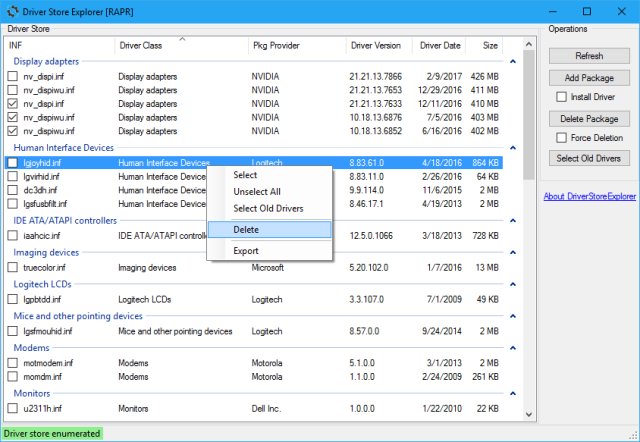
DriverStore Explorer version 1.0.28 has been released, presenting a user-friendly, open-source utility designed to streamline interactions with the Windows driver store. This tool facilitates various operations, including enumeration of driver packages, adding new driver packages, installing them, deleting existing packages, and even forcing deletion if necessary.
With DriverStore Explorer, users can easily list all driver packages currently staged in the driver store and can export this list in CSV format for further analysis or record-keeping. The utility provides a graphical user interface (GUI) that enhances user experience by allowing users to group and sort the displayed information based on different criteria and to select specific columns for a more tailored view.
Additionally, the tool can be particularly useful for those looking to manage driver installations efficiently, troubleshoot driver-related issues, and maintain system performance by managing outdated or unnecessary drivers.
For users seeking to optimize their Windows driver management, DriverStore Explorer serves as an invaluable resource. Similar tools and guides are available for users interested in downloading the latest drivers, preventing Windows updates from automatically downloading drivers, utilizing the Driver Verifier Manager for troubleshooting, and understanding the Windows Hardware Quality Labs (WHQL) certification process.
As technology continues to evolve, having reliable tools like DriverStore Explorer will be crucial for both casual users and IT professionals in maintaining optimal system functionality and driver integrity
With DriverStore Explorer, users can easily list all driver packages currently staged in the driver store and can export this list in CSV format for further analysis or record-keeping. The utility provides a graphical user interface (GUI) that enhances user experience by allowing users to group and sort the displayed information based on different criteria and to select specific columns for a more tailored view.
Additionally, the tool can be particularly useful for those looking to manage driver installations efficiently, troubleshoot driver-related issues, and maintain system performance by managing outdated or unnecessary drivers.
For users seeking to optimize their Windows driver management, DriverStore Explorer serves as an invaluable resource. Similar tools and guides are available for users interested in downloading the latest drivers, preventing Windows updates from automatically downloading drivers, utilizing the Driver Verifier Manager for troubleshooting, and understanding the Windows Hardware Quality Labs (WHQL) certification process.
As technology continues to evolve, having reliable tools like DriverStore Explorer will be crucial for both casual users and IT professionals in maintaining optimal system functionality and driver integrity
DriverStore Explorer 1.0.28 released
DriverStore Explorer is a free and Open Source utility that makes it easier to deal with the Windows driver store. Supported operations include enumeration, adding a driver package, adding & installing, deleting, and forcing deletion.