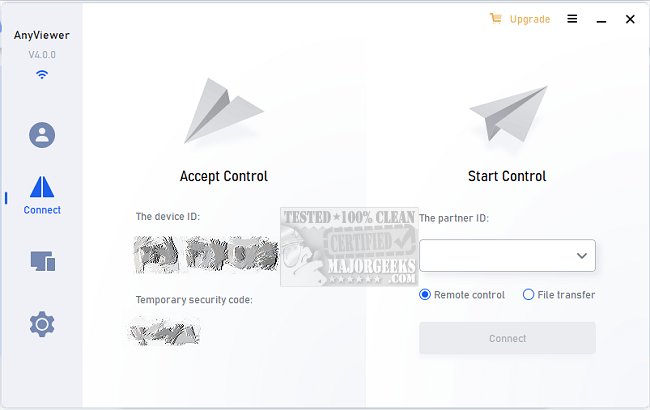
AnyViewer has recently released version 5.7.0, enhancing its capabilities as a secure and efficient remote desktop software tailored for Windows PCs and Windows Server. This innovative application allows users to access their computers from virtually anywhere, at any time, using the internet. It supports remote control from various devices, including PC to PC, iOS to PC, and Android to PC. Users can log in either through the same account or by entering a security code, which facilitates unattended access.
The software promises a high-definition visual experience, complemented by virtual mouse and touch control to ensure a smooth remote interaction. With AnyViewer, users can provide remote assistance to family, friends, and clients, addressing their IT issues promptly via chat. This platform allows access to vital data that may be exclusive to a work computer, enabling the use of work-specific applications as if one were physically present in the office.
Additional features include quick file transfer capabilities for easy access to critical information and security settings that prevent unauthorized manipulation or viewing of the computer's content. Users can disable mouse and keyboard input and black out remote screens for enhanced privacy. With robust authentication measures in place, workers can confidently access their cloud-based ERP or CRM systems without the fear of being locked out.
AnyViewer ensures a reliable and fast connection through PC-to-PC and iOS-to-PC controls, allowing users to share device IDs for stable connections. This software is designed for seamless integration into remote work environments, making it an excellent choice for professionals needing consistent access to their office tools while away. As long as the computer remains connected to the internet, users can expect uninterrupted service.
In addition to these features, future updates could focus on enhancing user interface customization, improving collaboration tools, and expanding compatibility with more operating systems and devices. This would further solidify AnyViewer's position as a leading solution for remote desktop access, catering to the evolving needs of remote workers and businesses alike
The software promises a high-definition visual experience, complemented by virtual mouse and touch control to ensure a smooth remote interaction. With AnyViewer, users can provide remote assistance to family, friends, and clients, addressing their IT issues promptly via chat. This platform allows access to vital data that may be exclusive to a work computer, enabling the use of work-specific applications as if one were physically present in the office.
Additional features include quick file transfer capabilities for easy access to critical information and security settings that prevent unauthorized manipulation or viewing of the computer's content. Users can disable mouse and keyboard input and black out remote screens for enhanced privacy. With robust authentication measures in place, workers can confidently access their cloud-based ERP or CRM systems without the fear of being locked out.
AnyViewer ensures a reliable and fast connection through PC-to-PC and iOS-to-PC controls, allowing users to share device IDs for stable connections. This software is designed for seamless integration into remote work environments, making it an excellent choice for professionals needing consistent access to their office tools while away. As long as the computer remains connected to the internet, users can expect uninterrupted service.
In addition to these features, future updates could focus on enhancing user interface customization, improving collaboration tools, and expanding compatibility with more operating systems and devices. This would further solidify AnyViewer's position as a leading solution for remote desktop access, catering to the evolving needs of remote workers and businesses alike
AnyViewer 5.7.0 released
AnyViewer is a secure and speedy software for remote desktop on Windows PCs and Windows Server.