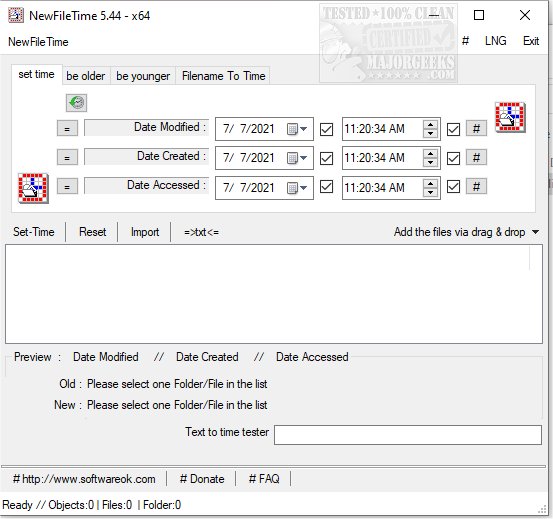
NewFileTime version 8.31 has been released, providing users with a powerful and free tool to manipulate the timestamps of files and folders on their systems. This utility allows you to easily change the timestamps, making them appear older, younger, or to set them to a specific date and time. The app supports batch processing, enabling users to modify multiple files and folders simultaneously.
One of the standout features of NewFileTime is its user-friendly interface, which allows for easy file addition through drag-and-drop or by importing from a folder. The application is designed to streamline the process, ensuring that users can quickly navigate to their tasks without unnecessary delays. As a portable utility, NewFileTime can be used on-the-go, making it convenient for users needing quick adjustments to creation, last access, and modification dates/times of their files and folders.
Additionally, NewFileTime is particularly useful for users facing issues like access denial or errors when deleting files or folders. It can also assist with securely deleting files using PowerShell and Cipher, as well as helping users take full ownership of files and folders in Windows 10 and 11.
In summary, NewFileTime 8.31 is an essential tool for anyone looking to manage file timestamps efficiently, providing flexibility and ease of use in various scenarios. As technology continues to evolve, the need for such utilities will likely grow, making NewFileTime a relevant option for users looking to maintain control over their file systems
One of the standout features of NewFileTime is its user-friendly interface, which allows for easy file addition through drag-and-drop or by importing from a folder. The application is designed to streamline the process, ensuring that users can quickly navigate to their tasks without unnecessary delays. As a portable utility, NewFileTime can be used on-the-go, making it convenient for users needing quick adjustments to creation, last access, and modification dates/times of their files and folders.
Additionally, NewFileTime is particularly useful for users facing issues like access denial or errors when deleting files or folders. It can also assist with securely deleting files using PowerShell and Cipher, as well as helping users take full ownership of files and folders in Windows 10 and 11.
In summary, NewFileTime 8.31 is an essential tool for anyone looking to manage file timestamps efficiently, providing flexibility and ease of use in various scenarios. As technology continues to evolve, the need for such utilities will likely grow, making NewFileTime a relevant option for users looking to maintain control over their file systems
NewFileTime 8.31 released
NewFileTime is a free app that allows you to manipulate timestamps on any file or folder on your system, making them younger or older or setting a specific date/time.