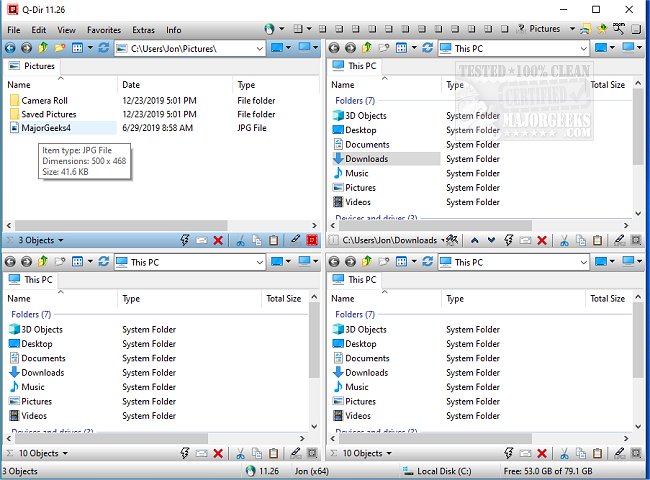
Q-Dir 12.79 has been released, enhancing the way users manage their files and folders. This free file management tool stands out by offering a unique quad-panel interface that allows users to view and manage up to four folders at once, making tasks such as copying, moving, and organizing files significantly more efficient compared to traditional single-window applications like Windows File Explorer.
Key Features of Q-Dir:
- Quad-Pane Interface: Manage multiple folders simultaneously for improved workflow.
- Drag & Drop Support: Simplifies file movements between panels.
- Customization Options: Users can create custom layouts and apply color filters for better organization.
- Tab Support: Open multiple folders within each panel for easy access.
- Fast File Operations: Quickly copy, move, and delete files.
- Portable Version: No installation is needed, making it ideal for on-the-go users.
- Lightweight Design: Runs smoothly even on older systems.
Q-Dir is beneficial for a diverse range of users, including everyday individuals organizing personal files, IT professionals managing system files, developers working on projects, power users performing bulk operations, and network administrators handling file transfers.
In addition to its core features, Q-Dir includes tools that enhance productivity, such as:
- Favorites & Quick Access: Bookmark frequently used folders for rapid navigation.
- File Preview: Quickly view contents of files without opening them.
- Clipboard & Shortcut Integration: Easily copy paths and create shortcuts.
- Multi-Monitor Support: Manage files across several screens.
- Built-in File Filters: Highlight specific file types with customizable colors.
- Support for ZIP & FTP: Manage compressed files and remote directories.
- Customizable Interface: Options for Dark Mode and themes to suit user preferences.
While Q-Dir can be immensely powerful, new users may find the quad-pane layout initially overwhelming. Familiarizing oneself with the default layouts is recommended, and users should be aware that Q-Dir lacks a built-in file search function, necessitating the use of Windows Search for deeper file lookups. Customization through hotkeys, color filters, and layouts can significantly enhance the user experience.
In conclusion, if Windows File Explorer doesn't meet your file management needs, Q-Dir is a robust alternative that offers speed, efficiency, and customization. Download Q-Dir today to transform your file management experience!
Extensions:
1. Future Updates: Users can look forward to ongoing improvements and features in upcoming Q-Dir versions, potentially including enhanced search functionalities and integration with cloud storage services.
2. User Community: Engaging with the Q-Dir community can provide tips, tricks, and shared layouts that further enhance productivity.
3. Comparative Analysis: Users might consider comparing Q-Dir with other file management tools, such as FreeCommander or Total Commander, to find the best fit for their specific needs
Key Features of Q-Dir:
- Quad-Pane Interface: Manage multiple folders simultaneously for improved workflow.
- Drag & Drop Support: Simplifies file movements between panels.
- Customization Options: Users can create custom layouts and apply color filters for better organization.
- Tab Support: Open multiple folders within each panel for easy access.
- Fast File Operations: Quickly copy, move, and delete files.
- Portable Version: No installation is needed, making it ideal for on-the-go users.
- Lightweight Design: Runs smoothly even on older systems.
Q-Dir is beneficial for a diverse range of users, including everyday individuals organizing personal files, IT professionals managing system files, developers working on projects, power users performing bulk operations, and network administrators handling file transfers.
In addition to its core features, Q-Dir includes tools that enhance productivity, such as:
- Favorites & Quick Access: Bookmark frequently used folders for rapid navigation.
- File Preview: Quickly view contents of files without opening them.
- Clipboard & Shortcut Integration: Easily copy paths and create shortcuts.
- Multi-Monitor Support: Manage files across several screens.
- Built-in File Filters: Highlight specific file types with customizable colors.
- Support for ZIP & FTP: Manage compressed files and remote directories.
- Customizable Interface: Options for Dark Mode and themes to suit user preferences.
While Q-Dir can be immensely powerful, new users may find the quad-pane layout initially overwhelming. Familiarizing oneself with the default layouts is recommended, and users should be aware that Q-Dir lacks a built-in file search function, necessitating the use of Windows Search for deeper file lookups. Customization through hotkeys, color filters, and layouts can significantly enhance the user experience.
In conclusion, if Windows File Explorer doesn't meet your file management needs, Q-Dir is a robust alternative that offers speed, efficiency, and customization. Download Q-Dir today to transform your file management experience!
Extensions:
1. Future Updates: Users can look forward to ongoing improvements and features in upcoming Q-Dir versions, potentially including enhanced search functionalities and integration with cloud storage services.
2. User Community: Engaging with the Q-Dir community can provide tips, tricks, and shared layouts that further enhance productivity.
3. Comparative Analysis: Users might consider comparing Q-Dir with other file management tools, such as FreeCommander or Total Commander, to find the best fit for their specific needs
Q-Dir 12.79 released
Q-Dir is a free option to make managing your files and folders easy by allowing you to quickly regulate your hard disks, network folders, USB-drives, floppy disks, and other storage devices.