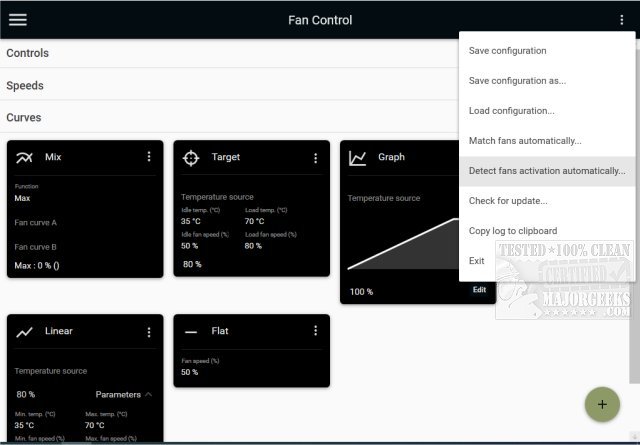
FanControl, now at version 283, is an advanced, open-source utility designed for managing the fan speeds of both GPU and CPU in Windows systems. This portable software provides users with extensive customization options, allowing for precise control over fan performance to ensure optimal cooling and quiet operation. Particularly beneficial for gamers and PC enthusiasts, FanControl helps maintain ideal temperatures during intensive tasks or prolonged usage.
The user-friendly interface simplifies the configuration process, offering a range of features to enhance system cooling. Users can monitor fan performance in real-time, making adjustments based on different temperature sources such as CPU, GPU, motherboard, and hard drives. This tool stands out due to its ability to create custom fan curves and profiles, enabling tailored cooling strategies.
Key Features of FanControl:
- Profile Management: Users can save, edit, and load multiple fan control profiles.
- Temperature Monitoring: Access to various temperature sources for accurate adjustments.
- Custom Fan Curves: Users can create personalized fan speed responses based on temperature readings.
- Fine-Tuning Options: Adjust fan control response with parameters like activation percentage, response time, and hysteresis.
- Multiple Curve Types: Options include linear, graph-based, target temperature, mixed curves, synchronized control, and fixed percentage settings.
- User Interface: A modern, dashboard-style UI that enhances usability.
- Background Operation: Can run in the background with a customizable tray icon.
- Custom Sensors: Ability to create external temperature sensors using *.sensor files.
Fan Curve Types Explained:
1. Linear: Fans respond based on a straightforward temperature-to-speed correlation.
2. Graph: Users can develop custom curves for more intricate control.
3. Target: Maintains a specific speed until the designated temperature is reached.
4. Mix: Combines two different fan curves using maximum or sum functions.
5. Sync: Aligns with existing fan control settings.
6. Flat: Sets a constant fan speed as a percentage.
Graph Fan Curve Editor:
- Offers tools to add, remove, and reposition points on the graph.
- Users can replicate and transfer points between different graphs for ease of setup.
- Fine-tuning options for hysteresis and response time enhance the precision of fan control.
Extended Insights:
In addition to the core functionalities, FanControl is ideal for users who desire a deeper understanding of their system's thermal dynamics. Customization capabilities enable enthusiasts to optimize their cooling strategies based on specific use cases, such as heavy gaming, video editing, or routine tasks.
Moreover, the utility's open-source nature allows for community involvement, where users can contribute to enhancements, share profiles, and even suggest new features. As technology evolves and hardware configurations become more complex, tools like FanControl will become increasingly vital for maintaining system performance and longevity.
For PC users looking to elevate their system's cooling management, FanControl presents a comprehensive solution that merges functionality with user customization
The user-friendly interface simplifies the configuration process, offering a range of features to enhance system cooling. Users can monitor fan performance in real-time, making adjustments based on different temperature sources such as CPU, GPU, motherboard, and hard drives. This tool stands out due to its ability to create custom fan curves and profiles, enabling tailored cooling strategies.
Key Features of FanControl:
- Profile Management: Users can save, edit, and load multiple fan control profiles.
- Temperature Monitoring: Access to various temperature sources for accurate adjustments.
- Custom Fan Curves: Users can create personalized fan speed responses based on temperature readings.
- Fine-Tuning Options: Adjust fan control response with parameters like activation percentage, response time, and hysteresis.
- Multiple Curve Types: Options include linear, graph-based, target temperature, mixed curves, synchronized control, and fixed percentage settings.
- User Interface: A modern, dashboard-style UI that enhances usability.
- Background Operation: Can run in the background with a customizable tray icon.
- Custom Sensors: Ability to create external temperature sensors using *.sensor files.
Fan Curve Types Explained:
1. Linear: Fans respond based on a straightforward temperature-to-speed correlation.
2. Graph: Users can develop custom curves for more intricate control.
3. Target: Maintains a specific speed until the designated temperature is reached.
4. Mix: Combines two different fan curves using maximum or sum functions.
5. Sync: Aligns with existing fan control settings.
6. Flat: Sets a constant fan speed as a percentage.
Graph Fan Curve Editor:
- Offers tools to add, remove, and reposition points on the graph.
- Users can replicate and transfer points between different graphs for ease of setup.
- Fine-tuning options for hysteresis and response time enhance the precision of fan control.
Extended Insights:
In addition to the core functionalities, FanControl is ideal for users who desire a deeper understanding of their system's thermal dynamics. Customization capabilities enable enthusiasts to optimize their cooling strategies based on specific use cases, such as heavy gaming, video editing, or routine tasks.
Moreover, the utility's open-source nature allows for community involvement, where users can contribute to enhancements, share profiles, and even suggest new features. As technology evolves and hardware configurations become more complex, tools like FanControl will become increasingly vital for maintaining system performance and longevity.
For PC users looking to elevate their system's cooling management, FanControl presents a comprehensive solution that merges functionality with user customization
FanControl V283 released
FanControl is a highly customizable portable Open Source GPU and CPU fan management utility.